
Family life rarely feels difficult because one task is impossible. The pressure comes from dozens of small decisions arriving at once: what to cook, which child needs a kit, when a permission form is due, whether the supermarket list includes everything, and which appointment conflicts with work. AI can help with some of that preparation. It cannot share responsibility for a child’s safety, health, privacy, or emotional wellbeing.
The sensible approach is to use AI as a household assistant for low-risk organisation. Let it sort information, suggest a shopping list, turn a school message into a checklist, or prepare questions for a trip. Keep a parent in charge of facts, final choices, sensitive information, and conversations that affect a child. The best family automation removes small pieces of friction without making important decisions invisible.
Start with preparation, not control
Before choosing an app, write down the household jobs that consume attention. Include the weekly meal plan, grocery planning, school reminders, birthday arrangements, travel packing, appointment preparation, and recurring chores. Note which tasks are repetitive, which require sensitive information, and which could cause problems if the result is wrong.
A useful first project has a clear input and a visible output. A parent might paste a school notice and ask for the dates, equipment, payments, and unanswered questions. The result can be checked against the original notice. By contrast, asking an assistant to “manage the children” is too vague. It hides decisions about priorities, permissions, discipline, and safety.
Choose tasks that can be reviewed in under a minute. If a suggestion requires extensive investigation before anyone can trust it, the automation is not reducing the right kind of work. The aim is not to create a digital parent. It is to prepare ordinary information in a form that a real parent can confirm quickly.
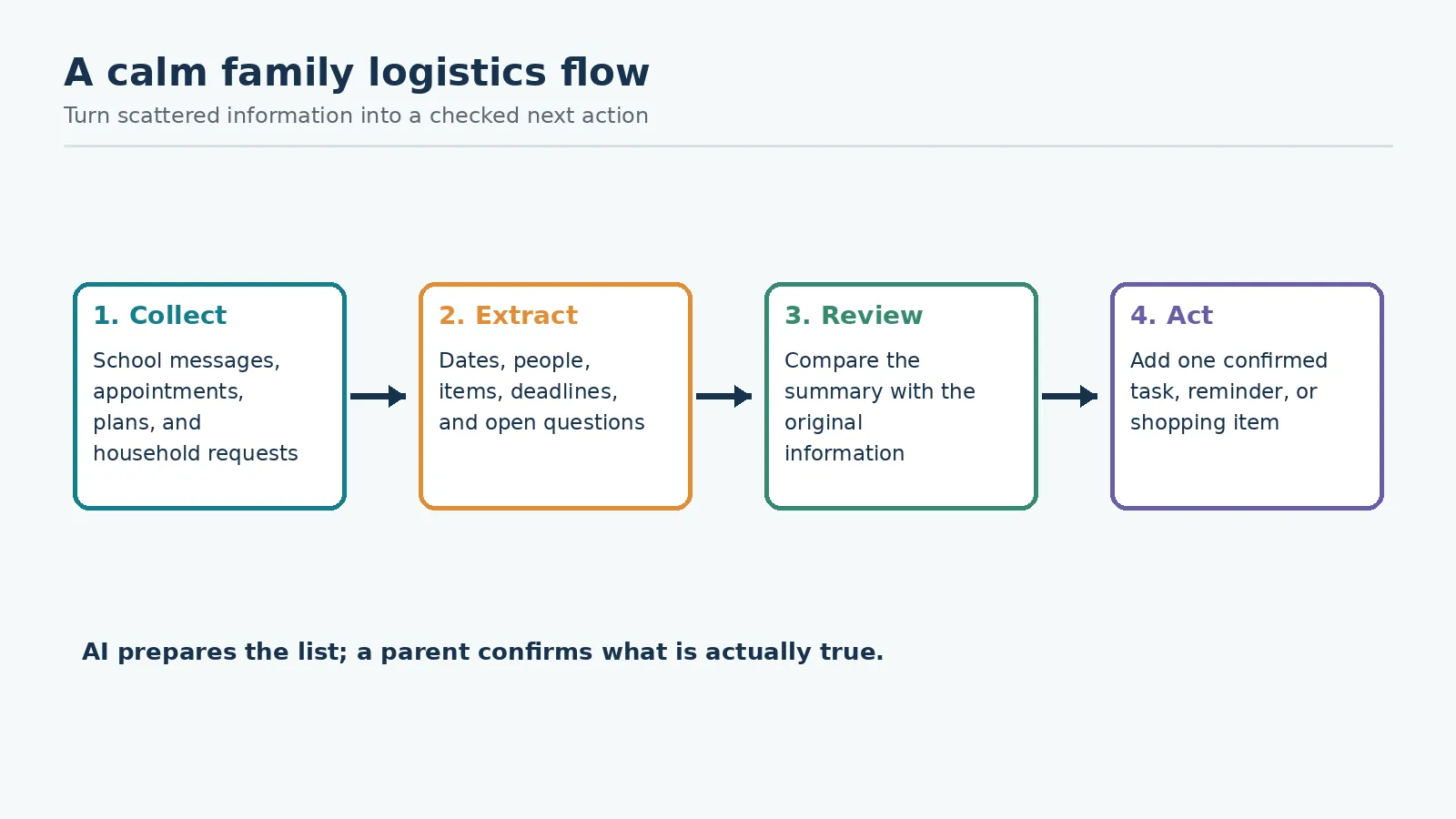
Low-risk family automation should turn scattered information into a checkable next step.
Use AI to turn school messages into clear actions
School communication often arrives as a mixture of dates, reminders, attachments, and requests. A short message may mention a non-uniform day, a payment deadline, a swimming kit, and a change to collection arrangements. Missing one detail can create a stressful morning.
Copy the relevant message into an approved tool and ask for a structured summary. Request five fields: event, date, child, required item, and action for the parent. Add a sixth field for uncertainty. If the message does not state whether a payment has been made, the summary should say “not stated” rather than guess.
Keep the original message beside the summary. AI can misread a date, attach a requirement to the wrong child, or treat an example as an instruction. The summary is a preparation aid, not the official school record. A parent should confirm unusual arrangements, medical details, transport changes, and anything that could affect collection or attendance.
This workflow is useful because it separates extraction from judgement. The tool finds possible actions. The parent decides which action is real, urgent, or already complete. That division makes the process easier to explain to another caregiver and easier to correct when a school sends an amended message.
Build a meal-and-shopping assistant with clear boundaries
Meal planning is a good candidate for simple automation because the result can remain a suggestion. Give the assistant the number of people, available budget, preferred ingredients, confirmed dietary restrictions, cooking time, and evenings when nobody can cook. Ask for a short plan and a grouped shopping list.
Do not ask the system to diagnose an allergy, decide whether a food is safe, or replace advice from a clinician. State known restrictions clearly, then check labels and preparation instructions yourself. A generated recipe can omit an ingredient, misunderstand a measurement, or suggest a product that is unavailable locally.
A practical prompt might say: “Plan four evening meals for two adults and two children. Use the ingredients below. Keep preparation under thirty minutes. Exclude unsuitable foods. List anything missing. Do not make medical claims.” The final sentence prevents the request from quietly becoming a health recommendation.
The same method works for packed lunches, birthday food, and weekend batch cooking. Ask for alternatives when an ingredient is unavailable, but require the assistant to label them as substitutions. A parent can then choose whether the replacement fits the family’s preferences and needs.
Create reminders without exposing the whole family diary
AI can help prepare reminders for permission forms, library returns, sports equipment, medicine collection, and appointments. It does not need every detail of a family calendar to do that. Provide the event, the responsible adult, the preparation time, and the deadline. Leave out unrelated names, private notes, and location details unless they are necessary.
A useful reminder has an owner and a trigger. “Buy kit” is weak because nobody knows which kit or when to act. “On Tuesday evening, check the swimming bag for Thursday’s lesson” is easy to verify. Ask the assistant to flag missing information rather than guess.
Use a shared calendar or task list as the final record. AI may draft entries, but a person should confirm dates and assign responsibility before anything is added. This matters when parents work different hours or when a child moves between households. A polished schedule can still be wrong if it was built from an outdated conversation.
Keep a family information shelf instead of a giant memory dump
Busy households often keep important facts in several places: a school portal, a paper notice, a message thread, and a note on one parent’s phone. AI can help create a temporary family information shelf from approved material. Give it the current term dates, club times, contact instructions, and recurring preparation notes. Ask it to label each item with its source and review date.
The review date matters because family information expires. A football club may change its collection point. A school may replace a consent form. A child may stop attending an activity. Ask the assistant to list outdated items, items without an owner, or details contradicted by a newer message. Do not let it merge conflicting information into one confident paragraph.
Keep the shelf narrow and purposeful. It should answer questions such as “What must be ready for Tuesday?” or “Who needs to collect the child on Thursday?” It should not become a complete record of family conversations, medical history, or private feelings. Delete temporary copies when the event has passed, and keep the authoritative record in the service that the school, club, or household already uses.
Make travel and outing checklists from real constraints
Family trips involve many small preparations. AI can turn a destination, length of stay, travel arrangements, weather forecast, and planned activities into a packing checklist. It can separate items for each person, identify documents to locate, and suggest questions for accommodation or transport providers.
Treat the result as a draft. Check the current forecast, booking terms, travel documents, medication arrangements, accessibility needs, and local rules yourself. The assistant may not know that a particular item is already supplied, that a document has expired, or that a child’s routine makes a proposed timetable unrealistic.
A helpful checklist distinguishes “pack”, “confirm”, and “buy”. That prevents a parent from treating a suggestion as a completed task. It also reduces duplicate shopping when another adult is preparing the same trip. Ask for a final section titled “Still unknown” because unanswered questions can be more useful than extra suggestions.
Use AI for age-appropriate learning support, not answer delivery
A parent can use AI to explain a difficult idea, generate practice questions, suggest a reading discussion, or offer a simpler example. Google’s family guidance describes supervised use of Gemini for questions, creativity, and learning support. It warns that children should understand they are interacting with an AI tool rather than a person. It advises families not to enter sensitive personal information and to verify each answer before using it. [1]
The safest learning prompt asks for hints before solutions. It can request one question at a time, a worked example using different numbers, or an explanation suitable for a stated age. A child should still do the thinking, writing, measuring, or reviewing the result required by the task.
Do not use a general chatbot as the final authority for homework, health questions, safeguarding concerns, or reports about another child. An incorrect explanation can look convincing. A parent or teacher should check important claims and decide when a subject needs human guidance.
Learning support should also respect the child’s privacy. Do not paste a full school report, name a classmate, or include a child’s personal difficulties merely to improve a prompt. Remove names and identifying details. If a child is asking about distress, danger, abuse, or self-harm, move the conversation to a trusted adult or appropriate professional service rather than relying on an AI reply.
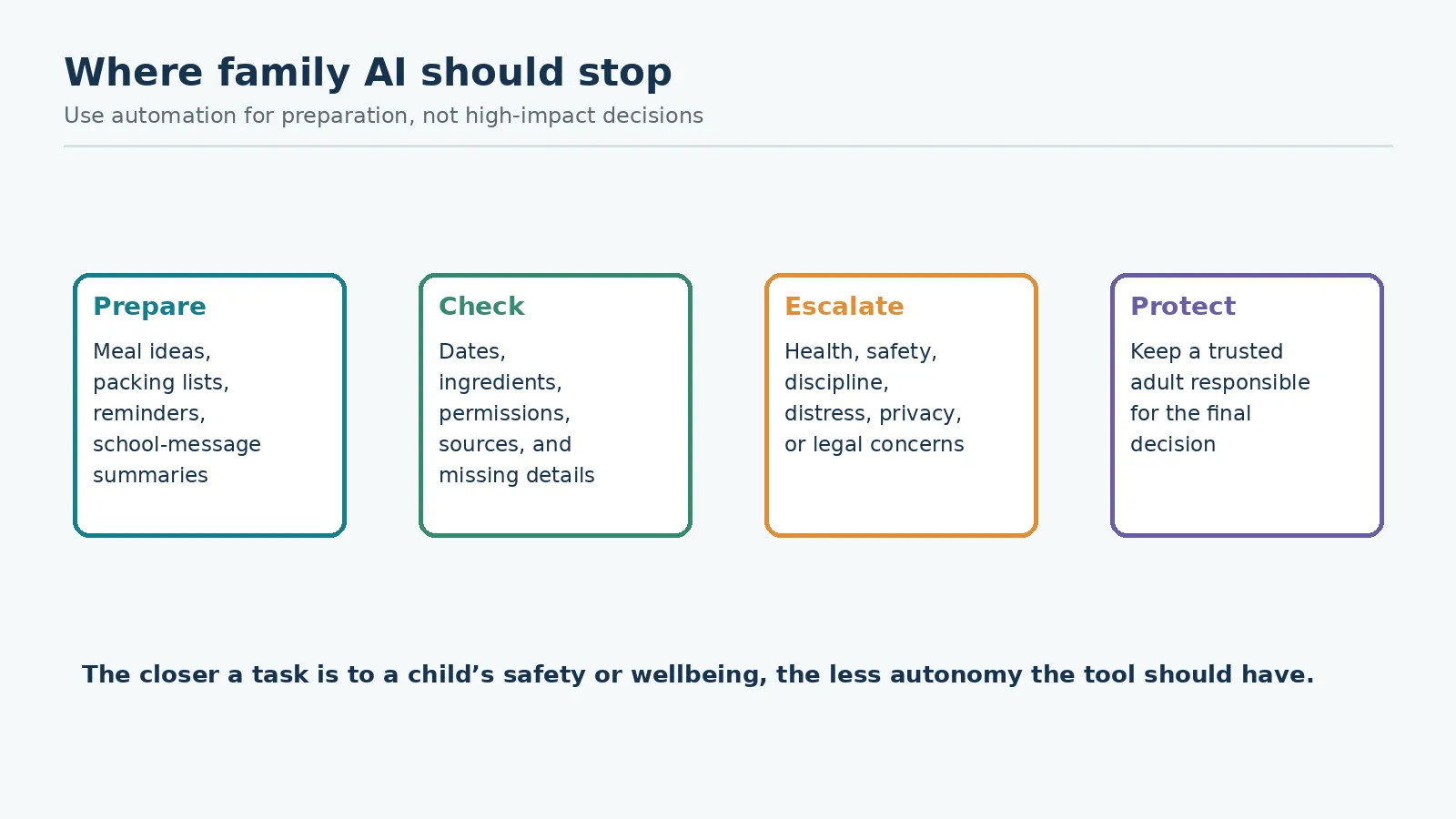
The boundary is simple: AI may prepare information, but people retain responsibility for high-impact decisions.
Keep children out of adult automation accounts
Parents often share devices, subscriptions, and smart-home systems. That convenience can blur who is allowed to see a conversation or trigger an action. Separate adult planning from child-facing use where the product supports separate profiles, supervised accounts, or family controls.
Google says that parents can control supervised child access to Gemini through Family Link. It also states that filters are not perfect and that availability depends on age, country, account type, and rollout status. [2] Treat controls as safeguards, not proof that every response is suitable. Review the settings and the product’s current availability before allowing access.
The FTC’s COPPA summary explains that the rule places requirements on operators of services directed to children under 13, and on services that know they are collecting personal information from children under 13. [3] This is a United States rule, not general international advice. Families elsewhere should follow the rules that apply to their location and the service they use.
Whatever the legal position, the practical family rule is straightforward: children should not enter their address, school name, daily route, passwords, family financial details, or private conversations into a general AI tool. Parents should also avoid uploading a child’s identifiable information when a de-identified example would work.
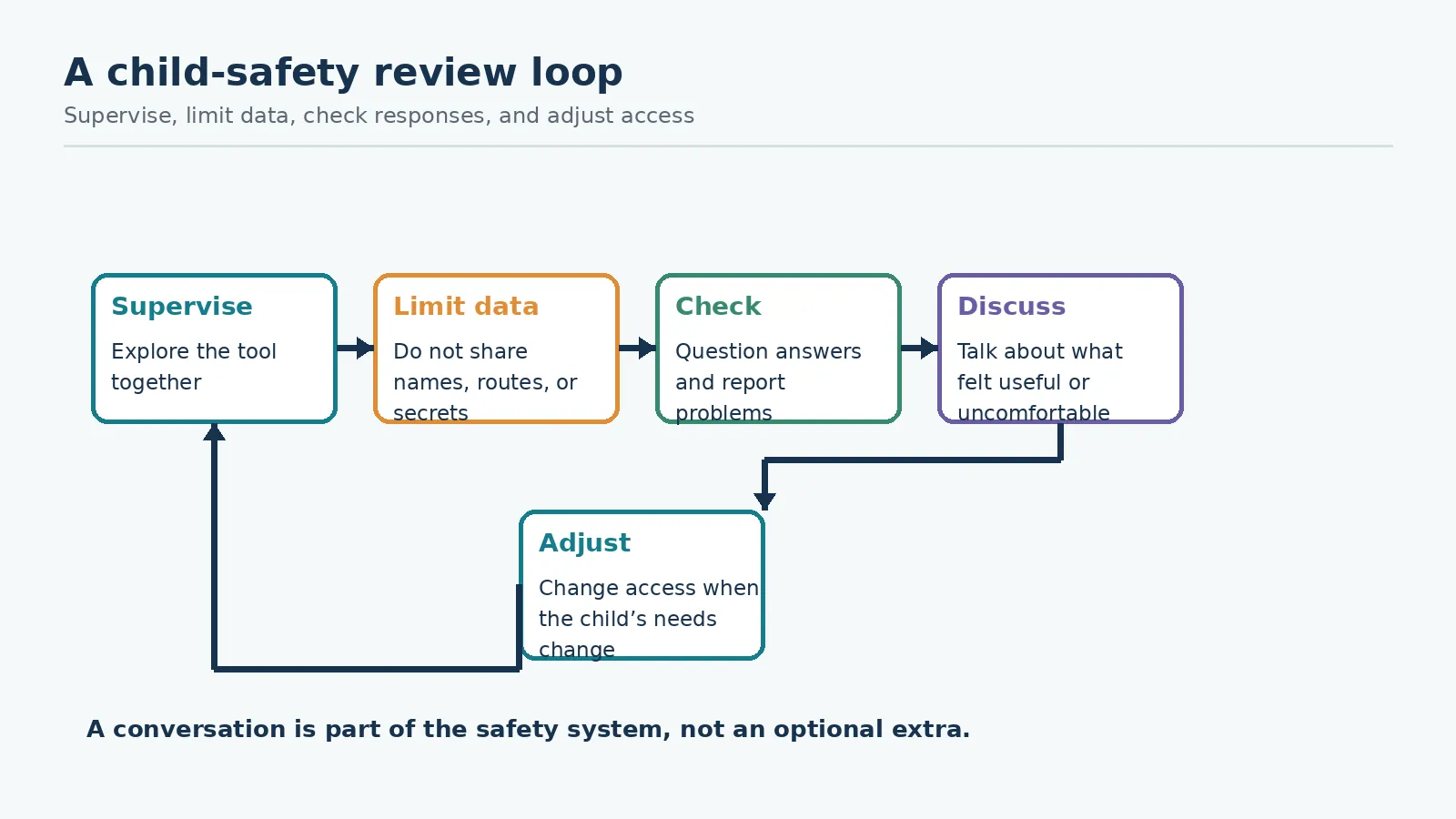
Child-facing AI use needs supervision, privacy limits, careful review, and regular conversations.
Measure whether the automation actually helps
Run one small experiment for a week. For the trial, choose one task, such as extracting school messages or preparing a meal list. Record how long the manual version takes, how long the review takes, how often details are wrong, and whether the result creates extra work. Do not count a polished list as a success if a parent must rebuild it from the original message.
Ask each adult who uses the workflow what they had to correct. One person may notice wrong dates; another may notice that the list ignores a child’s routine. Keep a short correction log and change one instruction at a time. If the workflow becomes complicated, narrow the task rather than adding more rules.
Stop using the automation when it creates avoidable confusion, encourages a child to share private information, or makes a parent less likely to check an important detail. A simple checklist that saves five minutes and remains trustworthy is more useful than an elaborate assistant that demands constant supervision.
A calm family rule for everyday AI
Use AI for preparation that can be checked: organise a notice, group a shopping list, draft reminders, create packing categories, or offer learning hints. Keep people in charge of health, safety, discipline, privacy, emotional support, and final commitments. Google and UNICEF both emphasise supervision, careful review, privacy conversations, and the limits of treating a conversational system like a person. [1] [2]
The useful role for AI in a busy family is modest but valuable. It can prepare the next question, organise the next errand, and reduce the number of details a parent must hold in mind. It should not become the person who decides what matters. That responsibility belongs with the adults who know the family, understand the context, and can act when something is wrong.