
Choosing an AI coding assistant by brand alone is rarely useful. Two developers can use the same tool and reach opposite conclusions. One may love short inline suggestions. Another may need help tracing a large codebase. A third may only want a second pair of eyes during pull-request review.
The right assistant fits the work you already do. It should reduce a specific source of friction without weakening your tests, security checks, version control, or judgement. A coding assistant is not a replacement developer. It is a configurable collaborator with uneven strengths.
This distinction prevents a common mistake. A product demonstration can make a tool seem useful because it completes an isolated example quickly. Everyday development is less tidy. A change may depend on a convention recorded in a short comment, a deployment rule held by another team, or a test that explains an awkward exception. The real question is whether the assistant helps you discover and respect those details.
Good evaluation also separates convenience from capability. A fluent explanation may be pleasant to read but still fail to identify the file that controls a production behaviour. A long code suggestion may save keystrokes but conceal an assumption that takes an hour to reverse. The most valuable assistance usually makes a decision easier to inspect. It gives you a smaller next step, a traceable place to look, or a testable claim.
Start with your working pattern, not a comparison chart
Before opening a trial, describe a normal difficult hour of work. Are you writing repetitive glue code? Learning an unfamiliar library? Investigating a defect? Reviewing a colleague’s change? Untangling a legacy service? The answer changes what good assistance looks like.
A front-end developer might value quick suggestions that keep momentum inside the editor. A platform engineer may care more about repository-wide questions and infrastructure guidance. A consultant who moves between client systems may need tight control over what context leaves the machine. A junior developer may benefit most from explanations that expose the reasoning behind a suggestion.
Do not begin by asking which assistant is “best”. Ask where your present workflow loses time or confidence. A suitable tool should improve one observable activity. If it creates more checking than it saves, it does not fit that activity yet.
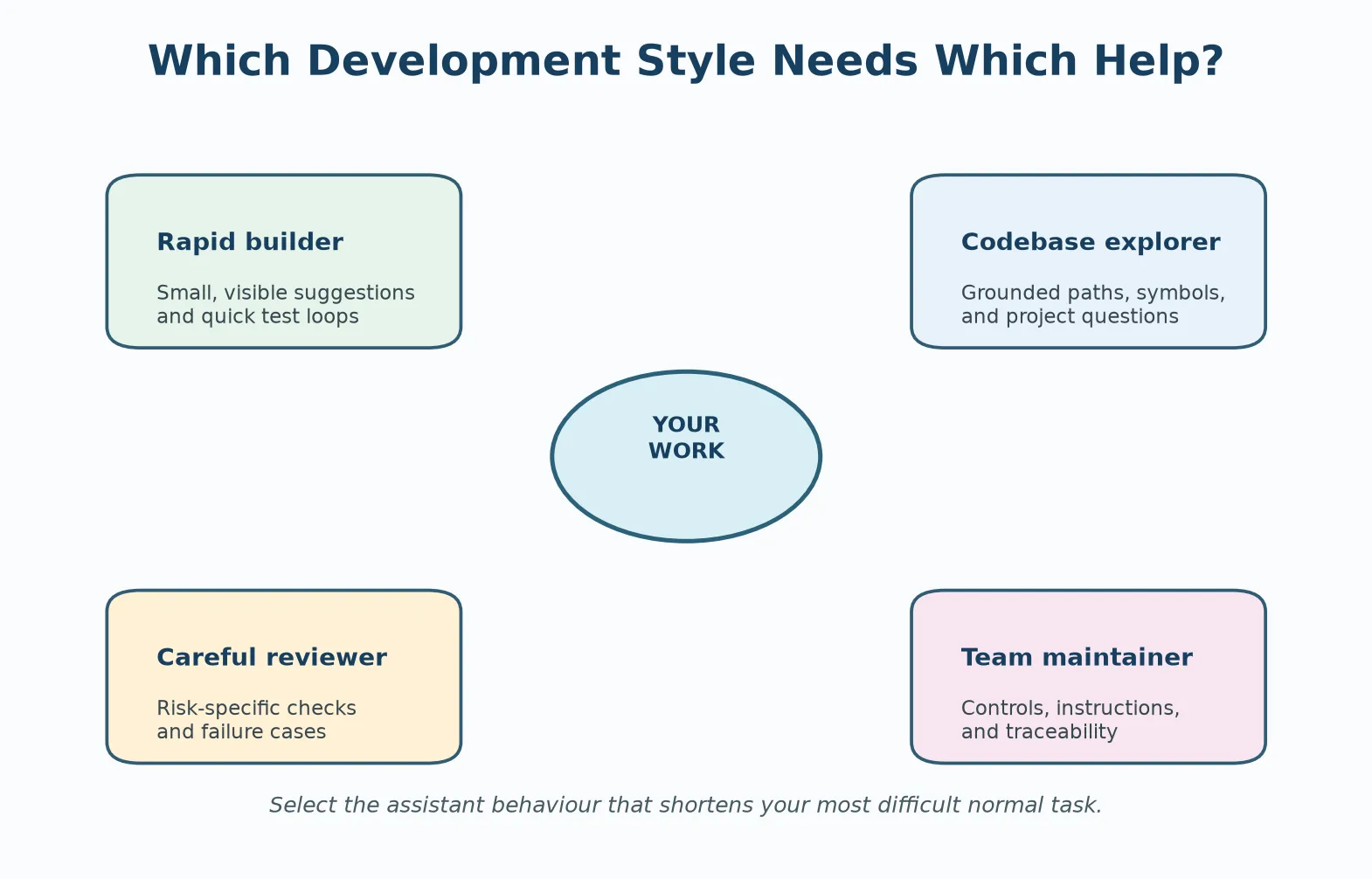
The rapid builder needs narrow, visible suggestions
Some developers work best in small loops. They write a function, run a test, inspect the result, and make the next change. For this style, an assistant is useful when it offers concise completions that can be inspected immediately. Boilerplate, repetitive transformations, test fixtures, and routine documentation are common candidates.
The danger is accepting speed as proof. A suggestion may compile while still using the wrong boundary case, dependency, or error behaviour. Keep the request narrow. State the language, framework version, input shape, expected failure mode, and the test that should pass. Then read the generated code as if it came from a hurried colleague.
A practical prompt might say: “Write a TypeScript validator for this existing object shape. Reject unexpected keys, return typed errors, and include tests for empty input and invalid dates.” That request is easier to check than “Build validation for my form.”
Use the assistant after you have written the acceptance criteria, not before. This order matters because the tool cannot reliably infer what a product owner, security reviewer, or future maintainer would consider correct. When the desired result is vague, ask the assistant to list the missing decisions. That response may be more valuable than code, especially near the start of a feature.
Save prompts that worked well alongside the project guidance. A reusable request for a particular test style or error-handling pattern can remove avoidable variation. Do not turn the prompt library into a substitute for engineering documentation, though. It should point towards agreed practices, not invent them.
When rapid suggestions are a poor fit
Avoid broad autonomous changes when the repository has undocumented conventions, the task affects authorisation, or a quick change could alter financial, safety, or privacy behaviour. Speed matters less than a reviewable change set.
It also helps to keep generated work in a deliberate shape. Ask for a small function, a focused unit test, or an explanation of one error message rather than a redesign of six unrelated files. Review becomes simpler when each generated proposal has a clear boundary. If the assistant produces a large patch, break it apart before you decide whether to merge it. A shorter series of checkable commits is usually safer than a dramatic one-step transformation.
The codebase explorer needs grounded answers
A large repository can make a competent developer feel new again. The hard part may be locating the policy, data model, service boundary, or test that explains a behaviour. An assistant with access to approved project context can help map those relationships.
Begin with questions that demand evidence. Ask which files call a function, where a configuration value is read, which test establishes the expected behaviour, or what changed between two versions. Request file paths, quoted identifiers, and uncertainty rather than a confident architectural summary.
Treat the first answer as a route map. Open the named files and verify the route yourself. An assistant can overlook generated code, hidden configuration, conditional paths, or a current branch difference. Its value is often reduced search time, not perfect understanding.
| Development situation | Helpful assistant behaviour | Human check before accepting |
|---|---|---|
| New feature in an unfamiliar service | Find related routes, tests, and data types. | Confirm the actual request path and ownership. |
| Legacy bug investigation | List likely call sites and recent changes. | Reproduce the failure and inspect the evidence. |
| Framework migration | Identify deprecated patterns and affected files. | Read official migration notes and run tests. |
| Pull-request review | Explain a change and name possible edge cases. | Check the diff, security impact, and test coverage. |
The careful reviewer needs challenge, not praise
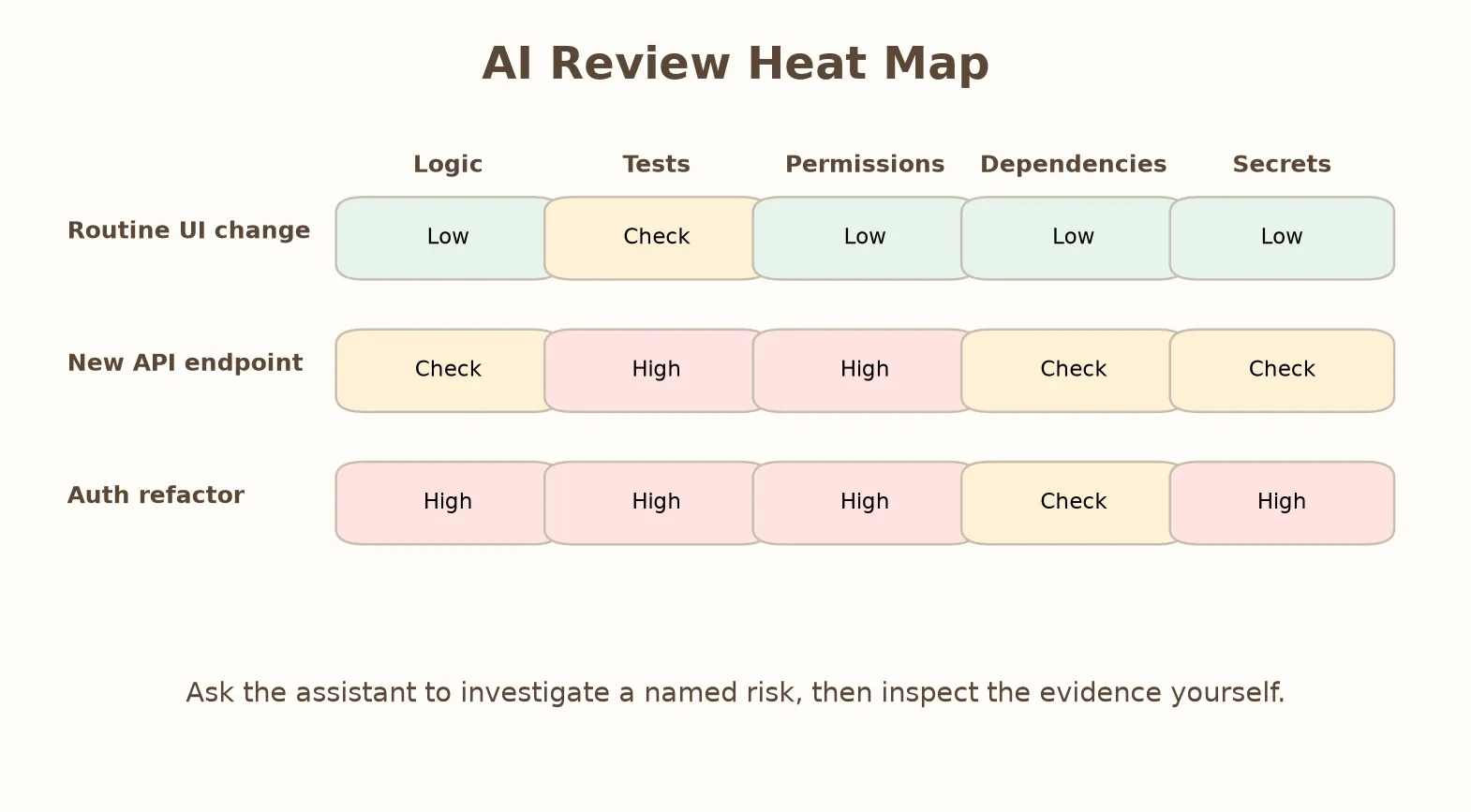
A reviewer should not ask an assistant whether code “looks good”. That invites a vague answer. Ask it to search for a particular class of problem. Examples include unchecked input, missing authorisation, race conditions, leaked secrets, weak error paths, unbounded queries, or a dependency that has not been verified.
OpenSSF advises developers to evaluate AI-generated code as critically as code written by a human colleague. Its security guide also stresses testing, review, trusted dependencies, and careful treatment of secrets.[3] Use that principle with every assistant, even when the suggested code appears familiar.
A strong review prompt includes the threat model. “Inspect this endpoint for access-control mistakes. Assume a signed-in user can alter object identifiers. Identify the relevant checks and propose tests that should fail before the fix.” The model may still miss something, but the question directs attention to a real risk.
The team maintainer needs guardrails and traceability
A personal trial is different from a team rollout. Once several people use an assistant, questions emerge about context access, instruction files, logs, accepted suggestions, and code ownership. The best assistant for a team is often the one that can be introduced with understandable controls.
Review the exact plan, integration, and configuration being considered. Google’s Gemini Code Assist Standard and Enterprise documentation describes customer data that may include prompts, responses, conversation context, open-file snippets, nearby-file snippets, and cursor location. It also describes authentication, role-based access, encryption in transit, and other controls.[2] Those details show why a team should assess the actual product configuration rather than assume all AI coding tools handle context identically.
Create a short working agreement. It should say which repositories are eligible, what must never be pasted into a prompt, who can enable extensions, how instructions are reviewed, and which changes still require human approval. Keep the agreement small enough to follow.
Use shared criteria during a team trial
Decide how the team will notice a bad outcome. A simple issue label for AI-assisted defects can reveal whether a tool is helping one activity while damaging another. Review the label after a few weeks. Look for repeated misread conventions, poor tests, unnecessary packages, or fixes that reviewers had to rewrite. This evidence is more useful than anecdotes about whether the assistant feels impressive.
Training should cover refusal as well as use. Developers need permission to decline a suggestion, pause a trial, or ask for a second review without appearing slow. The most mature practice is not accepting AI output quickly. It is recognising when the output has not earned trust.
A useful instruction file is a safety device
A repository instruction file can tell the assistant to use existing patterns, avoid hard-coded credentials, respect the project’s tests, and explain uncertain changes. Do not fill it with every security rule ever written. OpenSSF recommends concise, specific, actionable instructions.[3] Good instructions help the assistant produce work that reviewers can recognise.
Privacy and context should shape the trial
A coding assistant may receive more context than the text you type. It can work with open files, nearby files, conversation history, or repository information, depending on the tool and settings. Before connecting a sensitive project, identify what is sent, how it is processed, whether it is retained, and which administrators can see usage information.
Start with a low-risk repository or a synthetic exercise. Do not begin with production credentials, customer records, unpublished security findings, or proprietary algorithms. If a trial cannot be run without exposing material that the provider terms do not clearly cover, postpone it.
Least context is a sensible default. Provide the function, error message, or approved interface needed for the job. Do not give the assistant a database export because one error report is difficult to interpret.
Compare assistants with a short, repeatable test
Marketing demonstrations are designed to look impressive. Your trial should use work that resembles your normal tasks. Select three small exercises: one routine change, one investigation, and one review. Define what a satisfactory outcome would look like before you test any product.
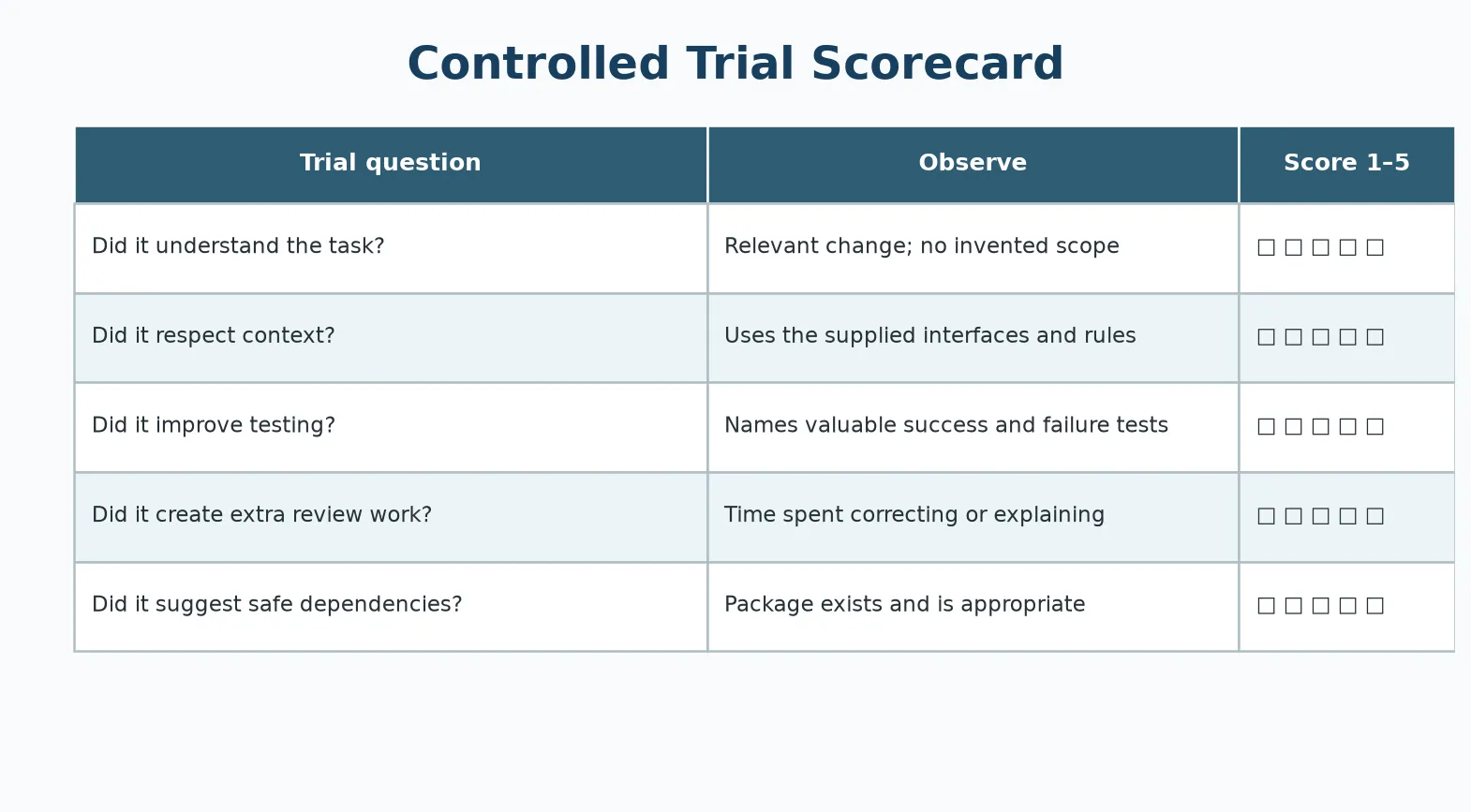
For each exercise, record the initial prompt, context supplied, first answer, changes you made, time spent checking, test result, and unresolved risk. Give the same exercise to each candidate with comparable context. Do not measure only lines of code produced. Measure whether the output shortened the path to a correct, understandable change.
Repeat one exercise without assistance. The manual comparison exposes costs that are otherwise easy to hide, such as rewriting a suggestion, checking an unfamiliar library, or explaining a complex patch to a reviewer. You do not need a large experiment. Four or five realistic examples often show a clear pattern when the records are honest.
A simple scorecard can include five questions: Did it understand the task? Did it respect the project boundary? Did it suggest a test? Did it introduce an unverified dependency? Did it make review faster or slower? The score is not a universal ranking. It is evidence for your workflow.
Keep ownership with the developer
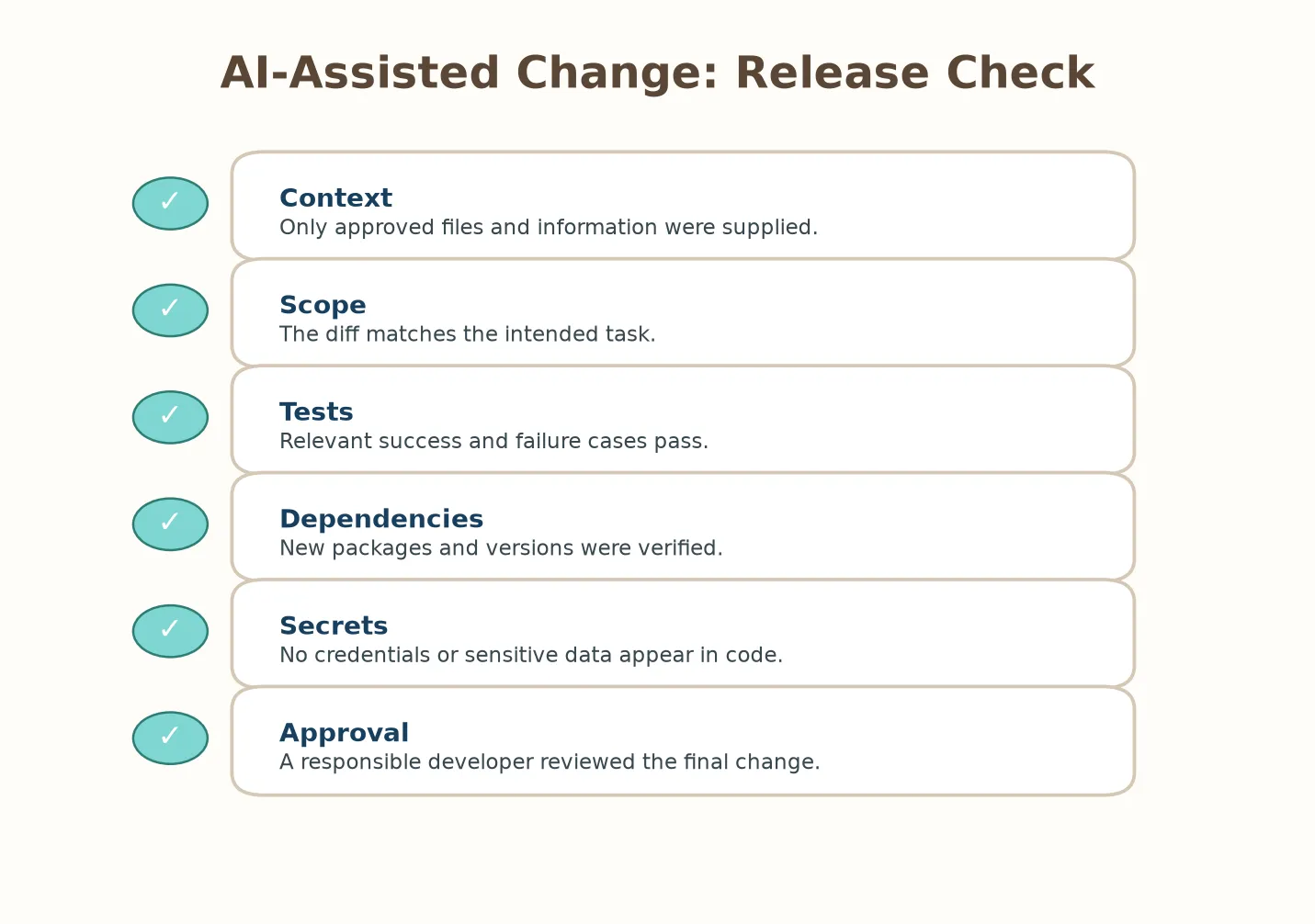
GitHub’s responsible-use material advises users to understand a feature’s purposes, capabilities, and limitations.[1] That is a useful standard for every product. The person who merges the change remains responsible for its behaviour, even when an assistant supplied the first draft.
Keep normal engineering habits intact. Run tests. Read the diff. Check package names with trusted sources. Inspect generated configuration. Use linters and static analysis. Ask another person to review sensitive work. An assistant can help prepare those steps, but it cannot make them unnecessary.
Key takeaways
- Choose an assistant for a real work pattern, not for a feature checklist.
- Use narrow prompts and demand evidence when exploring an unfamiliar codebase.
- Ask for risk-specific review, then verify the result with tests and human judgement.
- Assess context access, privacy, and controls before connecting a sensitive repository.
- Run a small trial that measures review effort and correctness, not output volume.
Conclusion
The best AI coding assistant is the one that fits a defined part of your development process while leaving you more confident in the final change. Rapid builders may prefer fast, local suggestions. Explorers may value grounded navigation. Reviewers may need structured challenge. Maintainers may prioritise policy and traceability.
Choose with a measured trial, not a promise. A tool that helps the team ask better questions, verify more carefully, and ship understandable code is more useful than one that simply produces more code.