
Agent orchestration is the coordination layer behind an AI workflow. It decides which agent handles a request, what information or tool that agent may use, what happens next, and when a person must review the result. In practice, it keeps the different parts of an AI system working as one process.
A restaurant has a host, chefs, servers, cleaners, and a manager. The host does not cook every meal, and the manager does not carry every plate. Someone coordinates the work so the right person handles each part. Agent orchestration does something similar with software.
Key takeaway. Agent orchestration gives each AI step a clear role, a controlled handoff, a defined permission set, and a safe stopping point.
What does agent orchestration mean?
An AI agent can interpret an instruction, make a plan, use approved tools, and continue through several steps. Agent orchestration controls the movement between those steps. It may route a request to a specialist, pass a summary to another agent, combine several answers, or stop the workflow when a condition is not met.
The orchestrator can be a software framework, a rules-based workflow, a central AI agent, or a mixture of these approaches. Its job is not always to generate the final answer. Often, it manages the work around the answer.
For example, imagine a customer asking whether a delayed order qualifies for compensation. One agent might retrieve the order record. Another might find the relevant policy. A third might draft a response. An orchestration layer can decide which agents are needed, pass the right context between them, and send the draft to a human reviewer before anyone promises a refund.
The important distinction is between capability and coordination. An agent may know how to search an order system, but orchestration determines when it may search, what it should receive, and whether the result is enough to continue.
Why do businesses need orchestration?
A single AI model can summarise a document, classify an enquiry, translate text, or answer a straightforward question. Those jobs may not need an agent at all. Microsoft’s architecture guidance recommends using the lowest level of complexity that reliably meets the need, beginning with a direct model call or a single tool-using agent before adopting a multi-agent design. [1]
Orchestration becomes useful when a workflow contains different responsibilities, information sources, permission levels, specialist checks, or stages that must happen in order. Without coordination, agents may duplicate work, use stale information, contradict one another, or act without a clear owner.
A coordinated workflow can also make a complicated process easier to inspect. Each stage can have a named purpose, an approved input, a measurable output, and a defined failure path. That structure is valuable even when only one AI agent is involved.
Orchestration is not the same as automation
Automation follows a process without necessarily making an intelligent choice. A rule might move every new form submission into a spreadsheet. Orchestration decides how a request should be handled when the answer depends on its content, risk, or required expertise.
The two ideas often work together. A rule can start the workflow, an orchestrator can choose the next specialist, and an automation step can save the result in the correct system.
How is an orchestrator different from an AI agent?
An AI agent usually owns a task. It may search a knowledge base, analyse a file, draft a message, or call an approved application programming interface. An orchestrator owns the wider journey. It determines which task comes first, which result becomes the next input, and what should happen when an agent fails.
The distinction is similar to the difference between a project specialist and its coordinator. One produces an expert answer; the other keeps the work connected to the original goal.
In some systems, a central agent acts as the orchestrator. In others, fixed rules decide the route. Some designs allow agents to hand work directly to one another. There is no single correct architecture. The appropriate choice depends on the workflow’s complexity, speed requirements, risk, and need for control.
The four common orchestration patterns
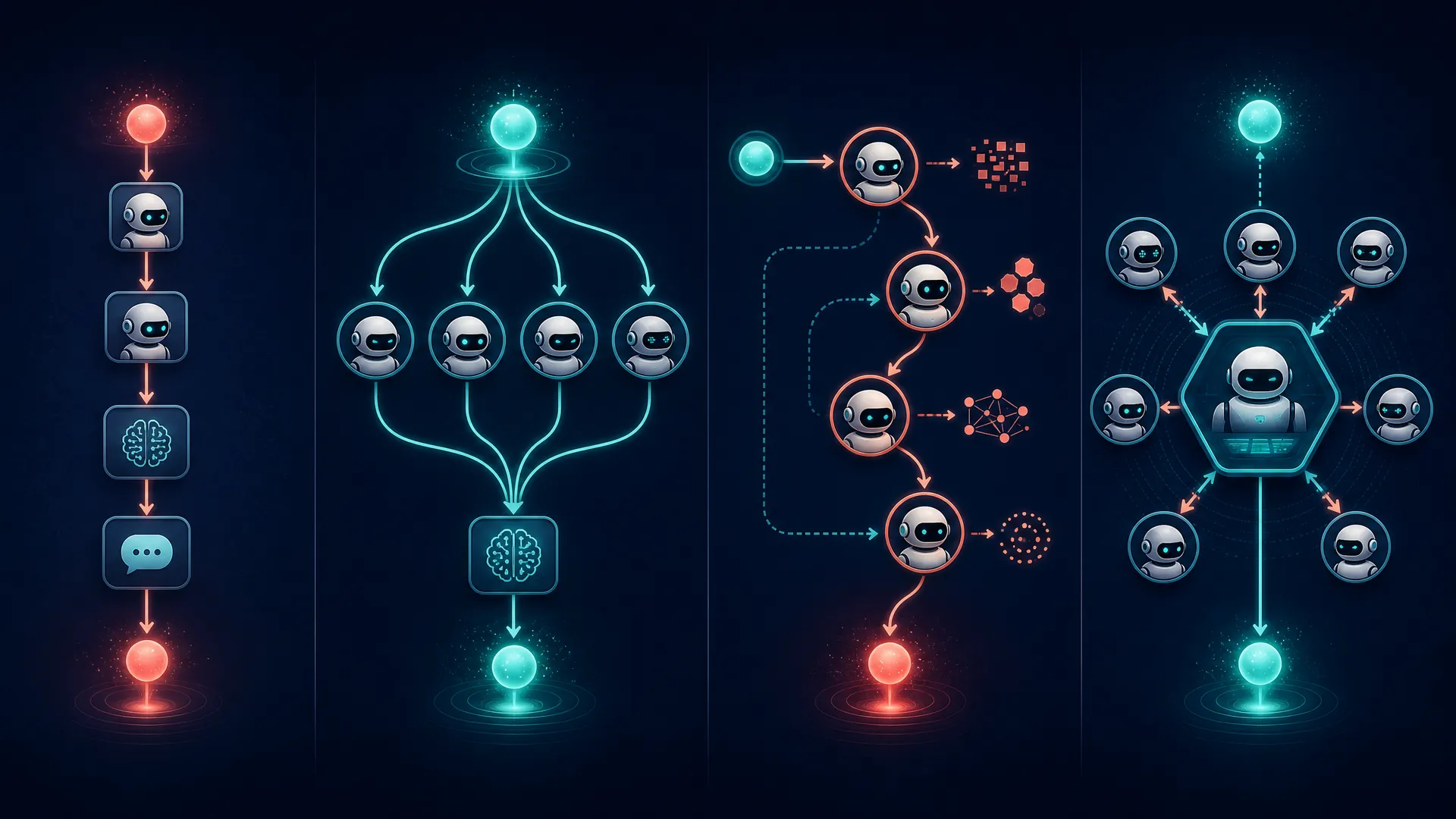
A pattern describes how work moves through the system. Selecting one before choosing a platform helps the team avoid unnecessary complexity.
| Pattern | How it works | Useful example | Main risk |
|---|---|---|---|
| Sequential | Each stage passes its output to the next stage. | Draft, fact-check, then edit an article. | An early error can travel through every later stage. |
| Concurrent | Several agents work on the same input at the same time. | Ask separate agents to assess a proposal’s cost, risks, and clarity. | Conflicting results need a fair method of comparison. |
| Handoff | One agent transfers the task to another when a condition is met. | Move a billing question from a general assistant to a finance specialist. | The handoff may lose important context. |
| Supervisor | A central agent assigns work and combines the results. | Route customer questions among sales, support, and accounts agents. | A weak supervisor can select the wrong specialist. |
Sequential orchestration creates a pipeline
A sequential workflow is easy to explain because the stages follow a fixed order. A document might pass from a research agent to a drafting agent, then to a policy checker and a human editor. This pattern suits work with clear dependencies, where each stage must finish before the next one starts.
Its weakness is also clear. If the first stage invents a fact, later stages may polish the error rather than catch it. Add validation points instead of assuming that a longer chain is more accurate.
Concurrent orchestration gathers different views
Concurrent orchestration sends the same material to several agents at once. Each agent may apply a different lens. One can check calculations, another can look for missing evidence, and a third can review the tone. A final step then compares or combines the results.
This approach can reduce waiting time and expose disagreements. It also costs more and creates a decision problem: the system still needs a reliable way to weigh the answers. Majority voting may suit a simple classification, while a human may need to resolve a disagreement about a contract or a customer complaint.
Handoff orchestration keeps specialist boundaries clear
A handoff occurs when one agent recognises that another agent should take over. A general support assistant might handle a basic delivery question, then transfer a refund request to an accounts workflow. The first agent should pass a concise summary of the request and the work completed. The next agent can then continue without rebuilding the conversation.
Handoffs work well when each role has a clear boundary. They become confusing when several agents can claim the same task or when nobody owns the final response.
What information should move between agents?
An orchestrated workflow needs shared context, but sharing everything is rarely a good idea. Give each agent only the information it needs for its assigned task. A billing specialist may need an order number and payment status, but not a customer’s unrelated support history.
A useful handoff includes the original request, the work already completed, the evidence found, unresolved questions, and the expected output. It should also identify the source and time of important facts. This makes the next step easier to check.
Context should not become a dumping ground. Long histories add cost and can hide the detail an agent needs to find. A small, well-labelled summary is usually more useful than a complete transcript.

This dispatcher view shows orchestration as controlled coordination rather than a collection of disconnected AI tools.
Where do permissions fit?
Permissions are part of orchestration, not a separate afterthought. The workflow should define which agent may read a source, which agent may prepare an action, and which actions require approval. A drafting agent may write to a review folder while a finance system remains inaccessible.
Use the smallest permission set that allows the stage to work. Read-only access is often enough for research, classification, and summarisation. If an agent can send a message, edit a record, or approve a payment, the workflow needs stronger controls, clear logs, and an easy stop mechanism.
NIST’s AI Risk Management Framework says organisations should consider trustworthiness throughout an AI system’s life. [2] For orchestration, that means recording important decisions, testing failure paths, assigning responsibility, and reviewing performance after launch.
How should a non-developer choose a pattern?
Begin with the request, the required result, the information involved, and the decision that needs human judgement. Then ask whether the task truly needs several agents.
A direct model call may be enough for a one-step summary. One tool-using agent may suit a varied workflow within one domain. Use sequential orchestration for a fixed pipeline. Use concurrent orchestration when separate checks can run independently. Handoffs suit clear specialist boundaries, and a supervisor pattern can manage a broader service desk.
The safest first design is usually the simplest one that meets the requirement. More agents do not guarantee better results. They add latency, cost, coordination points, and opportunities for confusion.
Use a small decision checklist
Before choosing a platform, list the stages and assign a clear owner to each one. That owner should check the evidence, resolve disagreements, and approve any irreversible action.
If the answers are vague, adding another agent will not solve the underlying problem. Clarify the process first.
A practical example for a small business
Consider a three-person design studio that wants to respond to new project enquiries more quickly. The first stage classifies the enquiry. Next, the team checks whether the request fits the studio’s services. It then drafts a reply from approved descriptions. A person reviews the wording, confirms the scope, and sends the message.
The workflow remains orchestrated if one agent performs several stages. The agent follows a set route, uses approved information, stays within its permissions, and pauses for human approval when needed. The studio does not need multiple autonomous agents.
If the process later grows, the team might separate proposal research from scheduling. It should add that complexity only after the first workflow has stable measures and a clear reason for the change.
What can go wrong in an orchestrated workflow?
Coordination introduces its own failure modes. An orchestrator may send a request to the wrong specialist. A handoff may omit a crucial fact. Two agents may edit the same record. A supervisor may keep calling tools in a loop. One agent may trust an unverified answer from another.
Prevent these problems with explicit limits. Set a maximum number of steps, record every tool call, identify the source of important facts, and define what happens when confidence is low. Keep actions reversible where possible. Add a person to the approval path when the workflow can affect money, legal commitments, access rights, or sensitive customer information.
Do not measure success by the number of agents involved. Measure accuracy, time, cost, and whether the workflow leaves a clear record.
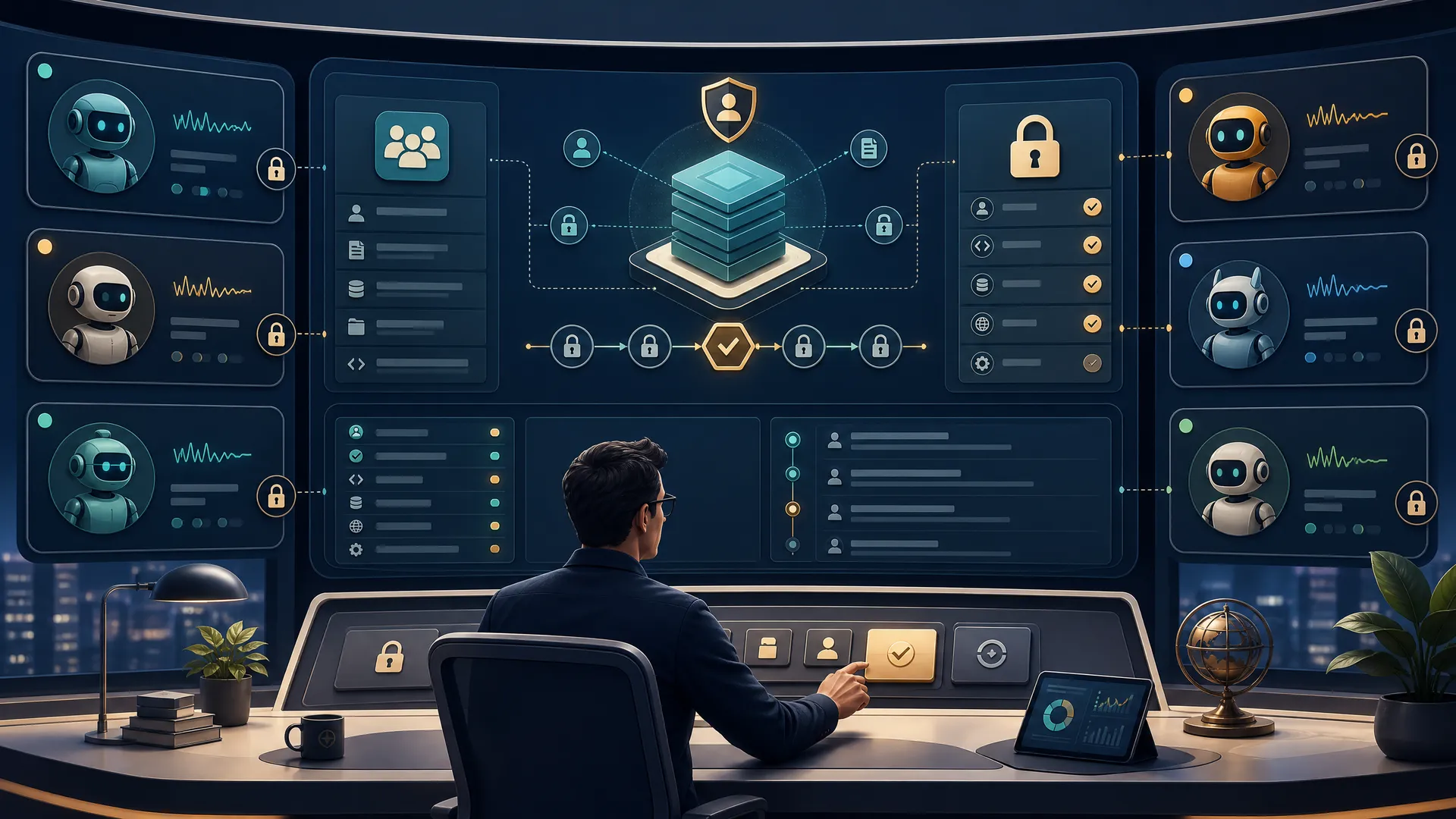
A well-designed workflow keeps its context, permissions, and handoffs visible to the person responsible for review.
How can a team start without coding?
A non-developer can begin with a written workflow map. Draw the trigger, each decision, each specialist role, each source, and the final approval point. Use ordinary language. “If the enquiry asks about a refund, send it to the accounts queue” is more useful than a vague instruction to “let the agents collaborate.”
Many visual automation platforms let users connect applications, add conditions, and route drafts without building a full application. The platform matters less than the discipline around it. Keep the first version in a test workspace, use fictional or anonymised records, and invite a colleague to challenge the workflow with missing information and unusual requests.
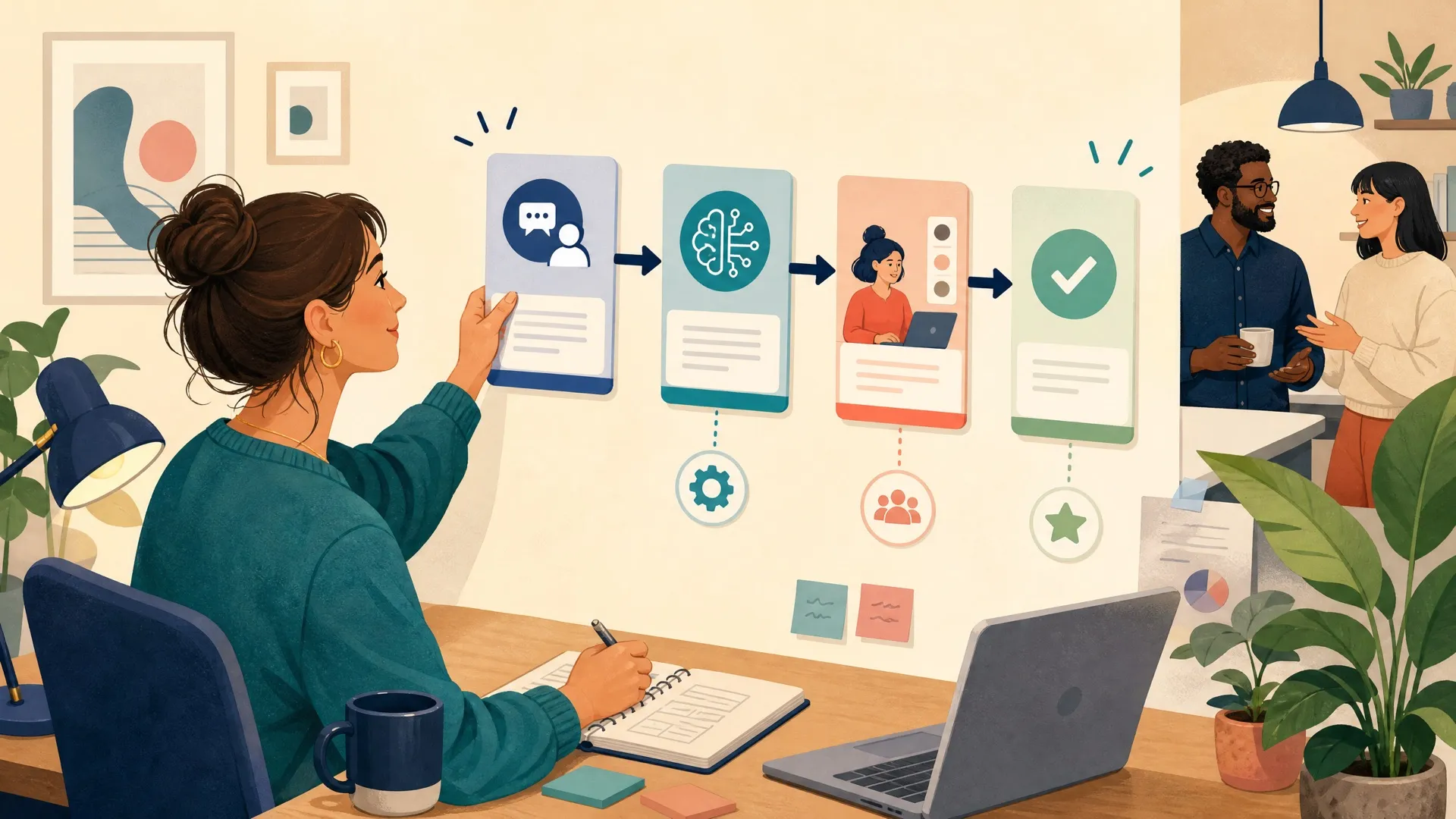
This small-business flow keeps the route understandable from the first request to the approved result.
A safe orchestration checklist
Before using an orchestrated workflow with real customers, confirm that it has one defined purpose, a small source set, named owners, limited permissions, step limits, logging, and a human handoff. Test ordinary cases, missing details, conflicting instructions, hostile content, and tool failures.
Review the workflow after launch. New documents, changed policies, and modified permissions can alter its behaviour. A monthly check may be enough for a low-risk draft workflow, while a process handling sensitive records may need more frequent review.
Safety check. Add another agent only when it has one distinct responsibility, a controlled source, a measurable output, and a clear purpose. Otherwise, keep the workflow simpler.
The plain-English answer
Agent orchestration coordinates AI agents, tools, information, and human decisions. It can move work through a sequence, run separate checks in parallel, hand requests to specialists, and combine results under a supervisor.
For non-developers, the practical lesson is straightforward: describe the work first, choose the simplest pattern that fits, limit what each stage can access, and test the handoffs before trusting the result. A well-orchestrated workflow should feel less like a crowd of bots and more like a careful team with clear roles.