
A weekly plan is meant to make work easier to see, not to turn every minute into a promise. Many people discover the danger when an AI planner fills the calendar with neat blocks that leave no room for interruptions, preparation, travel, or recovery. The schedule looks efficient on screen and becomes impossible by Wednesday.
AI can still be useful. It can collect loose tasks, group related work, identify missing deadlines, suggest an order, and prepare a draft timetable. The owner must remain responsible for deciding what matters, what can move, and what must never be scheduled without confirmation. The best weekly planning workflow therefore combines machine assistance with deliberate human control.
What an AI weekly planning workflow should actually do
A useful workflow begins with information capture. Tasks may arrive through email, meeting notes, messages, voice memos, or a notebook. AI can turn those fragments into a consistent list, but the list still needs a human decision about urgency, value, and ownership.
The next stage is interpretation. The system can sort tasks by project, flag possible deadlines, show likely dependencies, and identify tasks that need a clearer next action. It should not quietly invent a deadline because an email sounds urgent. When the source does not contain a date, the output should say that the date is missing.
The final stage is scheduling. AI can suggest a sequence or place draft blocks around existing commitments. A person should approve the proposal before the assistant changes a live calendar. This separation between recommendation and commitment is the central control in the process.
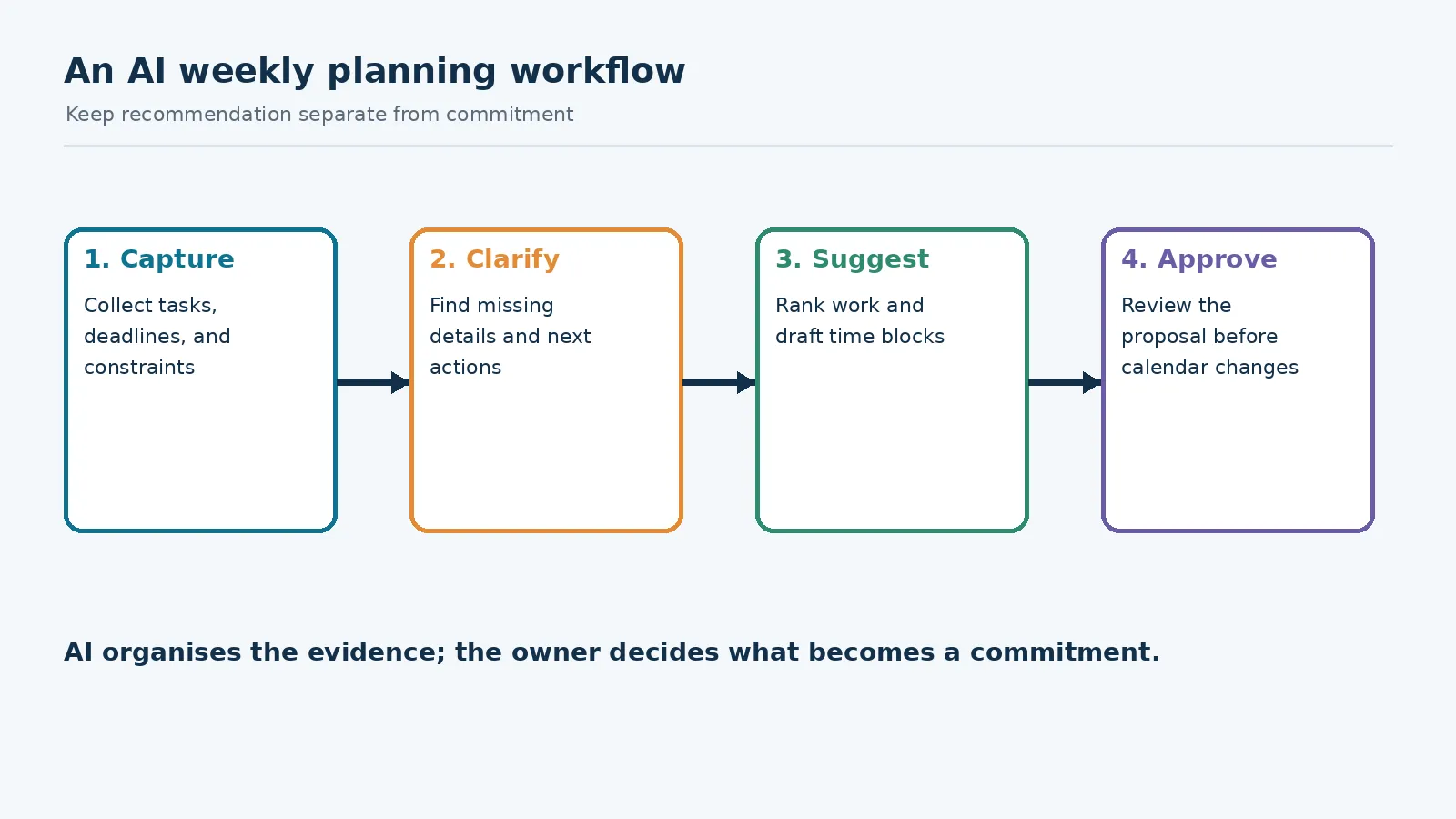
Before adding an important commitment to the live calendar, have the AI planner prepare a proposal.
Begin with a weekly reset, not a blank prompt
Choose a regular review time and collect the material that will shape the coming week. Include unfinished tasks, fixed appointments, deadlines, promised follow-ups, recurring responsibilities, and known periods when work is not possible. A short list of constraints is often more valuable than a long description of ambitions.
Write down the result you want from the review. You might ask for three priorities, a list of tasks that can wait, a draft of focused work blocks, or questions that need an answer before scheduling. A narrow request produces a plan that is easier to judge than a demand for a perfect timetable.
A useful prompt can list the week under review, working hours, fixed commitments, deadlines, preferred work periods, and tasks that need preparation. Do not include private details that the assistant does not need. A planning service can work with “client meeting at 2 p.m.” without receiving the client’s entire history.
Separate fixed commitments from flexible work
Calendar entries do not all have the same status. A court appointment, medical visit, live lesson, or customer call may be fixed. A research block, filing task, or draft proposal may be flexible. If an AI system treats both categories alike, it may move something that should not move or protect something that could easily be postponed.
Create simple labels such as fixed, preferred, flexible, and waiting. Explain the labels before asking for a plan. The labels do not need to be sophisticated. Their purpose is to make the owner’s boundaries visible to the planning process.
Google Calendar’s official guidance distinguishes task dates, start times, deadlines, availability, and visibility settings. Tasks with dates can appear on the calendar, while pending tasks can remain available for review. [1] This supports a practical rule: a due date is not automatically a promise to work on the task continuously until that date.
Use AI to clarify tasks before asking it to rank them
A planning assistant cannot prioritise a task well if the task is vague. The instruction “sort the website” could mean removing old pages, repairing a broken menu, reviewing search performance, or choosing a new design. Each version requires different effort and has a different consequence.
Ask AI to turn vague entries into questions. What is the next visible action? What result would count as finished? Is another person or document required? Which deadline is confirmed by a reliable source, and which deadline is only an assumption? A human should answer uncertain questions rather than allowing the system to fill the gaps.
This review can also identify tasks that belong outside the coming week’s plan. Some ideas need a parking area. Some requests need a reply before they become work. Some tasks are really projects that require several smaller steps. Good planning reduces ambiguity before it rearranges time.
Prioritise by consequence, not by noise
A full inbox creates the impression that everything is urgent. AI can sort messages quickly, but speed does not establish importance. A useful priority review considers consequences, deadlines, dependencies, customer promises, revenue protection, and the cost of delay.
Ask for a suggested order with a reason beside each recommendation. The explanation may reveal a mistaken assumption. For example, the assistant may rank a short administrative task above a customer deliverable because the administrative task has an earlier date. The owner can then correct the ranking rather than accept a polished list that does not fit the week.
Keep the number of weekly priorities small. A plan with twelve “top priorities” is a list of wishes, not a decision. Select the outcomes that would make the week worthwhile and classify the rest as supporting work, maintenance, waiting, or later.
Estimate effort without pretending that estimates are facts
AI can propose rough durations by comparing a task with descriptions supplied in the prompt. Those estimates are starting points, not measurements. A familiar task may take longer because a file is missing, a customer changes the brief, or the owner is moving between several types of work.
Use ranges rather than false precision. “Thirty to sixty minutes” communicates uncertainty better than “42 minutes”. Add preparation time when the task involves a meeting, a report, a presentation, or a decision that requires reading beforehand.
Compare suggested durations with your own history. If similar tasks regularly take twice as long as the estimate, change the planning rule. The purpose of AI is not to make the calendar look compact. The purpose is to make the plan more realistic.
Protect buffers and energy, not only unused space
A blank section of a calendar is not always available work time. It may be needed for travel, food, equipment problems, messages, recovery, or the mental change between a deep research task and a public meeting. A schedule that uses every gap assumes that life will remain perfectly cooperative.
Tell the planner which periods should remain open. You can also describe broad preferences, such as placing writing earlier in the day or leaving routine administration for a lower-energy period. Avoid treating these preferences as permanent laws. Review them when your work pattern changes.
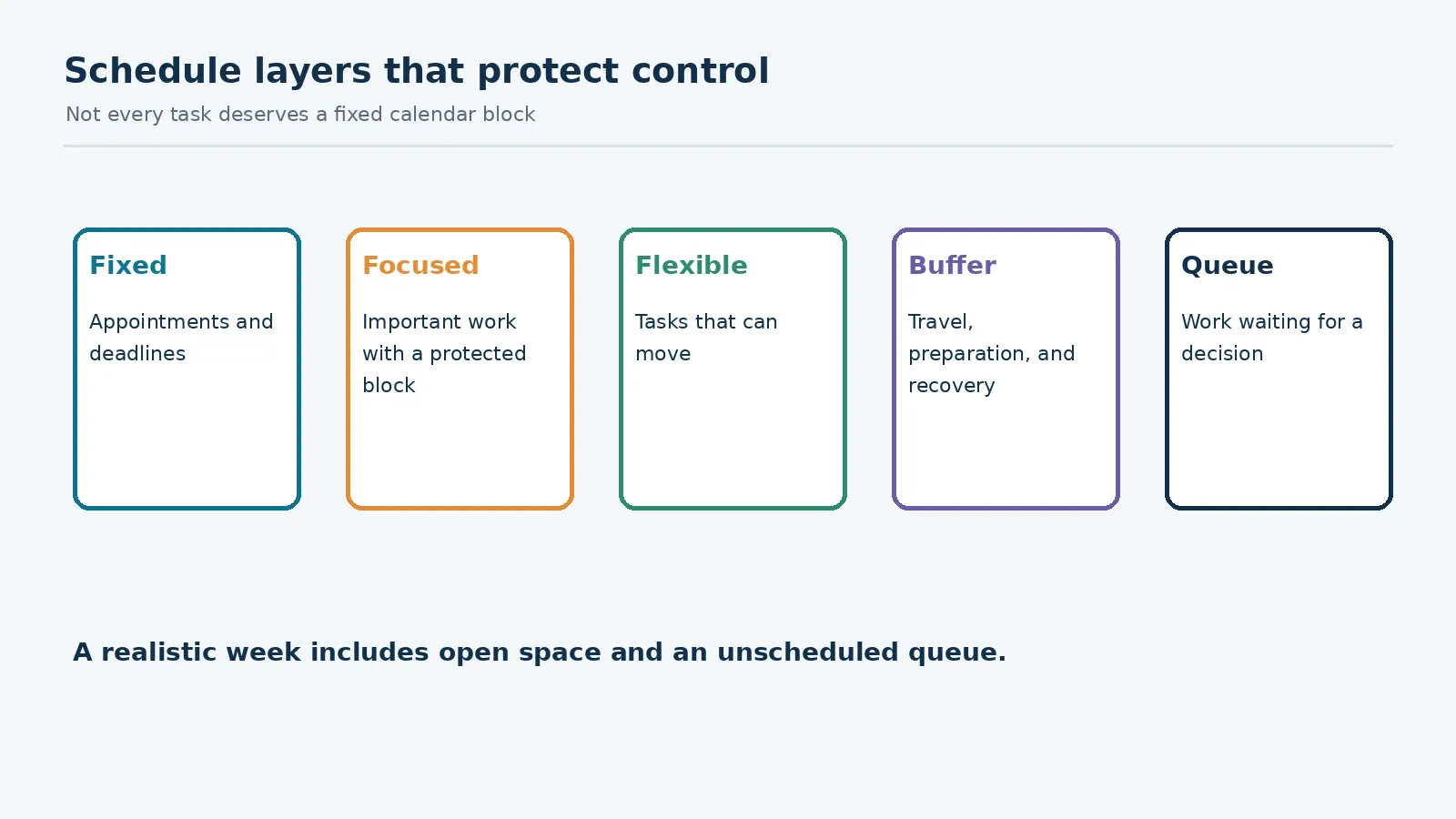
Separating schedule layers prevents flexible tasks from consuming the time needed for fixed commitments and recovery.
Energy levels are personal information, and an AI assistant cannot reliably infer them. Use the system to remember your stated preferences, then adjust the proposal when your actual capacity differs from the normal pattern.
Keep an unscheduled queue on purpose
Not every useful task needs a place in today’s calendar. Create a queue for important work that still needs information or a decision before it can be scheduled. Add a short reason, such as waiting for information, needing a decision, or having no confirmed deadline.
Microsoft Planner’s Schedule view displays tasks by start and due dates and keeps tasks without dates under Unscheduled tasks. The documentation also explains that users can move an unscheduled task to the calendar when it is ready. [2] That model is helpful even when you use another application: planning can include a deliberate holding area rather than forcing uncertainty into a fake appointment.
Review the queue once a week. Remove ideas that no longer matter, request missing information, and schedule only work with a clear reason for entering the coming week. A queue should be active, not a second inbox that grows forever.
Ask AI to compare several possible weekly plans
A single timetable can make an uncertain week look more predictable than it really is. Ask the assistant to produce two or three versions. One version might protect a major deadline. A second plan might leave more time for customer replies. A third might show what to postpone if an urgent request arrives.
Compare the trade-offs rather than asking which version is “best”. A plan that finishes the most tasks may leave no room for service work. A plan with generous buffers may mean renegotiating a deadline. Comparing the alternatives shows what each plan would require.
Scenario planning is particularly useful before a busy week. It makes the cost of a new commitment visible. If accepting one meeting removes the only preparation block for a proposal, the owner can decide whether to move the proposal, decline the meeting, or renegotiate the deadline.
Do not connect a live calendar too early
A safe workflow can begin with copied events and a sample task list. Ask AI to prepare a table with five columns: task, reason for priority, estimated duration, proposed day, and unresolved question. Review the table before granting permission to read or change a real calendar.
When a connection is necessary, use the narrowest access available. A planning assistant may need to see free and busy periods without reading the private details of every event. It may need to prepare a draft without receiving permission to move appointments or send invitations.
Test the workflow with unusual cases. Include an overlapping appointment, a task with no deadline, a recurring commitment, a time zone difference, and a day with lower availability. Record what the system does and where a person must intervene.
Measure whether planning improved the week
Judge the planning workflow by what happened during the week, not by how many calendar blocks it produced. Record whether important commitments stayed protected, missed deadlines decreased, rearranging took less time, and each priority ended with a workable next action.
Track rejected suggestions as well. Frequent corrections may indicate that the assistant lacks context, the task list is vague, or the planning rules do not match the owner’s reality. Those findings are useful because they show where the process needs better information.
NIST’s framework treats trustworthiness as an ongoing concern for AI systems. [3] For weekly planning, review the workflow regularly because calendars, responsibilities, and tools change.
A repeatable Friday or Sunday review
Start by closing the previous week. Mark completed work, carry forward only tasks that still matter, and write down promises that need follow-up. Next, inspect the coming calendar for fixed commitments, preparation needs, and areas with no recovery space.
Ask AI to group the remaining work and identify decisions that are still missing. Review its suggestions against the outcomes you actually want. Choose a small number of priorities, assign realistic ranges, protect buffers, and leave uncertain tasks in the unscheduled queue.
Finish by reading the plan as a person would experience it. Is the first task possible after the preceding meeting? Is there time to prepare? What happens if a customer replies late? Which item can move without breaking a promise? The final review belongs to the owner because the calendar represents real commitments, not merely organised text.
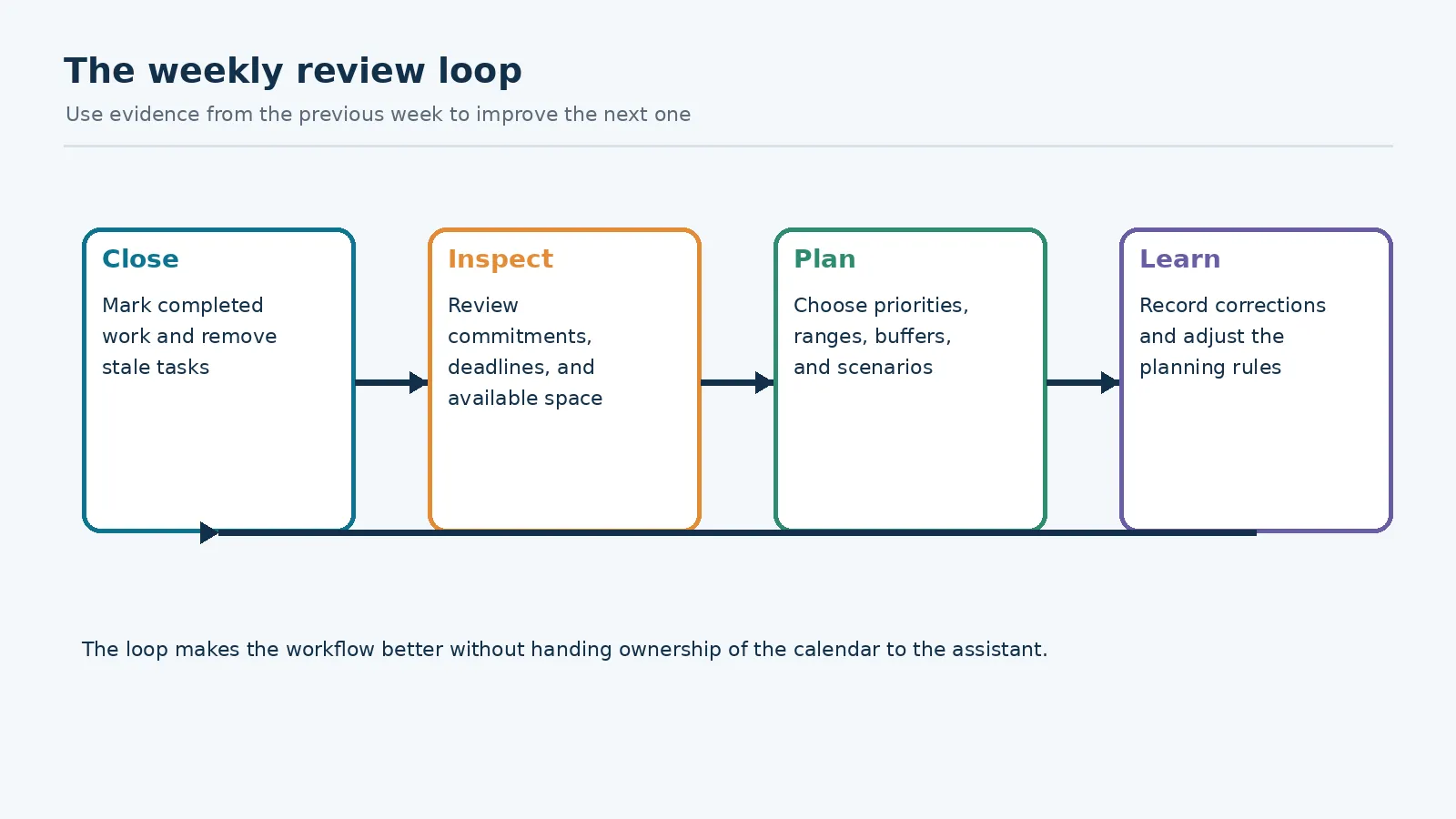
The weekly review loop improves the planning rules without handing calendar ownership to the assistant.
AI can make weekly planning clearer by handling the mechanical parts of the review. It can expose missing information, show alternatives, and reduce the effort required to turn scattered tasks into a visible plan. It becomes counterproductive when its suggestions are treated as authority or when a full calendar is mistaken for a successful week.
A controlled workflow leaves room for judgement. Capture broadly, clarify carefully, prioritise by consequence, schedule conservatively, and keep a human approval step before important changes reach the live calendar. That approach uses AI as a planning assistant while keeping the owner in charge of the time, promises, and boundaries that matter.