
A folder full of PDFs, Word files, scanned forms, spreadsheets, slide decks, and half-remembered versions is not yet a knowledge base. It is a storage problem waiting to become a search problem. Adding an AI chat box on top may make the mess easier to question, but it does not make the underlying information reliable.
A useful AI knowledge base begins before embeddings, vector databases, or retrieval prompts enter the picture. A named owner should decide which files belong in the collection and identify the current version. The preparation team can then extract the text, preserve useful context, attach meaningful metadata, and set retrieval permissions. The language model comes near the end of that chain. If the earlier stages are weak, a fluent answer can hide the weakness rather than fix it.
This guide presents a practical route from an untidy document folder to a searchable system. It focuses on the decisions that have the greatest effect on usefulness: what to keep, how to prepare it, how to divide it, how to test answers, and how to prevent private or outdated material from appearing in the wrong response.
Begin with an inventory, not an upload button
Create a simple register before moving any file into a search system. Record the filename, document type, business area, owner, creation date, last review date, status, sensitivity, and known replacement. The register does not need to be sophisticated. A spreadsheet is enough for a first pass if people can update it consistently.
The aim is to separate useful material from material that merely exists. A current procedure, an old procedure, a draft procedure, and an email attachment about the procedure should not carry equal weight. Nor should a promotional slide deck be allowed to answer a question about a binding internal rule unless someone has deliberately approved it for that purpose.
Use four practical labels: keep, review, archive, and remove. “Keep” means the document has a clear purpose and a responsible owner. “Review” means it might be useful but contains uncertainty, missing context, or a possible version conflict. “Archive” means it may need to remain available for records but should not normally answer current operational questions. “Remove” means the organisation has no good reason to keep it in the searchable collection.
This stage often reveals several copies with small differences. Do not quietly merge them. Identify the current version. Name the person who can approve answers. State the archive label for older copies. A search system cannot infer organisational authority from a filename such as “final-new-updated-2”.
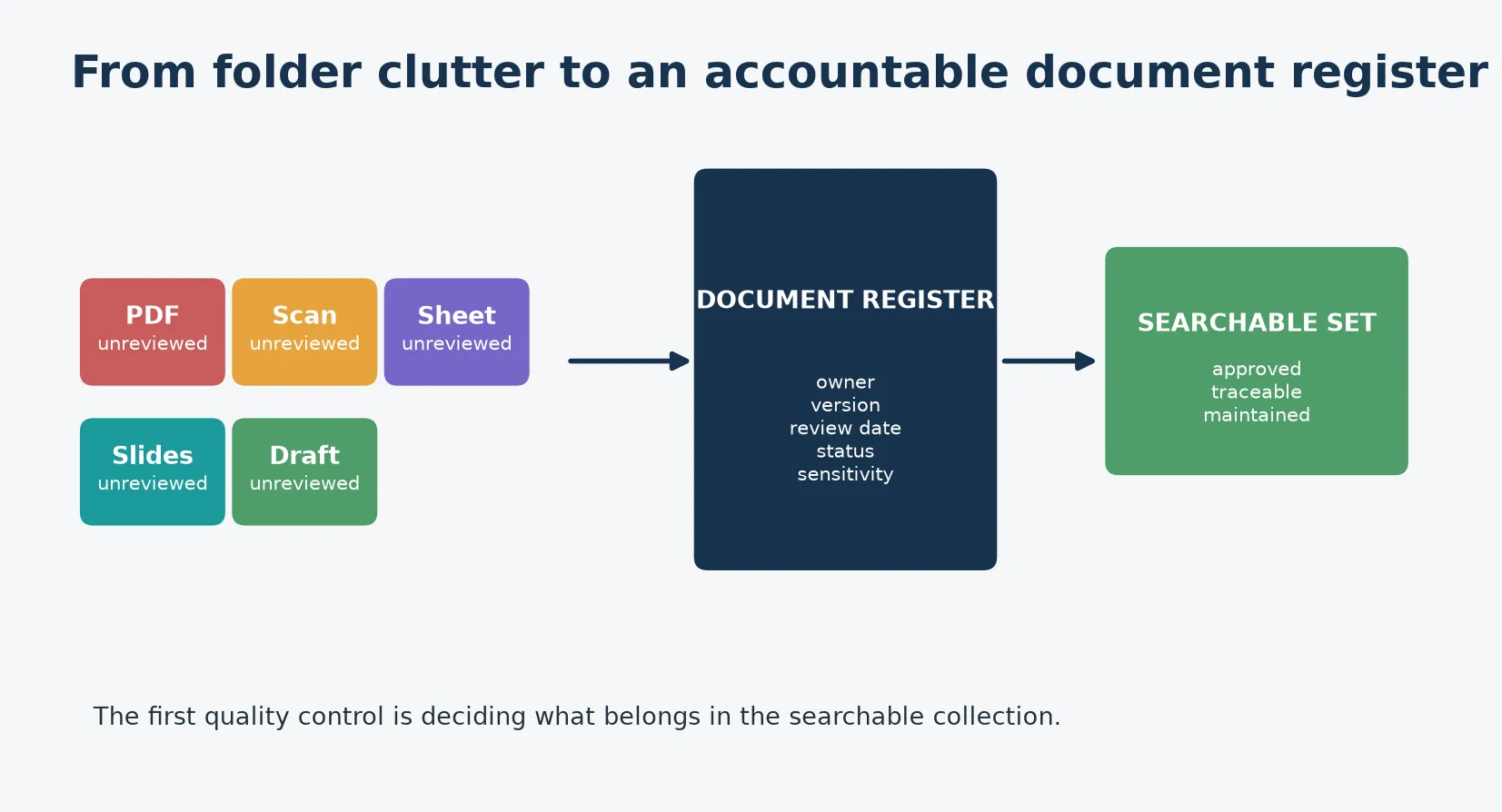
An inventory makes the document collection easier to manage by showing who owns each file and whether the file is approved for search.
Separate extraction from understanding
A searchable system needs machine-readable content, but extraction is not the same as interpretation. A scanned contract may look clear to a person and contain no usable text for a search engine. A PDF may expose the words but lose the table structure. A spreadsheet may store the important value in a comment, a hidden column, or another worksheet.
Classify each file by its extraction route. Text PDFs and Word documents may need ordinary text parsing. Scanned pages require optical character recognition. Tables need a method that preserves the relationship between each row and its column headings. Slide decks need the text, speaker notes, and useful labels extracted separately. Images may require a description, but an AI-generated description should not be treated as the original fact without review.
Keep the extracted version connected to the original file. Store a source identifier, page number, sheet name, slide number, or paragraph location where possible. When a user asks for evidence, the system should be able to point back to the document and location rather than produce a paragraph with no traceable origin.
Run a small extraction check before processing the whole folder. Choose a text PDF, a scan, a table, a presentation, and a document with headers or footnotes. Compare the extracted text with the originals. Look for missing negative signs, broken dates, merged table cells, lost headings, incorrect names, and reading-order errors. Fixing those problems early is cheaper than debugging them after thousands of fragments have been indexed.
Preserve the shape of each document
An AI search system does not need a document to remain in its original file format, but it does need enough structure to understand what belongs together. A policy heading, its qualifying paragraph, and the exception below it may form one useful unit. Splitting them carelessly can leave a retrieved passage that sounds definitive while hiding the condition that limits it.
Keep titles, headings, section labels, footnotes, table headings, dates, and document identifiers alongside the extracted text. If a fragment comes from a table, preserve the table structure rather than flattening the cells into an ambiguous sentence. If a section refers to an earlier definition, carry enough context for the retrieved passage to make sense on its own.
This is where document chunking becomes important. NIST describes retrieval-augmented generation as a model paired with a separate retrieval system or knowledge base that supplies relevant information as context. 1 Microsoft’s technical guidance explains that dividing large documents into smaller pieces can help retrieval and can prevent long content from being truncated. It also describes fixed-size, structure-based, semantic, and mixed approaches to chunking. 2
There is no universal chunk size that works for every folder. A short troubleshooting step may deserve one complete chunk. A long policy may work better when divided at headings, with a small amount of neighbouring context. A conversation transcript may need larger sections than a catalogue of product specifications. Test each chunking choice with real questions. Do not select a size merely because a sample configuration uses it.
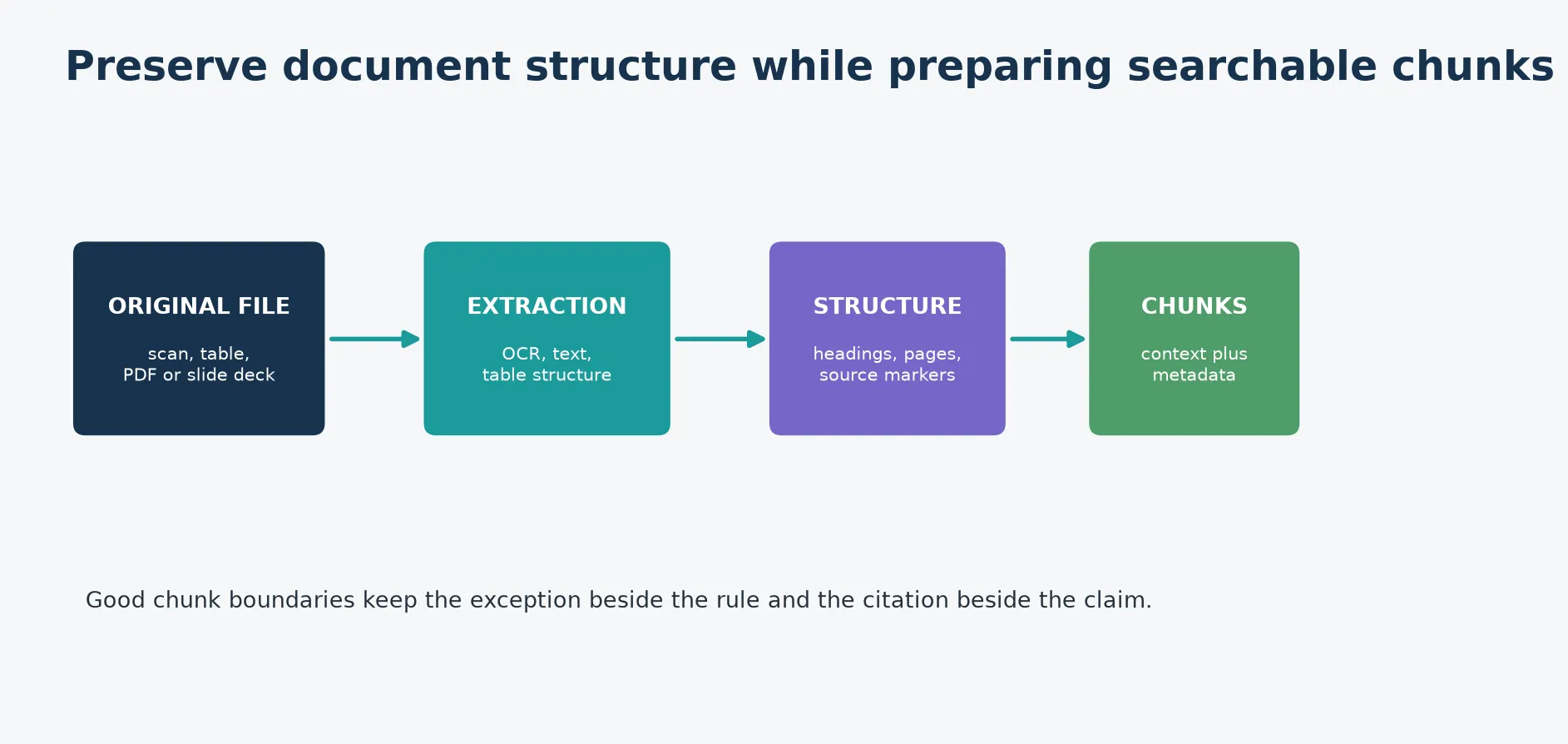
The preparation chain keeps extracted words connected to headings, tables, page markers, and enough context to make each chunk meaningful.
A practical rule is simple: a retrieved fragment should contain enough information to answer a narrow question without dragging in several unrelated topics. If the system routinely returns a useful sentence but misses the exception in the next paragraph, the boundaries are too aggressive, or the context is too thin.
Use metadata as a second route into the folder
Text similarity is helpful, but it is not a substitute for document description. Add fields that help the system distinguish a current finance policy from an archived one, a United Kingdom procedure from a United States procedure, or an employee guide from an internal implementation note.
Useful fields include document owner, department, jurisdiction, audience, effective date, review date, confidentiality level, document status, product name, and version. Give important fields controlled values rather than relying on free typing. The labels “HR”, “Human Resources”, and “People team” may describe one group to a person. A search filter may treat them as three different values.
Metadata can also reduce irrelevant retrieval. A question about contractor expenses should not search every document that contains the word “expense” if the collection knows which audience, region, and policy family apply. Combining ordinary keyword matching, semantic similarity, and metadata filters can give the system several ways to find the right material. Microsoft describes hybrid retrieval as a combination of keyword and vector search intended to improve recall. 3
Do not use metadata to hide uncertainty. A confident label does not make an unreviewed document authoritative. When a field is unknown, mark it as unknown and decide whether the system should include or exclude the file until someone resolves it.
Build permissions before the first question
A searchable knowledge base can make an accidental permission error easier to repeat. If a company-wide search index includes a private salary spreadsheet, the AI interface may reveal confidential data to unauthorised users.
Begin with the existing access model. Identify who may read each document and check whether the search layer can enforce those boundaries at query time. Use separate collections when a shared index would make permission filtering unreliable. Keep confidential files out of the first pilot unless a clear business need and a tested protection method justify their inclusion.
Treat retrieved text as untrusted input as well. A document can contain outdated instructions, malicious content, or text designed to influence an AI system. The system should treat a retrieved passage as evidence to evaluate, not as an instruction that automatically changes its behaviour. For high-impact questions, show the supporting document and send the answer to a person who can challenge it.
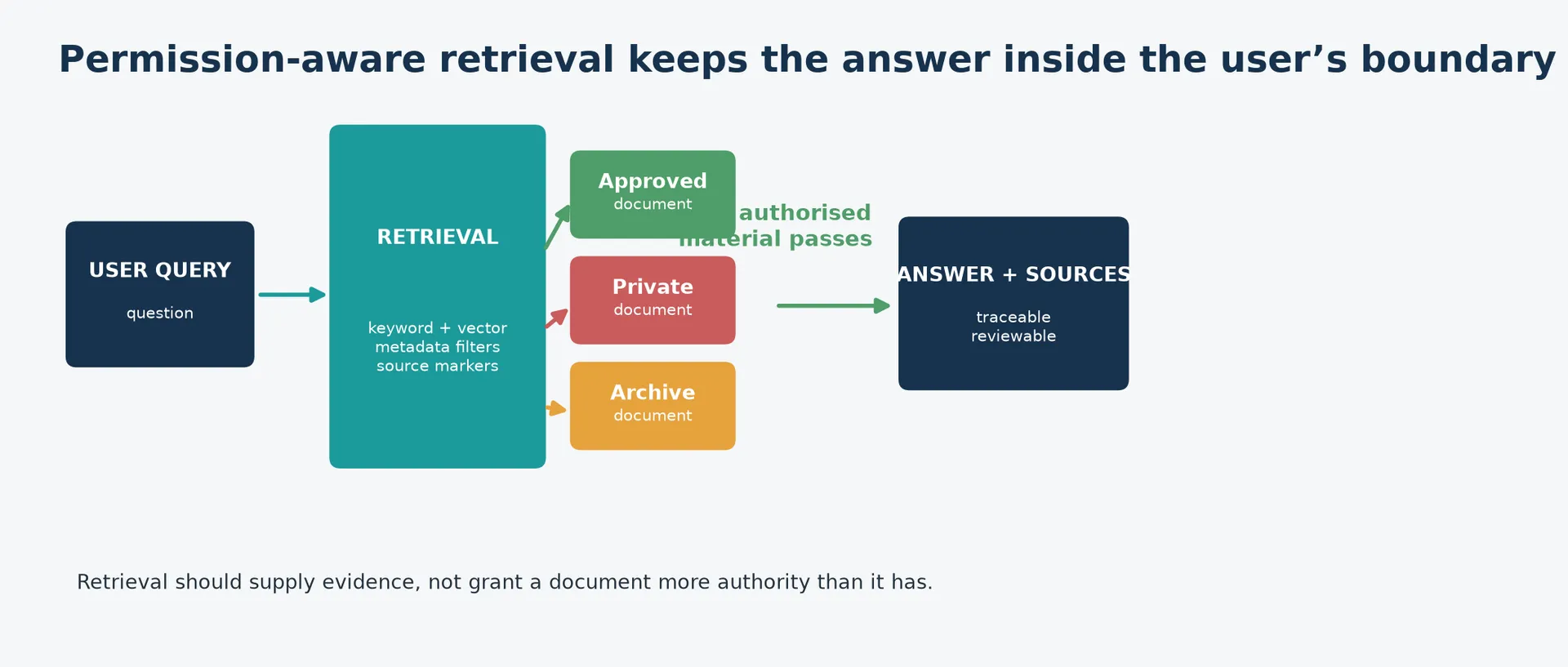
Permission-aware retrieval filters the collection before the answer is assembled, while source markers give a reviewer a route back to the evidence.
Test questions, not just documents
A knowledge base may pass a file-count check while failing the questions that matter. Build a small evaluation set before launch. Include questions with one clear answer, questions that require two documents, questions about an outdated version, questions that should return “not found”, and questions that a user should not be allowed to ask.
For each test, record the expected source, acceptable answer, unacceptable answer, and permission outcome. Note whether the answer must include a citation. Add awkward questions with abbreviations, synonyms, missing details, and incorrect assumptions. A good test does not merely reward a fluent reply. It checks whether the system found the right material, represented its limits, and refused to invent a conclusion when the folder did not contain one.
Repeat the evaluation after changing the extraction method, chunk boundaries, metadata fields, ranking settings, or source files. A change that improves one question may damage another. Keep a small set of difficult cases in the test suite so improvements cannot be judged only by easy examples.
Plan for maintenance from the beginning
Documents change after launch. A policy may be replaced, a new owner may take responsibility for a product guide, and an old spreadsheet may remain in a shared folder long after the project ends. Decide what happens when a source changes. The process may need to remove old fragments, index the new version, update metadata, and record the date of the change.
Assign a named owner to review the collection. Track files with missing owners, expired review dates, failed extraction, conflicting versions, and repeated “not found” questions. Those signals tell you whether the folder, the retrieval process, or the user guidance needs attention.
Do not measure success only by how quickly the AI answers. A better measure asks whether people can find the right source with less effort and recognise an uncertain answer before acting on it. A slower answer with a clear citation may be safer and more useful than a fast paragraph that cannot be checked.
The practical starting point
You do not need to transform every file at once. Choose one document family with a clear owner and a real search problem. Start by inventorying the files and removing obvious clutter. Test extraction across the formats you use. Preserve headings and source locations, add metadata, and prepare a small set of representative questions. Connect the retrieval system only after those checks are complete, then evaluate its answers.
That sequence may feel less impressive than uploading a folder and opening a chat window. It is also more likely to produce a knowledge base people can trust. The search box is the visible part. The real product is the disciplined chain underneath it: approved documents, readable content, meaningful structure, controlled access, traceable evidence, and a maintenance habit that keeps the collection honest.