
Most organisations already possess a knowledge base. It is scattered across policy PDFs, slide decks, email threads, meeting notes, scanned forms, spreadsheets, intranet pages, support tickets, and folders with names that made sense years ago. An AI search tool can make that material easier to find, but it cannot repair every weakness by adding a chat box. Search quality depends on what the system receives, how that material is interpreted, and whether the right person is allowed to see the result.
Preparing unstructured business data for AI search means turning a mixed collection of files and pages into searchable, permission-aware, traceable content. The work includes inventory, extraction, cleaning, deduplication, structure-preserving chunking, metadata, indexing, testing, and maintenance. It is closer to preparing a well-organised reference room than dumping documents into a machine.
This guide uses a fictional operations team that wants to search supplier procedures, delivery agreements, safety instructions, and internal how-to notes. The examples are deliberately practical: they focus on the decisions that make a small first search collection dependable.
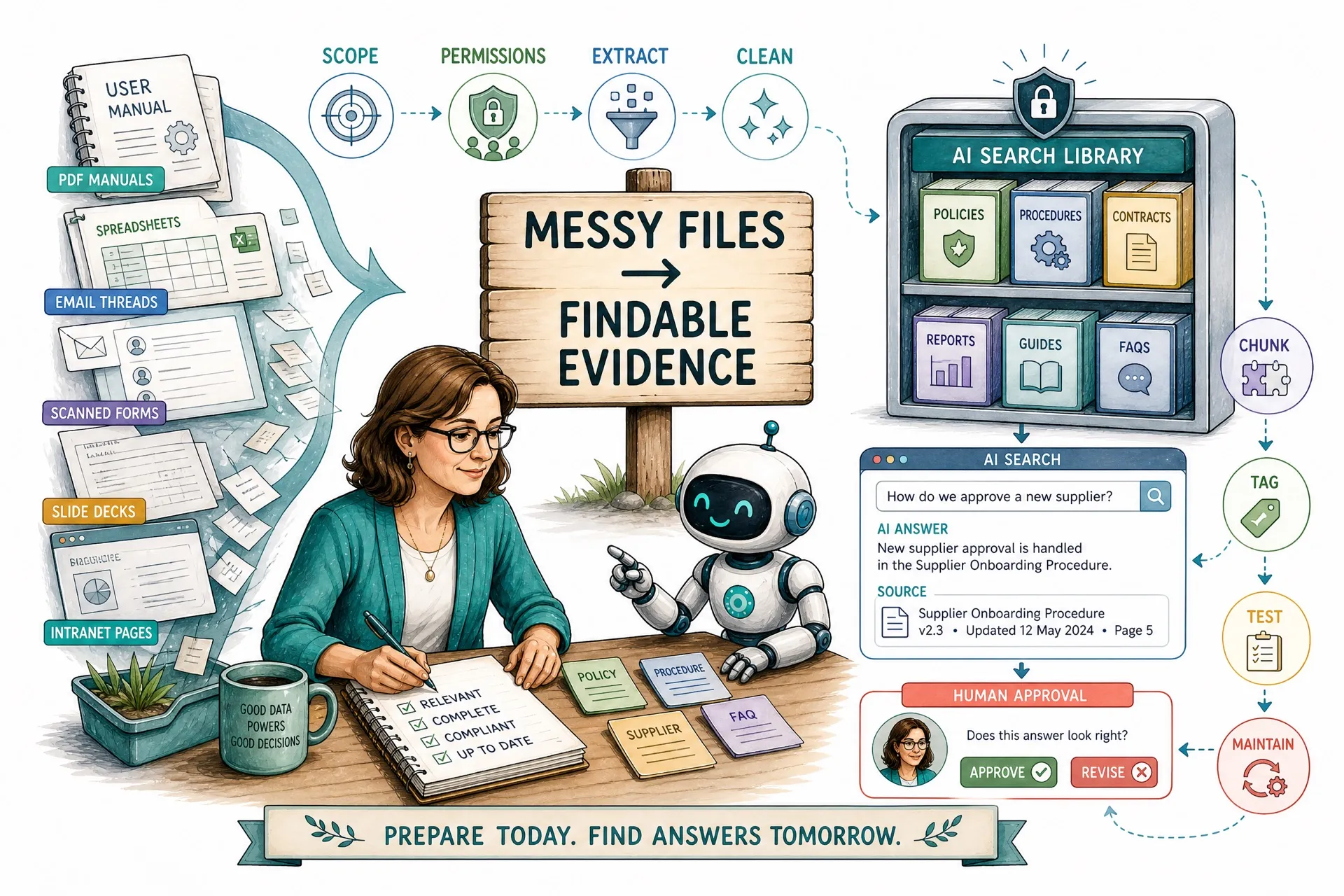
Begin with the questions people need answered
Choose the first business problem before selecting a vector store or copying a shared drive. Gather the recurring information requests that the intended users need answered in practice. A warehouse coordinator might need supplier terms for a damaged shipment, while a new colleague might need the current process for reporting a safety incident. Those requests point to the relevant documents, sections, dates, and permission boundaries.
Record the audience, business area, response format, and consequence of an incorrect result. General office guidance carries a different risk from legal obligations, clinical instructions, financial controls, or emergency procedures. Give the initial collection a clear scope and assign one owner who can approve what belongs inside it.
Turn those real requests into an evaluation set. Keep representative questions, expected sources, acceptable answers, and cases where the search tool must acknowledge insufficient evidence. Preparation becomes measurable when the team defines a dependable result before indexing begins.
1. Build an inventory before moving content
Create a catalogue of candidate sources. Record the location, owner, file type, last review date, business area, sensitivity, language, and likely value. Include documents that are easy to overlook, such as embedded images, tables, attachments, scanned pages, archived versions, and pages generated by a content-management system.
The inventory is not a popularity contest. A long document may be authoritative but rarely used. A short spreadsheet may contain the only approved escalation thresholds. Ask which source is the current authority, which copies are obsolete, and which files are merely working notes.
Mark uncertain items for review instead of treating every file as ready. A collection with fewer trusted documents is often a better first release than a large index filled with conflicting drafts.
2. Map permissions before extraction
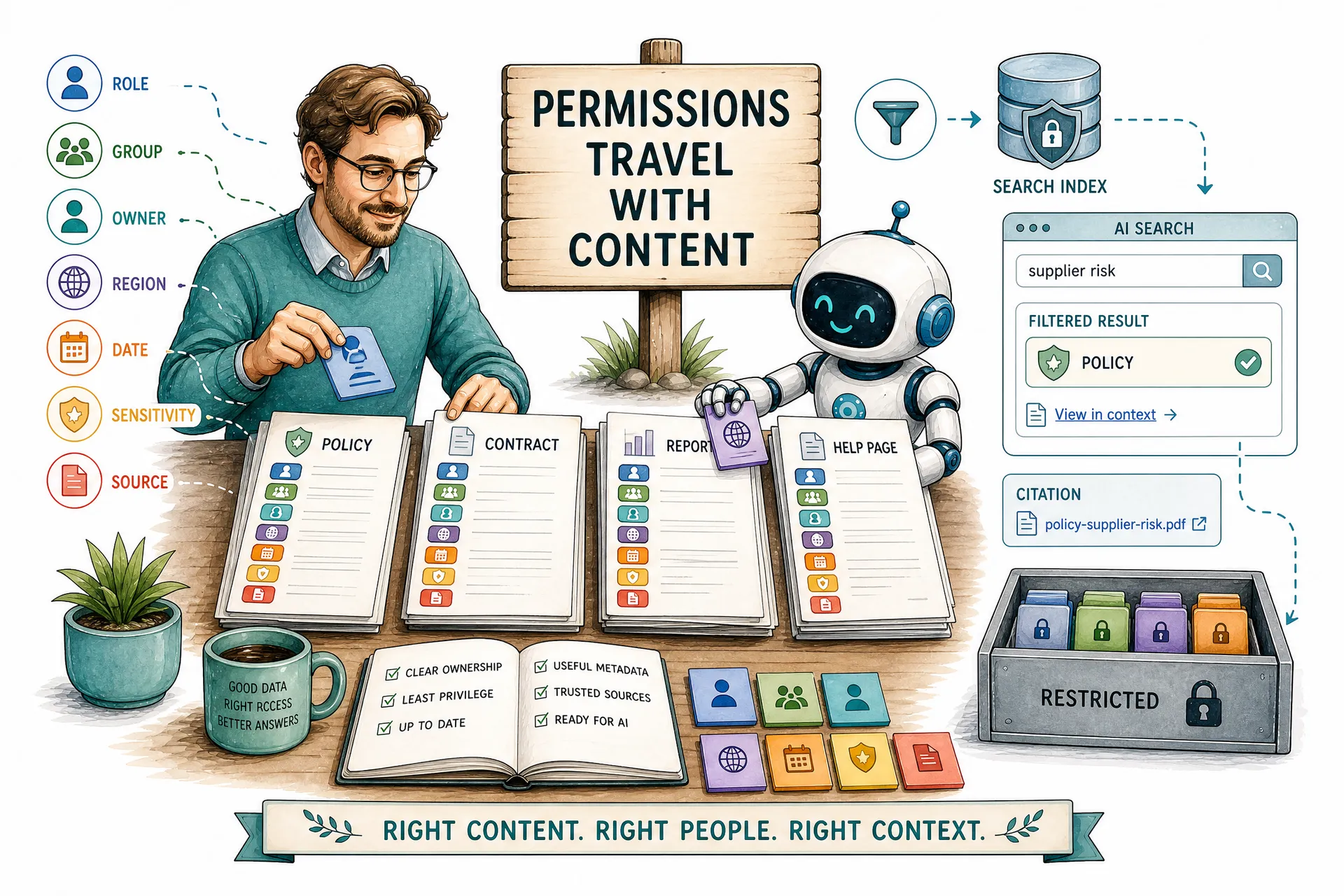
Search content must not become a shortcut around existing access controls. For every source, identify who may read it, whether permissions apply to the document or to individual sections, and how those permissions are represented in the target search system. If a user cannot open the original file, the AI search result should not reveal its protected text through a generated answer.
Separate public internal guidance from confidential material, personal information, commercial terms, investigations, and restricted leadership documents. Remove content that has no approved search purpose. Where possible, attach the relevant department, role, group, classification, and document owner to each searchable unit.
Microsoft’s Azure AI Search documentation lists role-based and document-level access controls among its capabilities, while Google’s Agent Search documentation describes preparing metadata alongside unstructured content. [1] [2] The product features do not remove the need to design and verify your own permission model.
3. Extract text without flattening the document
A PDF is not automatically a readable text source. It may contain a normal text layer, a scanned image, multi-column content, footnotes, tables, diagrams, headers, and page numbers. An extraction step should identify which parts are text, which require optical character recognition, and which need visual or manual review.
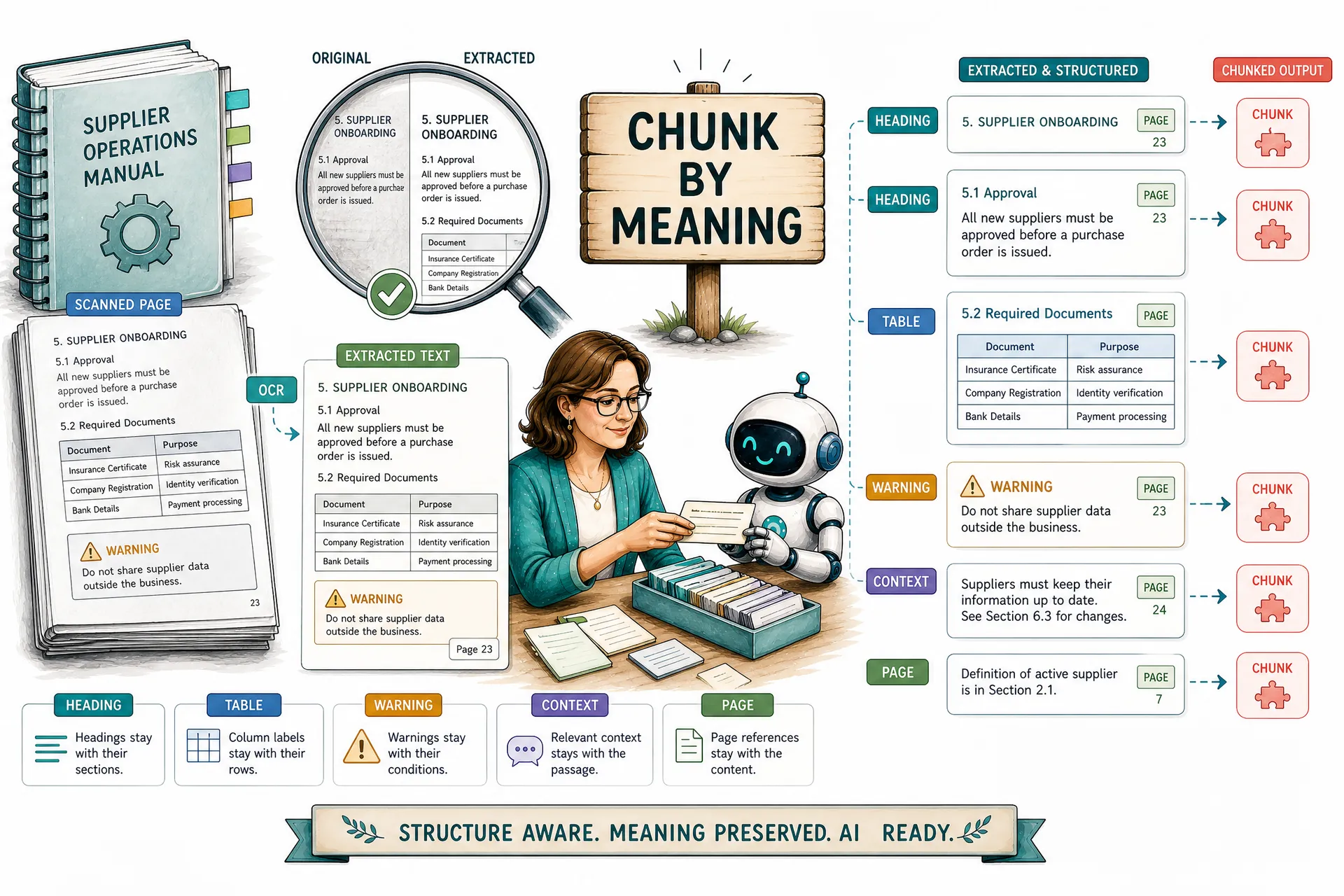
Keep useful structure during extraction. Retain the document title, headings, section order, table relationships, list boundaries, page or slide references, and links to the original file. A sentence extracted from a table without its column heading can change meaning. A warning separated from the procedure it qualifies can create a dangerous answer.
Inspect extraction samples from each important format. Compare the original page with the extracted representation. Look for missing symbols, broken reading order, lost accents, repeated headers, incorrect columns, and text that OCR has guessed poorly. Do not assume that a successful file import proves a successful interpretation.
4. Clean noise while protecting meaning
Cleaning removes material that makes retrieval less useful, such as navigation menus, repeated legal footers, tracking parameters, empty pages, template instructions, and accidental export artefacts. It should not remove the context needed to understand an instruction.
Standardise dates, names, identifiers, and spelling variants where that improves findability. Keep the original wording available for citation and audit. Expand an internal abbreviation only when the expansion is known; do not invent a meaning because it looks familiar. Preserve negative words, conditions, exceptions, and qualifiers. “Do not release” must never become a search fragment that reads as “release”.
Store both the cleaned representation and a link to the source. If a reviewer finds a mistake, the owner should trace the transformation that introduced it and correct the process instead of patching one isolated chunk.
5. Remove duplicates and resolve competing versions
Duplicate content wastes index space and can confuse ranking. Near-duplicates are more troublesome than exact copies: an old policy may differ from the current policy by one threshold, one date, or one exception. A search tool that retrieves both versions may produce a fluent answer assembled from incompatible rules.
Use file hashes, canonical URLs, titles, revision numbers, effective dates, and similarity checks to find likely duplicates. Then ask the business owner which version is authoritative. Retire or exclude superseded copies when the retention policy allows it. Keep an audit record instead of silently deleting evidence.
Google warns that duplicate URL patterns can create duplicate documents, dilute search quality, and increase storage costs in an indexed collection. [2] The same principle applies to internal pages and file copies: one concept should have a clear route to its current source.
6. Chunk by meaning, not by an arbitrary character count
Chunking divides a document into retrievable passages. A chunk that is too large may contain several unrelated subjects. A chunk that is too small may lose the condition, definition, or heading that gives a sentence its meaning.
Begin with natural boundaries: a heading and its opening explanation, one procedure step group, a complete FAQ answer, or a table with its heading and units. For long sections, use modest overlap only when it preserves continuity. Do not split a warning from the action it modifies, a contract clause from its definition, or a table row from its column labels.
Record the parent document, heading path, page or section location, and chunk position. This allows a result to show context and gives a reviewer a way to open the source. Microsoft documents integrated data chunking and vectorisation for routing smaller passages into searchable fields, but the appropriate boundaries still depend on the content. [1]
7. Add metadata that helps people and the search engine
Metadata is the description that travels with a searchable unit. Useful fields may include title, department, document type, owner, effective date, expiry date, region, product, language, confidentiality, source URL, revision, and permission group. Choose fields because they support a question, a filter, an explanation, or an ownership task.
Avoid a tag cloud with inconsistent labels. Decide whether a department is called “Operations”, “Operations Team”, or “Ops” and use one approved value. Keep dates machine-readable and make time zones explicit when a document contains deadlines.
Metadata improves more than ranking. It can help the interface show why a passage was selected, filter results to a region, suppress expired material, and route a correction to the right owner. A missing effective date can be as damaging as missing text when two procedures disagree.
8. Index a controlled pilot collection
Choose a small, representative set instead of indexing every available file on the first attempt. Include different formats, a few difficult documents, current and deliberately excluded examples, and content from the main permission groups. Keep a manifest of what entered the index, what was rejected, and why.
Decide whether the search tool will use keyword search, semantic retrieval, vector search, or a combination. The choice matters, but content quality comes first. A sophisticated retriever cannot recover a missing table heading or a document that should have been excluded.
Test whether each indexed result links back to its source and whether the displayed title, section, date, and permission status are correct. Confirm that deleted or expired content leaves the index according to the agreed refresh process.
9. Test retrieval before trusting generated answers
Create a question set with easy, ambiguous, multi-step, negative, and permission-sensitive examples. For each question, record the expected source, the expected section, acceptable alternatives, and the reason a result would be unsafe. Include questions that should return “no approved answer found”.
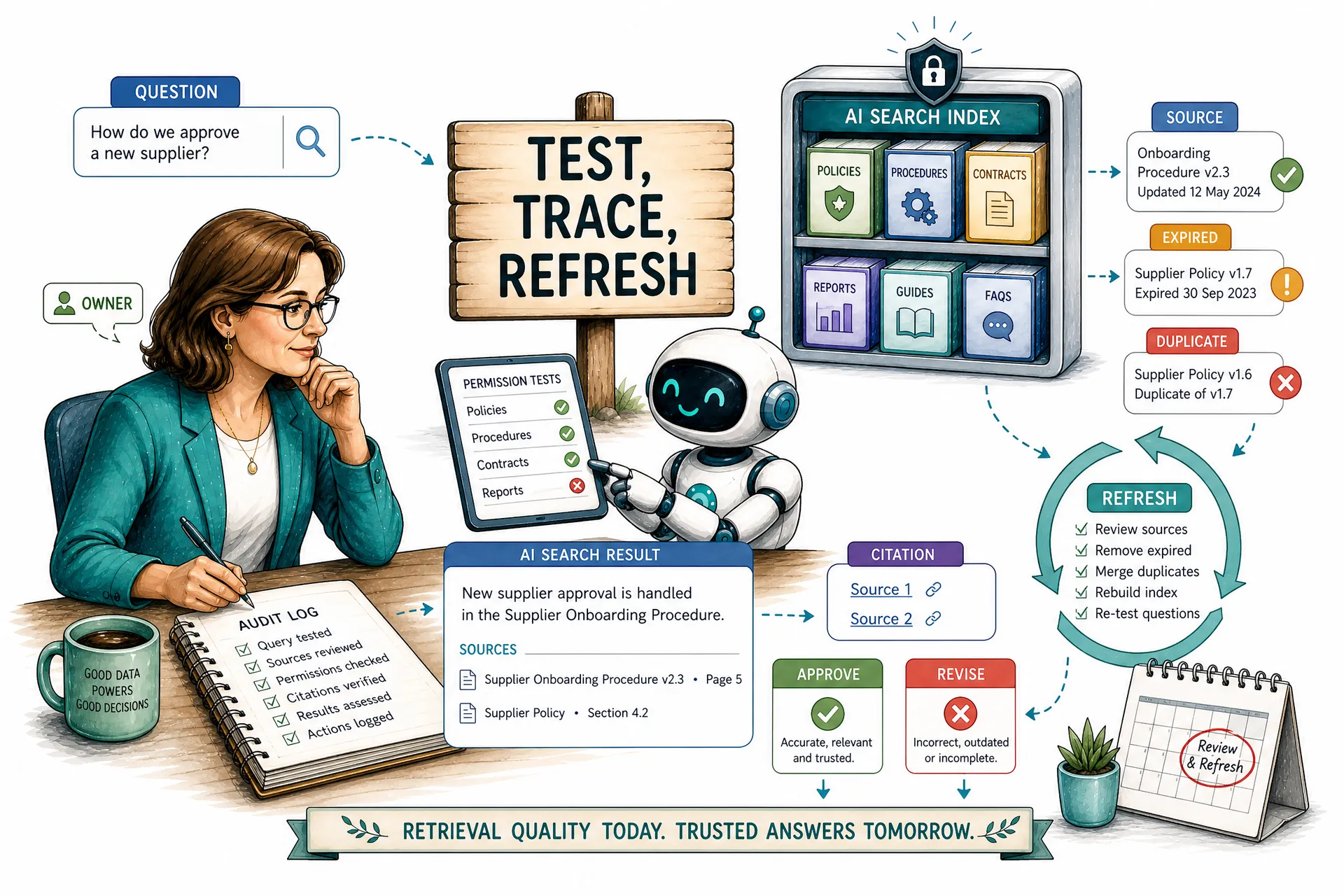
Review retrieval separately from answer writing. First ask whether the correct passage appears near the top. Then ask whether the generated answer preserves conditions, cites the right source, distinguishes current from expired material, and admits uncertainty. A polished answer based on the wrong document is still a failure.
Test access with accounts representing each approved role. Ask whether a restricted document appears in results, snippets, citations, or answer text. Test after permission changes and after a document is deleted or replaced. Keep a record of failed cases and assign each one to extraction, metadata, retrieval, permissions, or generation.
10. Maintain the collection as business knowledge changes
Business documents become outdated over time. Procedures change, suppliers renegotiate terms, teams move responsibilities, and internal pages acquire duplicate URLs. Establish refresh triggers for new files, revisions, expiry dates, ownership changes, permission changes, and source deletion.
Give every important collection a review owner and a service expectation. Monitor ingestion failures, extraction quality, duplicate rates, stale documents, permission mismatches, retrieval success, citation coverage, and user-reported errors. A monthly review may suit a stable handbook; safety or regulatory content may require a faster route.
Keep a change record that connects a source revision to the index update and the retrieval tests rerun. AWS’s knowledge-base guidance describes chunking and associated metadata as part of preparing content for retrieval, reinforcing the need to treat preparation as a repeatable ingestion process instead of a one-off upload. [3]
A practical preparation checklist
The following table turns the workflow into a release gate for a small AI search pilot.
| Preparation area | Question to answer | Evidence to retain |
|---|---|---|
| Scope | Which questions and business area are included? | Approved question set and collection boundary. |
| Ownership | Who confirms that a source is current? | Named owner and review date. |
| Permissions | Which roles may read each source or chunk? | Permission mapping and access tests. |
| Extraction | Was text, OCR, layout, and table meaning preserved? | Format samples and extraction review. |
| Cleaning | Which noise was removed, and which meaning was protected? | Transformation rules and test cases. |
| Versions | Which copy is authoritative? | Revision, effective date, and duplicate decision. |
| Chunking | Does each passage retain its heading and conditions? | Chunk examples and boundary review. |
| Metadata | Can users filter, understand, and trace a result? | Field definitions and approved values. |
| Retrieval | Does the correct evidence appear for known questions? | Ranked results and error log. |
| Maintenance | What triggers refresh, review, or removal? | Runbook, owner, and change record. |
Protect the boundary between search and authority
An AI search tool can help someone locate a policy; it does not become the policy owner. Keep a visible link to the approved source and show its date or revision. For high-impact instructions, require a person to confirm the source before acting. If the collection includes personal, confidential, regulated, or commercially sensitive information, use approved storage and processing routes, minimise copied content, and prevent secrets from entering prompts or test files.
A sensible first release has a narrow scope, a measurable question set, tested permissions, traceable citations, and an owner who can correct a source. It does not promise that every answer will be automatic. It promises that the team can see what was indexed, why it was retrieved, and how to improve the collection when reality exposes a gap.
| KEY TAKEAWAY: Prepare unstructured business data for AI search by defining the questions, inventorying sources, mapping permissions, extracting structure, cleaning carefully, resolving versions, chunking by meaning, adding useful metadata, testing retrieval, and maintaining the index. The goal is not to make every file searchable; it is to make the right evidence findable and explainable. |
|---|
| SAFETY CHECK: Never use AI search preparation to bypass access controls or replace an accountable source owner. Test restricted, expired, deleted, contradictory, scanned, and malformed content. Preserve links to authoritative documents, minimise sensitive data, review high-impact answers, and provide a human route for reporting and correcting errors. |
|---|