
An AI agent can sort enquiries, prepare replies, update records, and move work between business systems. Those abilities are useful, but they also create a difficult question: where should a person remain involved? If review happens too early, employees may slow down harmless tasks. If review happens too late, a flawed action may already have reached a customer, changed a payment record, or exposed private information.
Human-in-the-loop AI is not simply a person clicking an approval button. It is a workflow in which a human has enough context, time, authority, and control to question an AI result before it causes avoidable harm. The design matters as much as the reviewer’s ability to act.
What human-in-the-loop AI actually means
The phrase describes several different arrangements. A person may review an input before the system acts, supervise the agent while it works, approve a proposed action, or inspect the result afterwards. These arrangements are not interchangeable. A final check cannot prevent an email that has already been sent. A review that happens before the agent sees sensitive information may not protect data during processing.
NIST’s AI Risk Management Framework is voluntary guidance for managing risks to people, organisations, and society. It encourages teams to consider trustworthiness during the design, development, use, and evaluation of AI systems [1]. That lifecycle perspective is useful for small businesses because it shifts the question from “Do we have a reviewer?” to “Can the reviewer influence the outcome at the point where influence still matters?”
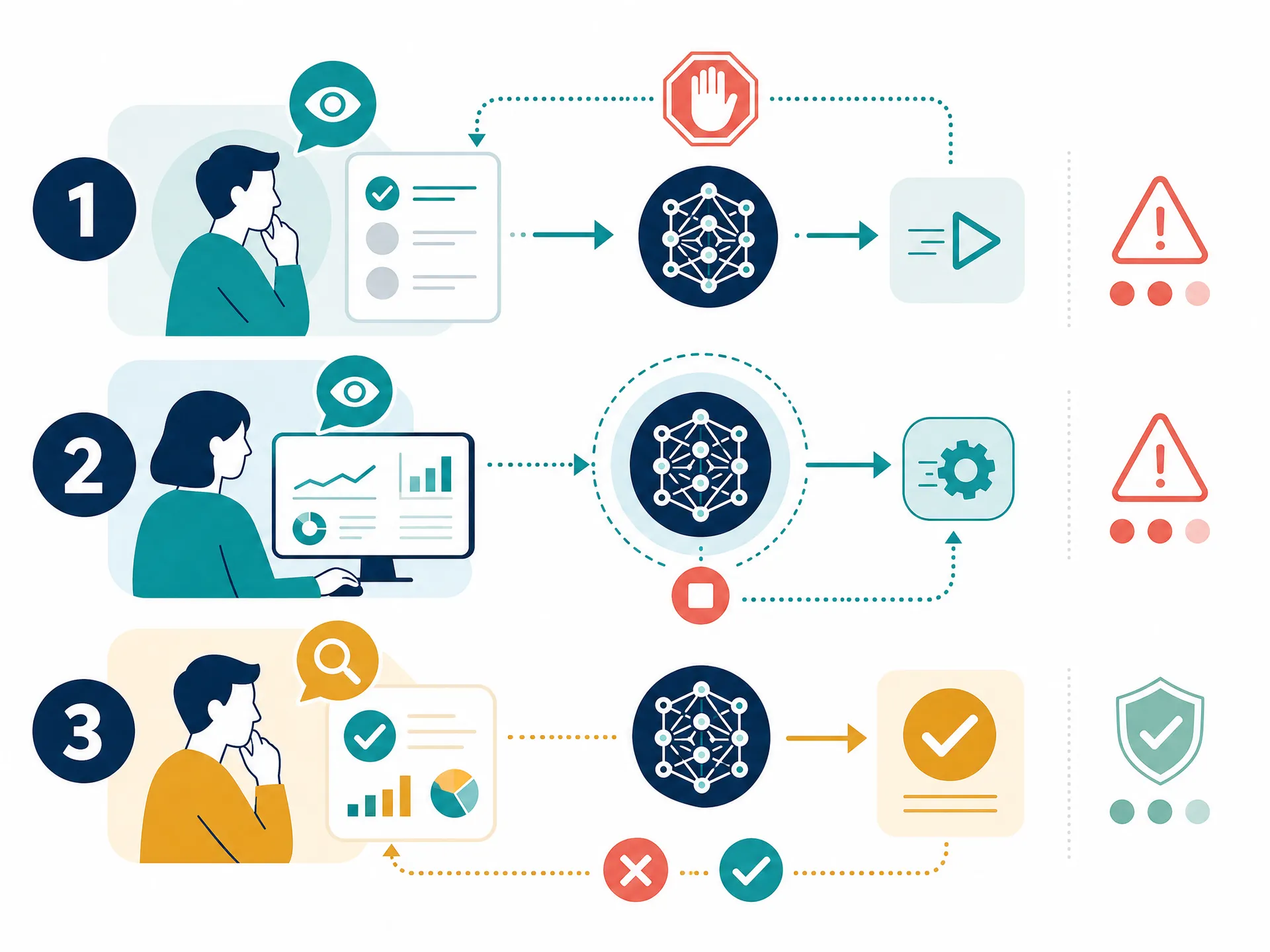
Why a human checkbox does not guarantee safety
The reviewer needs more than an approval button
A reviewer may approve an unsafe result for several reasons. The person may be rushed, may not have access to the source evidence, or may assume that the system has already checked the important details. A screen that presents a polished answer can make a weak recommendation look more reliable than it is.
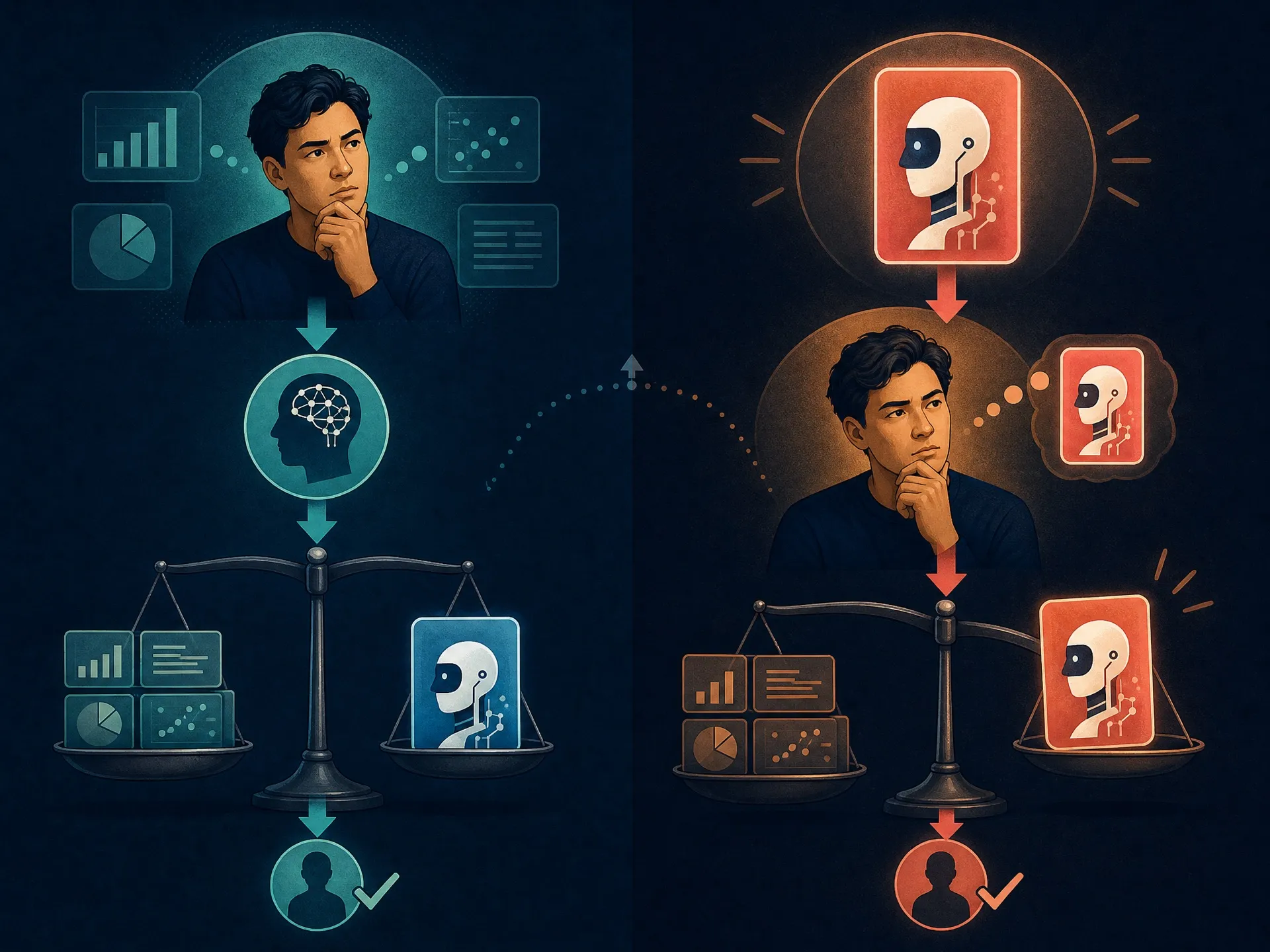
Research on human-in-the-loop decision processes has examined this problem through the idea of automation bias. People may use an automated recommendation as a shortcut, especially when it appears before they form an independent judgement. A 2024 study found that incorrect algorithmic support can affect human judgement, particularly when the support arrives before the person makes an initial assessment [2]. The lesson is not that human reviewers are ineffective. The lesson is that the review experience must help them think critically.
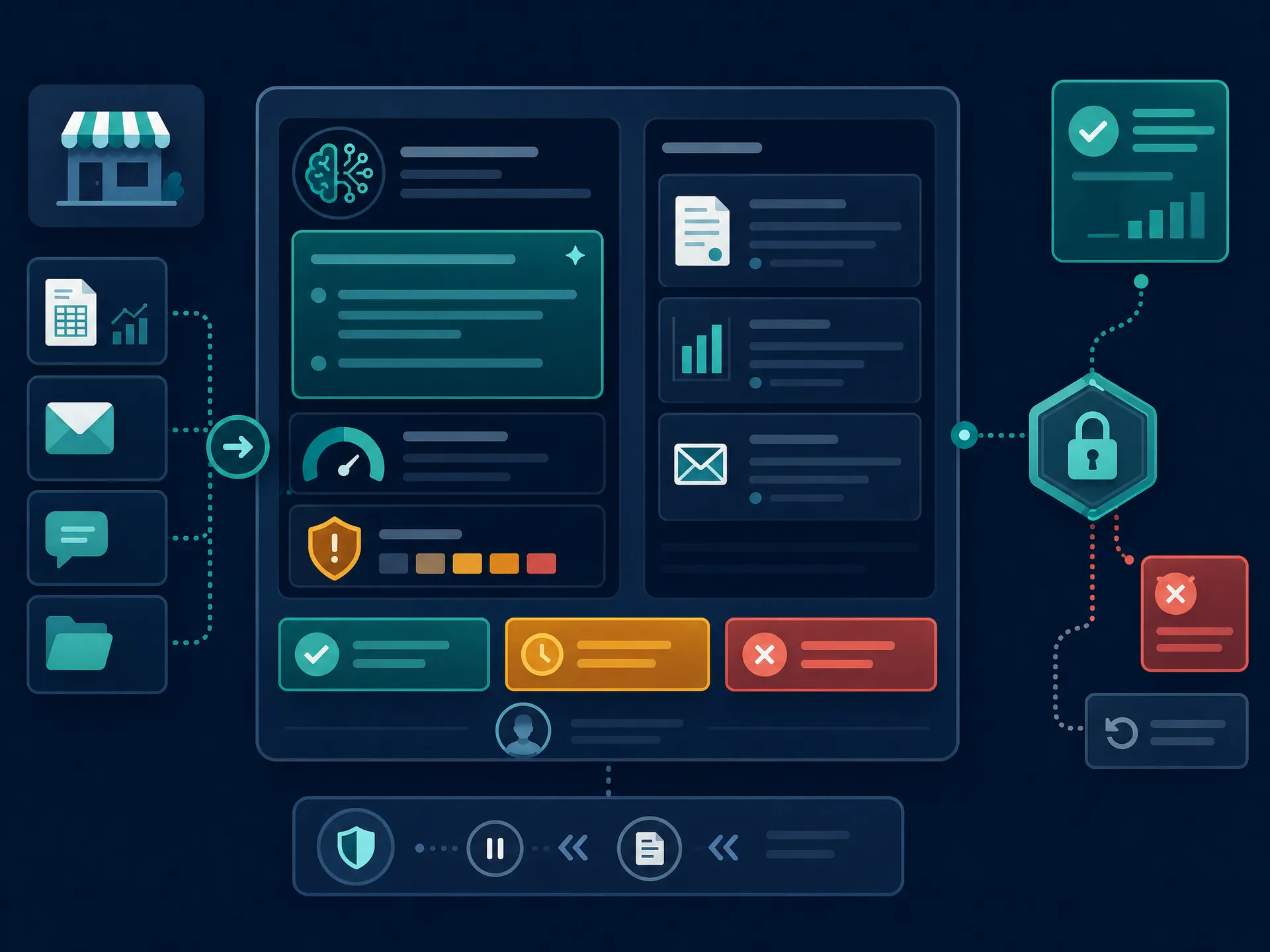
A useful review screen should show the recommendation, the evidence used, important missing information, uncertainty, and the action that will follow approval. It should not hide the reject, edit, pause, or escalate options behind a secondary menu. Reviewers also need enough time to inspect unusual cases instead of treating every request as routine.
Match review strength to the possible harm
Use risk instead of one rule
Not every AI action deserves the same level of oversight. A low-risk classification can often run automatically if the team samples results and measures errors. A supplier-payment change needs stronger protection because an incorrect action can create financial loss. A message that makes a legal, employment, medical, or contractual commitment deserves careful review even when the language appears confident.
Use four questions when assigning a review level:
- How serious would the harm be if the output were wrong?
- How easy would it be to reverse the action?
- How likely is the agent to encounter missing or ambiguous information?
- Can a reviewer realistically detect the error before approval?
The answers help create a practical risk ladder rather than a blanket rule. The table below offers a starting point.
| Workflow example | Suggested review level | Useful control |
|---|---|---|
| Sorting an internal enquiry | Sampled review | Check a measured percentage of cases. |
| Drafting a customer reply | Approval before sending | Show the source policy and proposed wording. |
| Updating a CRM field | Review exceptions | Record the old value and the new value. |
| Issuing a refund | Approval for every case | Display order evidence and refund limits. |
| Changing supplier payment details | Two-person approval | Confirm the request through a separate channel. |
| Making a high-impact decision | Human-led decision | Use AI as support, not as the final authority. |
The exact categories will vary by business. The important principle is to spend review effort where an error would be costly, difficult to reverse, or difficult to notice.
Design the approval checkpoint properly
Show the evidence before approval
An approval checkpoint should answer five questions before the reviewer chooses an action. What did the agent receive? What information did it use? What does it recommend? What will happen if someone approves it? What can the reviewer do if the recommendation is wrong?
The checkpoint should also display the limits that apply. If an agent can approve refunds only below a certain amount, show that limit beside the recommendation. If it can update a customer record but cannot delete one, make the boundary visible. Clear limits reduce the chance that a reviewer assumes the agent has checked something it was never authorised to inspect.
Keep the original input, the agent’s output, the evidence, the reviewer’s decision, and the final action in an audit record. This record helps the team investigate mistakes and improve the workflow. It also prevents an argument about what happened when the system produced an unexpected result.
Reduce automation bias before the recommendation appears
Let people think before they see the recommendation
One useful technique is to ask the reviewer for an initial assessment before revealing the agent’s recommendation. For example, a support employee could first decide whether a refund appears justified, then compare that judgement with the agent’s conclusion. The difference between the two views becomes useful information rather than a hidden influence.
This approach will not suit every workflow. It may add time, and it may be unnecessary for a simple formatting task. It is more valuable when the decision involves judgement, incomplete information, or a serious consequence. In those cases, the interface should make independent thinking possible.
Show uncertainty without pretending that a confidence score proves correctness. A high score can still accompany a wrong result if the input is unusual or the source data is incomplete. Display the evidence and known limitations alongside the score. Ask reviewers to explain a rejection or an override in sensitive workflows. Those explanations create feedback that can reveal recurring failure patterns.
Give reviewers real authority, not symbolic responsibility
A reviewer cannot provide meaningful oversight if the agent has already sent the message, committed the payment, or overwritten the record. The workflow should hold the proposed action until the reviewer approves it. For high-risk processes, add a safe stop button and a reversal procedure.
Authority also includes the freedom to disagree without being punished for slowing the workflow. If employees are measured only on the number of approved cases, they may approve weak recommendations to meet a target. Measure thoughtful overrides and useful escalations as signs of good control, not as failures of automation.
Assign a named owner to each review queue. Define who handles an unanswered request, who receives an escalation, and how long a high-risk case may wait. If a reviewer is unavailable, the agent should pause or move the case to a backup person rather than continue without oversight.
Build a review queue that people can manage
Make ownership visible
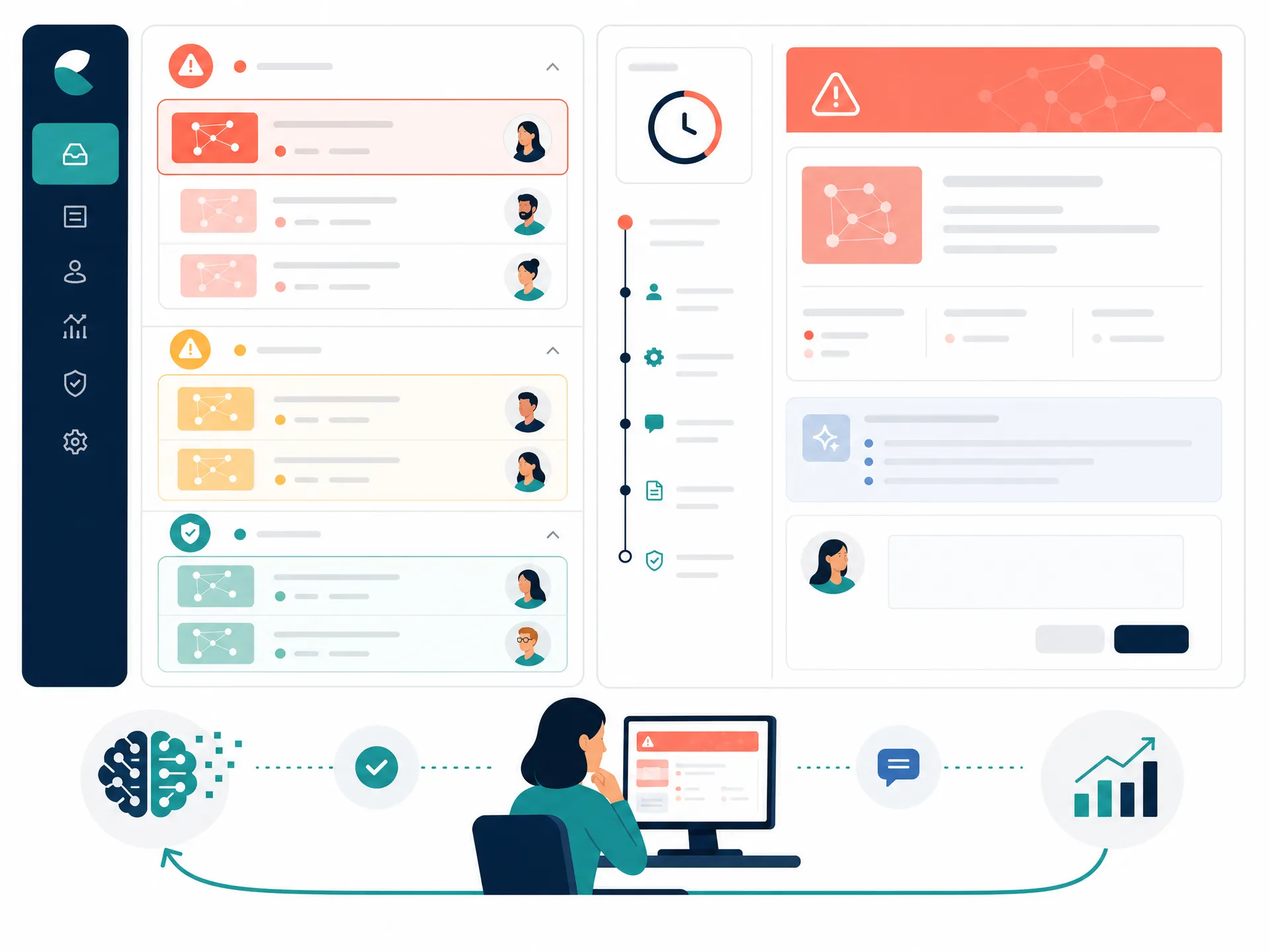
A review queue should group work by risk, urgency, and owner. High-risk cases should be easy to find. Low-risk cases can be sampled or handled automatically after the team has established reliable performance. The queue should show how long each case has waited and what will happen if nobody responds.
Do not overload reviewers with every minor output. Excessive alerts create fatigue and make important warnings easier to miss. Start with a narrow set of cases that need a human decision. Review the queue after a week and remove alerts that do not change an outcome.
The queue should collect feedback. A reviewer might mark an output as correct, incomplete, unsafe, or based on the wrong source. Those labels help the team improve instructions, documents, routing, and approval rules. They also reveal whether the workflow is saving time or merely moving work into a new screen.
Test the workflow before relying on it
Measure review quality, not just model accuracy
Create a test set that includes ordinary requests, missing details, contradictory information, unusual wording, and deliberately difficult cases. Ask the agent to produce recommendations, then have reviewers record whether they could understand the reasoning and identify the risky cases.
Measure more than accuracy. Record the time required for review, the percentage of recommendations rejected, the number of unsafe results that reached approval, and the cases that should have been escalated but were not. Check whether reviewers actually use the evidence and whether they know how to stop the workflow.
Run a small pilot with a human owner who can pause the system. Compare the cost of review with the time saved. If the queue becomes unmanageable, narrow the agent’s task or change the review threshold before expanding the pilot.
Examples of mistakes that human review can prevent
A customer-support agent might offer a refund under an old policy. Showing the current policy beside the draft gives the reviewer a chance to correct the answer. A finance agent might receive a convincing request to change supplier bank details. A separate confirmation call and two-person approval can prevent a fraudulent transfer. A scheduling agent might place a meeting on the wrong calendar. A reviewer who sees the target account before approval can stop the error.
These controls do not make the agent infallible. They reduce the chance that an error moves directly from a model response to a real-world action. They also make responsibility clearer because the organisation can see which person approved what information and under which rule.
When human review is not the right answer
Human review is not free, and it can become a weak ritual if the queue grows faster than the team can handle it. Some low-risk tasks may be safer with automatic processing and regular sampling. Requiring approval for every harmless classification can encourage rushed approvals and reduce attention on serious cases.
The answer is not to remove people completely. It is to place people where their judgement can change the result. Use automatic handling for stable, reversible tasks. Use sampled review when performance is measurable. Use approval, escalation, or multiple reviewers when the consequences are serious.
Final checklist for a safer AI workflow
Before launching an AI agent, identify the actions that could cause financial, legal, privacy, safety, or reputational harm. Place the human checkpoint before those actions occur. Give the reviewer the source evidence, limitations, uncertainty, and available controls. Define an owner, an escalation path, a pause method, and a record of every decision.
The purpose of human-in-the-loop AI is not to make a person responsible for every machine output. It is to make sure the right person can understand, challenge, and stop the outputs that matter most.