
Freelancers rarely lose an afternoon to one major problem. The real drain is a series of small tasks: checking an enquiry, copying a deadline into a calendar, searching for a template, writing a follow-up, and updating a project board. Together, these tasks take attention away from paid work.
AI workflow automation can reduce this wasted effort when it follows a real process. The goal is to create one dependable routine that removes preparation work while keeping important decisions with the freelancer.
What AI workflow automation means for a freelancer
Traditional automation follows fixed instructions: when a form arrives, create a record; when a date is reached, send a reminder. AI adds the ability to interpret less tidy material. It can classify an enquiry, extract a deadline from a message, summarise a call, compare a request with a service description, or prepare a draft for review.
A useful workflow has a clear beginning, middle, and end. It receives an input, transforms it, and produces an inspectable output. A typical flow might look like this:
| Workflow stage | Freelancer example | Sensible AI role |
|---|---|---|
| Input | A new client enquiry arrives | Identify the service, urgency, and missing details |
| Preparation | The freelancer needs context | Find the relevant notes or approved template |
| Drafting | A reply or task must be created | Prepare a concise draft in the freelancer’s voice |
| Review | A commitment may be made | Check facts, price, scope, and tone |
| Action | The work is approved | Send, schedule, or record the final result |
AI should not be treated as an invisible employee with unlimited authority. It is a preparation layer inside a visible, controllable process. NIST’s AI Risk Management Framework recommends considering trustworthiness during the design, development, use, and evaluation of AI systems [1]. For a solo professional, that principle becomes a simple habit: know what the system receives, what it may produce, and where a person must make the final decision.

This lean workflow shows AI helping with preparation while the freelancer retains control of the final action.
Sign 1: You can identify one repeated time leak
Choose friction that appears every week
Do not begin with the tool. Begin with a recurring nuisance that you can describe without using the word “everything”. A designer may spend time turning enquiry emails into project notes. A copywriter may repeatedly search previous briefs before drafting a reply. A consultant may reformat meeting notes into actions and deadlines.
Log the task for five working days: frequency, manual time, required information, and a satisfactory result. This reveals whether the problem is frequent enough to justify a workflow.
The strongest first candidates are repetitive but reversible. Drafting an internal summary is safer than sending a legal commitment. Extracting action points is safer than changing an invoice.
Sign 2: The workflow has a clean starting point
Automation becomes difficult when the trigger is vague. “When I need to be more organised” is not a trigger. “When a new enquiry arrives in the client inbox” is one. Other clear starting points include a completed form, a new calendar recording, a file placed in a project folder, or a status change on a task board.
Select one channel for the pilot. Start with the source containing the most complete information; expanding later is easier than diagnosing four inconsistent formats.
A clear trigger also makes testing possible. Run anonymised examples through the workflow and compare the outputs with your normal results.
Keep the first input small
A lean setup does not need access to every document you own. Give the workflow only the information required for its assigned task. If it prepares enquiry drafts, it may need your service descriptions, preferred questions, availability rules, and tone examples. It probably does not need private tax records, unrelated client folders, or an entire cloud drive.
Sign 3: You know exactly what the workflow should produce
Many automation projects become confusing because the output is described as “something useful”. Replace that phrase with a visible artefact. The output could be a draft email, a structured enquiry record, a list of missing details, a project task, or a short meeting summary with named actions.
The output should have a destination: a review folder, task board, or client record. An unknown location or missing source context creates search problems.
Use a fixed output shape
Ask for consistent fields rather than an open-ended answer. An enquiry summary might contain the client name, requested service, deadline, budget information, unanswered questions, and suggested next step. A fixed shape makes errors easier to notice and results easier to compare.
Sign 4: You can separate preparation from approval
A freelancer’s reputation often depends on details that an automated system cannot safely infer. A draft may sound confident while misstating availability. A summary may omit a condition hidden in a client’s attachment. A suggested price may ignore the difference between a small revision and a new project.
For that reason, the first version should prepare work rather than silently commit you. Let AI propose a reply, but keep sending manual. Let it extract invoice details, but check the total before recording it. Let it suggest a deadline, but confirm the calendar before promising it to a client.
This is a sensible boundary. The workflow can still remove repetitive reading, sorting, and drafting.
Sign 5: You have a small, trustworthy information set
AI output is only as useful as the material it can rely on. Before connecting a knowledge source, remove old service descriptions, conflicting prices, duplicate templates, and notes that contain another client’s information. A smaller collection of current documents is usually safer than a large unfiltered archive.
Create a source folder with clear names for current services, standard terms, common questions, intake questions, and escalation rules. Add review dates and update the source when your offer changes.
Do not paste confidential client material into a public AI service without checking its data terms and permission. When testing, replace names, addresses, account numbers, and distinctive project details with neutral examples. Privacy belongs in the initial design.

This information safeguard shows why a source set is safer than an unfiltered archive.
Sign 6: The tool stack is smaller than the process
A freelancer can assemble a complicated chain quickly: an intake form, integration platform, AI model, database, project board, calendar, and notification channels. Every connection adds another place where a permission or format can fail.
For a first pilot, use the fewest services that can complete the job. One input, one AI step, one review location, and one destination may be enough.
Compare tools by practical questions rather than feature counts. Does the service support the trigger you need? Can you review the raw input and the generated output? Can you turn the workflow off quickly? Does it retain information longer than you expect? Can you export or delete the records? Those answers matter more than a long integration list.
| Question | Lean choice | Warning sign |
|---|---|---|
| Where does it begin? | One reliable channel | Several inconsistent inputs |
| What does AI do? | One defined interpretation or draft | Multiple hidden decisions |
| Where is review? | A visible queue or folder | An approval buried in notifications |
| What happens next? | One controlled action | Automatic messages and edits everywhere |
| How is it checked? | A weekly sample and time log | No owner or review routine |
Industry guidance on AI workflow automation commonly describes a sequence of input collection, processing, decision-making, execution, and feedback [2]. For a freelancer, the practical lesson is to make each stage visible. If a result is wrong, you should be able to identify whether the input was incomplete, the interpretation failed, the instruction was unclear, or the final action was approved too quickly.

A practical four-day pilot for AI automation
Day one: Map the manual version
Write the current process from trigger to finish. Include the files opened, decisions made, handoffs, and exceptions. Mark each step as prepare, decide, or act. AI is usually most useful in the preparation steps.
Day two: Build a draft-only version
Create the narrowest workflow that receives a test input and produces a reviewable result. Use anonymised examples. Do not connect the final sending or payment action yet. Keep a copy of the original input beside the output so you can inspect what the system missed.
Day three: Test ordinary and awkward cases
Run clear examples, incomplete requests, contradictory information, urgent messages, and material outside the workflow’s purpose. Record whether the system asks for clarification, marks uncertainty, or invents an answer. A workflow that stops safely is more valuable than one that responds confidently to everything.
Day four: Compare effort and quality
Measure the time spent before and after the workflow. Count how often you corrected the draft, discarded it, or had to search for missing context. Also note whether the process felt easier to supervise. A time saving that creates repair work is not a real saving.
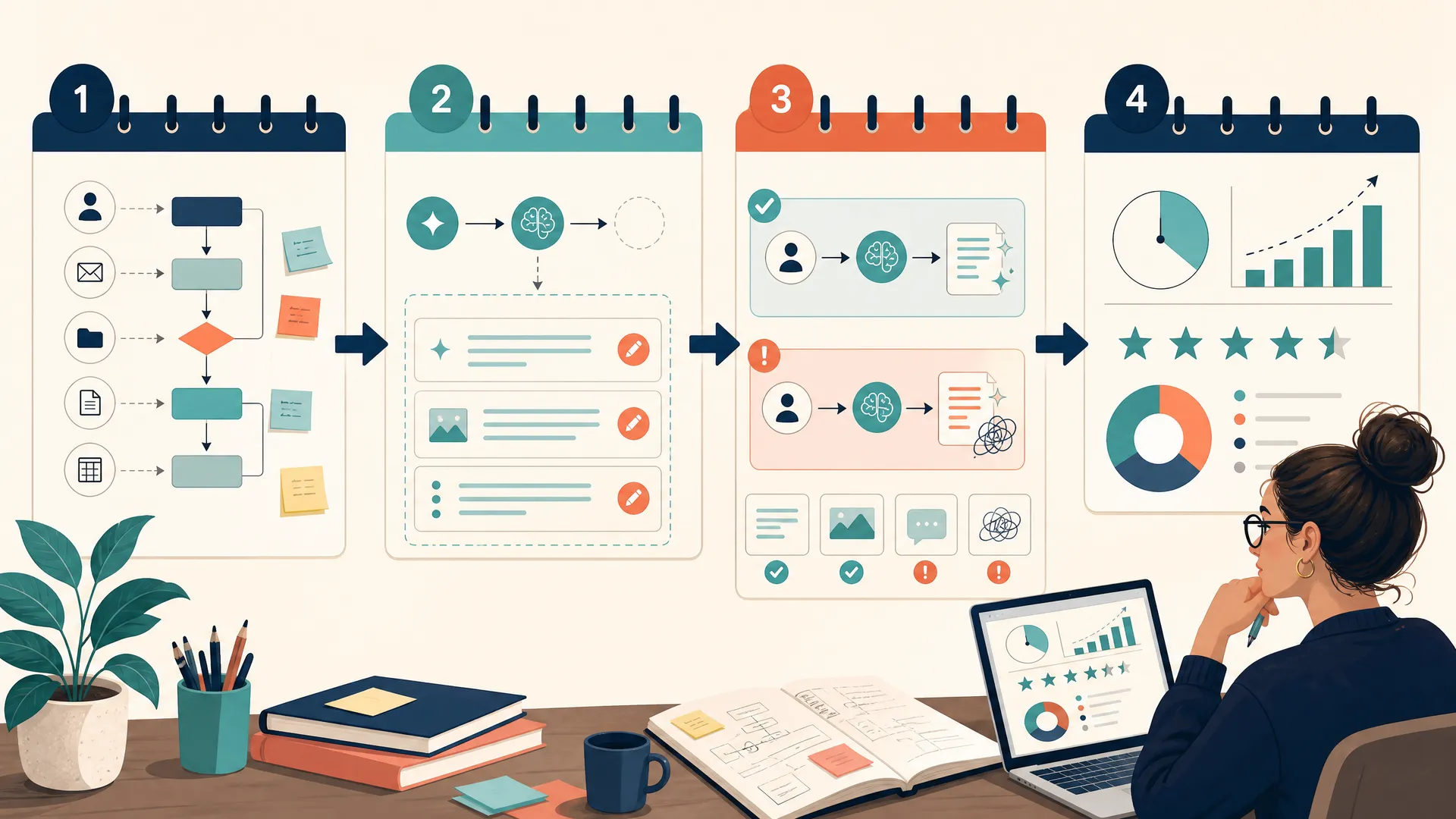
This pilot sequence keeps the first experiment short, observable, and easy to stop.
How to decide whether the automation is worth keeping
Use a simple comparison rather than a dramatic promise. Track old and new preparation time, corrections, escalations, and monthly tool costs. A small sample cannot prove a large claim.
You should also measure confidence. Can you explain what the workflow did when a client asks about a message? Can you find the source information behind a recommendation? Can you pause it without losing important records? These questions matter because a workflow that saves six minutes but creates uncertainty may not be worth keeping.
At the end of the pilot, choose one of three decisions: keep it as it is, revise one stage, or remove it. Expansion should require evidence. If the workflow performs well for one enquiry channel, add another only after you understand the new format and its risks.
Common mistakes that make freelancers slower
The first mistake is automating a process that is not understood. If the manual version changes every time, the automated version will be difficult to trust. Document the current routine before trying to improve it.
The second mistake is asking AI to make a business decision when it only needs to prepare information. Keep judgement with the person who understands the client, the scope, and the consequences.
The third mistake is measuring activity instead of value. A workflow may create hundreds of records while producing no useful work. Count accepted outputs, reduced preparation time, and avoidable corrections.
The fourth mistake is letting the system become invisible. Keep an activity log, preserve the original input, and review a sample. NIST’s framework treats governance, measurement, and management as continuing responsibilities rather than one-time setup tasks [1].
The fifth mistake is adding tools before fixing the instruction. A clearer scope, better source document, or explicit exception rule often improves results more than another integration.
The lean setup to keep
A freelancer does not need an AI department to build a useful workflow. Start with one recurring bottleneck, one reliable trigger, one small information set, one defined output, one visible review step, and one measurable outcome. Keep the first action reversible and the permissions narrow.
If the workflow survives ordinary and awkward examples, saves genuine preparation time, and remains easy to supervise, improve one part at a time. Add a new channel, connect a new destination, or increase automation only when the previous version is stable.
The goal is not to make your business look automated. The goal is to protect more hours for skilled work without surrendering the judgement that clients pay you to provide.