
A support desk has a saved instruction for delivery-delay replies. One colleague shortens it, another adds a policy example, and a third changes the model after a supplier raises its price. Replies continue, but the team loses the trail behind an earlier result.
The problem begins when a casual chat instruction becomes part of a daily workflow. Its wording then affects the context supplied to the model, the material retrieved for it, the shape of its response, and the checks expected from staff.
Prompt version control turns a recurring instruction into a managed working asset. The team gives it a stable identifier, a known location, test cases, an approval state, and a history that can be restored. A controlled folder, decision log, sample cases, and named custodian are enough to begin.
OpenAI’s developer guidance recommends keeping prompts versioned and measuring their behaviour with evaluation cases when instructions or model versions change. [1] NIST frames responsible AI work as an ongoing cycle of governance, measurement, management, and reassessment. [2] Its Generative AI Profile addresses additional risks associated with generative systems. [3]
The method below keeps change management proportionate for a compact team. It uses a customer-support drafting assistant as the example, but the same thinking applies to internal search, sales research, document classification, meeting notes, and coding support.
Treat a prompt as a working asset
A one-off chat request can change freely. An instruction that shapes customer messages, research, or an automated step deserves a durable record. It has a purpose, dependencies, risks, users, and someone who must answer for its use.
Name the workflow before anyone edits its text. “Support reply drafter” tells colleagues what the instruction controls; “new AI prompt” leaves its purpose unclear. Assign a durable key such as SUPPORT_REPLY_DRAFT, then attach revisions such as 1.0, 1.1, and 2.0 to that key.
Describe the intended result and appoint its accountable owner. The owner can delegate editing, but remains responsible for arranging review, defining the boundary, and withdrawing a revision that no longer fits the workflow.
Keep the approved instruction outside individual chat histories. A colleague should reach the live version through a shared location, instead of reconstructing it from private conversations or pasting text from an old response.
Map every layer inside the live request
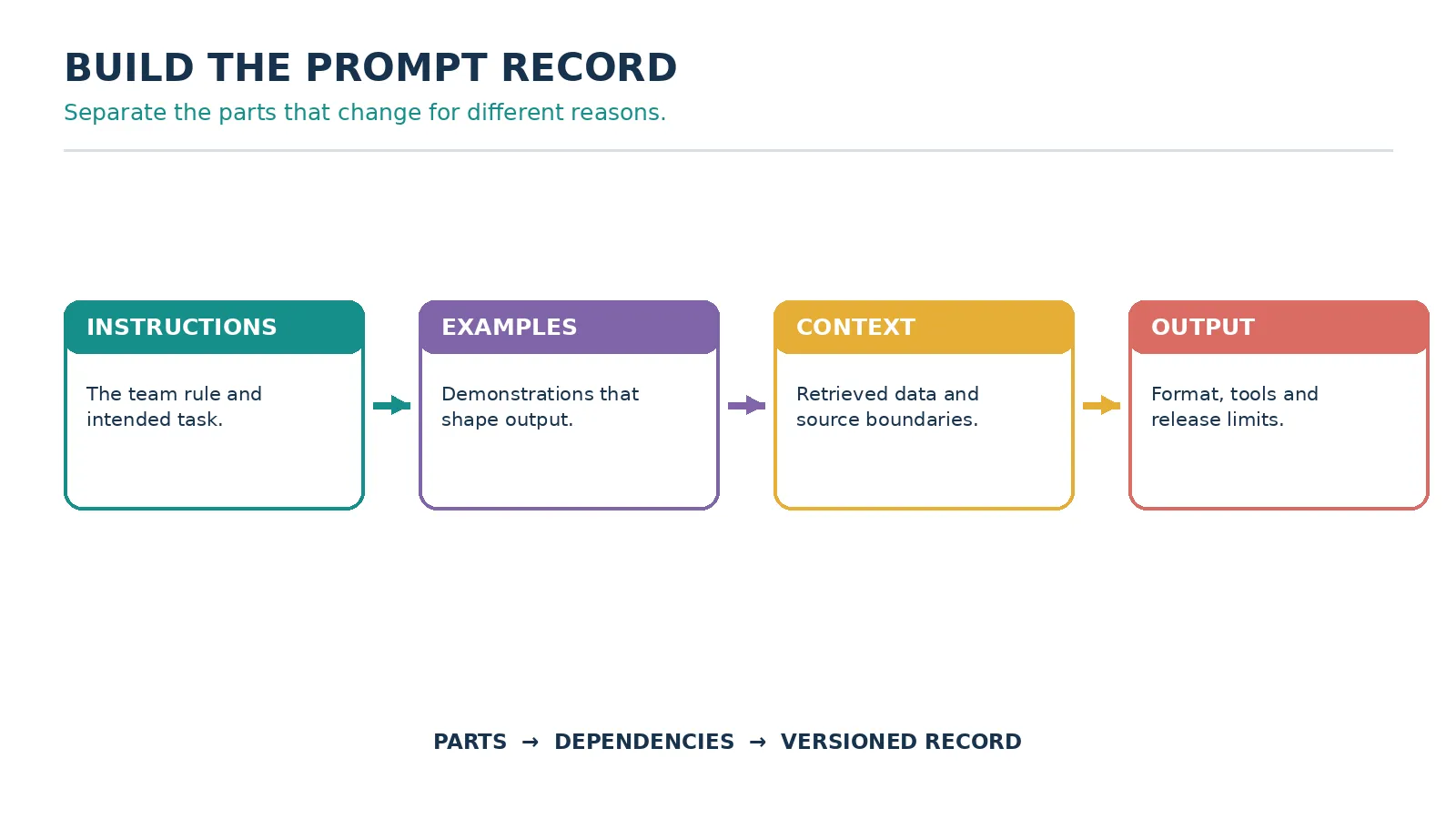
The live request usually contains more than the text called “the prompt”. List the governing rule, task instruction, examples, retrieved material, response schema, safety limits, and runtime parameters as distinct layers.
Layering gives reviewers a test plan. A schema alteration may break parsing, a policy revision may change factual support, an example may shift tone, and a governing rule may influence every response.
Keep the layers in an intelligible record, with a short explanation beside each one. Place business rules in their own section instead of hiding them inside a long example that a later editor might delete.
Record the material delivered to the model at runtime. The template may stay unchanged while the search index, user profile, tool description, or conversation history shifts. The resulting behaviour belongs to that full request path, not to the visible instruction alone.
Write a change note that a colleague can use
Give each revision a compact change record. Note what moved, why the team altered it, which response pattern could shift, and what evidence supported approval. Someone joining the project later should understand the choice without reopening an old chat.
Describe observable behaviour instead of using a vague quality label. For example, record that replies about delayed deliveries must name an approved policy source. Also explain when an example disappeared because it might make an unapproved refund seem acceptable.
List the situations most likely to change. A revision may improve brief answers while harming extended exchanges, incomplete order questions, or escalation requests. Connect the record to test cases that reveal those trade-offs.
Record the editor, reviewer, date, revision identifier, model, source collection, and release status. Label experiments prominently, and keep them apart from the approved instruction used by staff.
Keep instructions distinct from supplied data
A prompt often combines trusted instructions with text retrieved from a document, email, ticket, or web page. Those materials have different authority. A policy instruction from the team should not be treated as equivalent to a sentence inside a customer attachment.
Mark the boundary in the template. State which section contains the team’s instructions, which section contains reference material, and which section contains the user’s request. Tell the model to treat supplied material as evidence to inspect instead of as permission to change the workflow.
Review changes to the boundary as carefully as changes to the wording. Moving retrieved text into an instruction field can create a new security problem even when no sentence within the prompt appears harmful.
Do not place secrets in versioned prompts. Passwords, access tokens, private keys, and session cookies should remain outside the template and its examples. Use labels that show the required field without recording the sensitive value.
Build a small evaluation set before editing
A prompt change needs a stable comparison. Create a set of representative cases before the team begins revising the wording. Include normal requests, incomplete information, ambiguous language, conflicting source text, long inputs, sensitive fields, and cases that must be refused.
Store the evaluation cases separately from production data. Use synthetic or approved de-identified records. Keep the expected behaviour clear without forcing one exact sentence when several outputs could be acceptable.
Define review criteria before looking at the new results. For a support drafter, the criteria may include factual accuracy, policy alignment, missing escalation, privacy exposure, tone, citation quality, and correction effort.
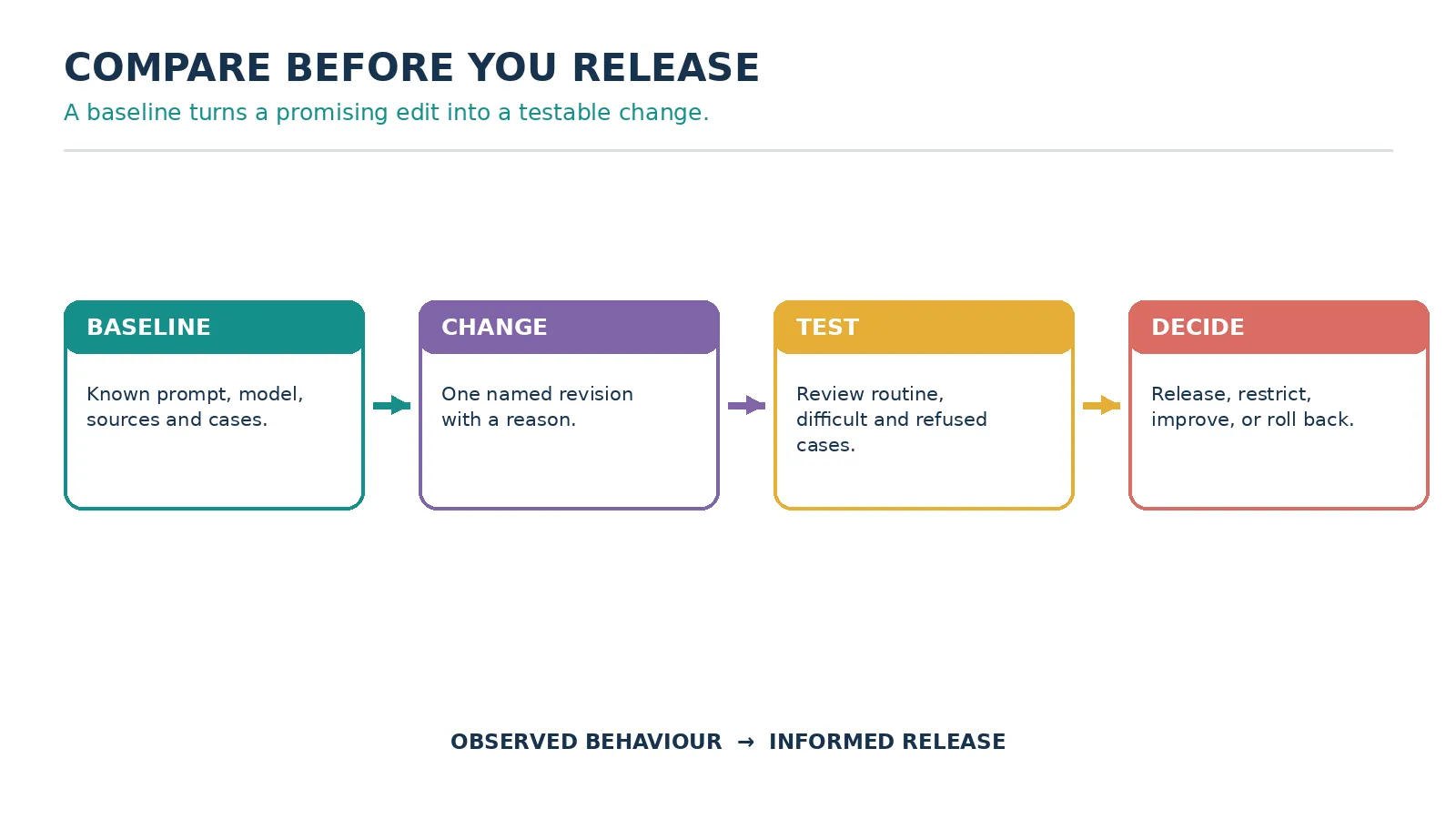
Record the baseline result. Note the prompt version, model version, source version, evaluation date, reviewers, and observed failures. A baseline turns “the new prompt feels better” into a comparison that another person can inspect.
Use small releases for uncertain changes
Not every prompt edit has the same risk. Correcting a spelling mistake may need a quick review. Changing how the assistant interprets customer eligibility needs a stronger gate. Match the release process to the possible consequence.
Start with a draft version that cannot reach ordinary users. Run the evaluation set, review failures, and compare the results with the baseline. If the change affects a customer-facing workflow, use a limited pilot or a manual shadow test before wider release.
Keep the approval decision visible. Record who approved the change, which evidence they saw, which limitations remain, and when the team will review the result again. Approval should not mean that every risk has disappeared.
Do not promote a prompt because one attractive example looks better. Check whether the change improves the target behaviour without increasing privacy exposure, unsupported claims, refusal failures, or reviewer workload.
Plan for model and source changes
Prompt behaviour can change even when the prompt text stays the same. A provider may replace a model, alter a default, change a context limit, update a safety behaviour, or modify a tool interface. A source collection may also gain new documents or lose an important policy.
Record these dependencies beside the prompt version. A useful record names the model identifier, provider setting, retrieval source, output format, tool list, temperature or equivalent setting, and any middleware that changes the request.
Treat a model replacement as a new test event. Rerun the evaluation set and inspect the cases most affected by the model’s known limitations. Do the same after changing the retrieval collection, output schema, tool description, or conversation memory.
Keep the old version available for comparison when possible. A rollback is difficult if the team has overwritten the earlier prompt, deleted its examples, or forgotten which model served the previous release.
Make rollback a normal operation
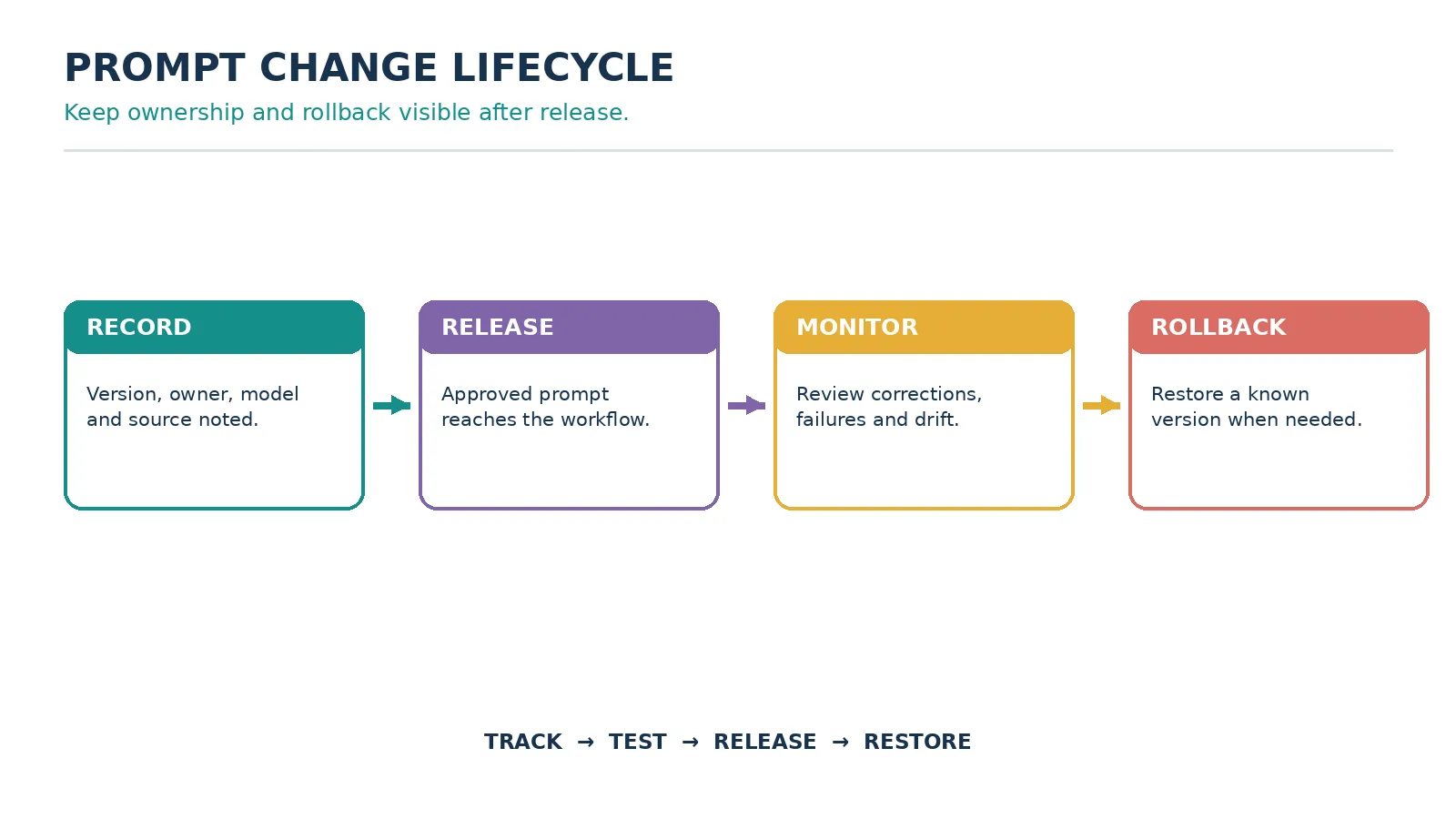
A rollback plan should answer what triggers it, who can activate it, which version returns, and how users learn about the change. The trigger may be a rise in factual errors, a privacy incident, an increase in refusals, a broken integration, or a reviewer finding a harmful new pattern.
Store released versions as read-only records. Keep the prompt, model identifier, source version, evaluation result, approval note, and release date together. A tag in a code repository or a controlled document archive can work for a small team.
Test the rollback route before an incident. Confirm that the previous prompt can be restored, credentials still work, dependent tools accept the old format, and the team knows how to handle requests created during the failed release.
Tell users what changed. A short internal notice can state that version 1.4 has been paused, version 1.3 is active, and reviewers should report cases that appear inconsistent with the earlier behaviour.
| Change area | Example revision | Evidence to check | Release response |
|---|---|---|---|
| Instruction | Add a required escalation rule | Escalation and refusal cases | Review before pilot |
| Example | Replace an ambiguous demonstration | Tone and interpretation cases | Compare with baseline |
| Source | Add a new policy collection | Retrieval and citation cases | Approve source boundary |
| Model | Move to a different model version | Full evaluation set | Treat as a new test |
| Output | Add structured fields | Parsing and missing-field cases | Test downstream use |
| Tool | Change an available action | Permission and failure cases | Require human gate |
Watch behaviour after release
Evaluation before release cannot show every condition in daily work. Monitor a small set of operational signals. Track reviewer corrections, escalations, refusal rates, unsupported claims, privacy incidents, latency, and cases returned to manual handling.
Do not treat a single number as the whole result. A lower correction rate may look positive because reviewers stopped checking carefully. A higher refusal rate may signal safer behaviour in one workflow and a broken instruction in another.
Sample outputs using an approved process. Remove unnecessary personal information from monitoring records, restrict access, and keep only the evidence needed to investigate a pattern. Link the sample to the prompt, model, and source versions that produced it.
Set review thresholds in advance. If unsupported delivery promises exceed the agreed level, pause the release and examine the relevant cases. If no one can investigate a signal because the version record is missing, fix the record before expanding the workflow.
Keep a human responsible for the decision
Version control does not replace judgement. A prompt can pass a small evaluation set and still be unsuitable for a new customer group, policy, language, or consequence. The owner and reviewer must decide whether the evidence fits the intended use.
Give reviewers enough context to challenge the output. They should see the prompt version, important sources, relevant case details, and any warning that the model may be uncertain. A polished answer should not hide the conditions that produced it.
Separate acceptance of a prompt from acceptance of an individual result. The team may approve version 1.5 for drafting while requiring a person to inspect every message before it leaves the organisation.
Review ownership when people, providers, or workflows change. A version record without an active owner can become a historical document that nobody updates.
Start with a lightweight prompt register
A small team can begin with one table containing the prompt identifier, purpose, owner, current version, model, source boundary, evaluation date, approval status, release date, and rollback version. Add links to the prompt files and evidence instead of copying every detail into the table.
Schedule a review when the model changes, the prompt changes, a source changes, a tool changes, an incident occurs, or the workflow reaches a new audience. A calendar reminder is useful, but a change trigger is stronger because it connects the review to a real event.
Keep experimental work separate from production work. A colleague should be able to test a new instruction without changing the version that ordinary users rely on. Label trials, restrict access, and remove abandoned drafts so they cannot be selected accidentally.
Make rollback part of ordinary maintenance
A rollback plan should name the last approved version, the person who can restore it, and the signal that triggers the decision. Test the route before an incident by switching a harmless workflow to an older revision and confirming that its dependencies still load. Keep the reason for each rollback in the change record. A failed experiment may expose a bad example, a missing source, an unsuitable model, or a weak approval step. Recording that cause helps the next editor avoid repeating the same path.
Prompt version control works because it makes invisible change visible. It gives a small team a way to compare behaviour, understand responsibility, restore a known version, and stop a fluent but unsuitable instruction from spreading through daily work.
| KEY TAKEAWAY: Give each recurring prompt an owner and stable identifier, separate its components, record its model and data dependencies, test changes against a baseline, approve proportionately, monitor real behaviour, and keep a tested rollback route. |
|---|
| SAFETY CHECK: Never release a prompt change solely because its wording sounds better. Recheck privacy, security, factual accuracy, refusal behaviour, source boundaries, downstream tools, and human approval before the new version can affect customers, money, access, employment, health, or legal outcomes. |
|---|