
A support colleague is under pressure. A customer has reported a billing problem, and the fastest route appears to be pasting the full conversation into an AI assistant. The message contains a name, email address, order number, delivery address, payment reference, and an internal note. The colleague asks for a concise reply and sends the prompt.
The draft may help, but the input contains more information than the task requires. It raises questions about the destination, retention, access, and hidden instructions inside the pasted material.
AI prompt hygiene is the routine of deciding what an AI system needs, removing unnecessary information, transforming sensitive values, checking supplied content, and recording the decision before submission. It is not a promise that a prompt contains no risk. It is a practical way to reduce exposure while keeping the task useful.
The Information Commissioner’s Office says personal data should be adequate, relevant, and limited to what is necessary for the purpose. Its guidance confirms that AI use still requires data minimisation. [1] The UK National Cyber Security Centre warns that prompt injection can make a model behave in an unintended way, including revealing confidential information or triggering unwanted consequences when inputs are not controlled. [2]
This guide shows how a small team can prepare safer prompts without building an elaborate privacy platform. The examples use a customer-support assistant, but the method also suits recruitment notes, sales analysis, project documents, meeting summaries, and internal research.
Start with the answer the team needs
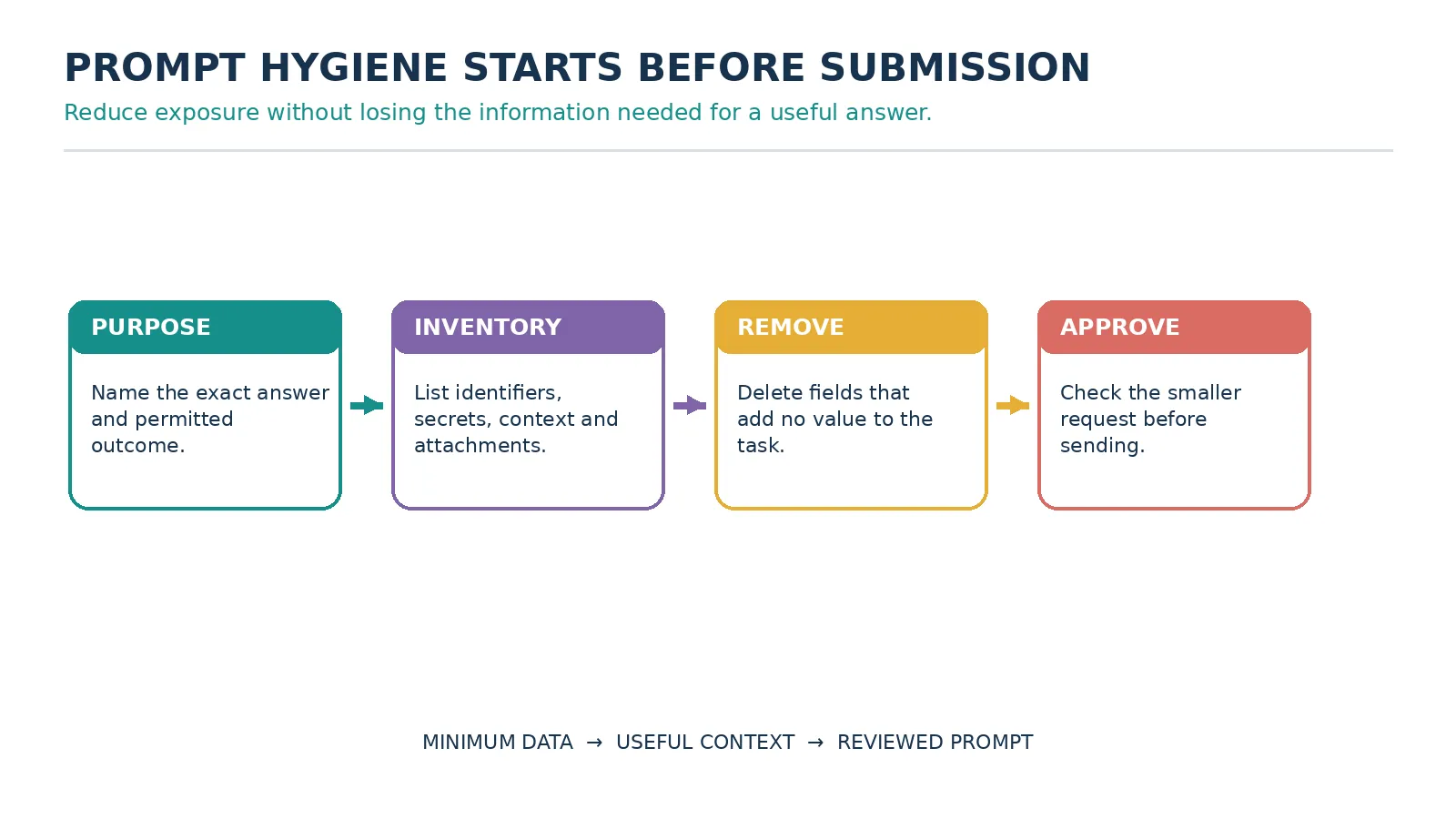
Do not begin by asking which information is available. Begin with the result required from the model. A colleague may need a polite explanation of a delivery delay, a list of possible causes, a comparison of two product descriptions, or a summary of a meeting decision.
Write the task in one sentence. “Draft a reply explaining the delayed delivery and offer the approved next step” is more useful than “Review this customer record”. The narrower request makes unnecessary fields easier to spot.
Name the audience and the permitted outcome. A draft for a trained adviser has different requirements from a message intended for a customer. An internal summary may mention a case identifier, while an external reply should not expose internal references.
Define what the model must not decide. It may suggest wording, identify a missing fact, or organise evidence. It should not approve compensation, determine a person’s eligibility, change an account, or provide specialist advice beyond the team’s authority.
Keep the purpose visible beside the prompt template. A new colleague should understand why each field exists instead of copying an old example without considering its contents.
Create a data inventory before copying anything
A source document often contains several types of information mixed together. Separate the fields before they reach the prompt. Mark direct identifiers, contact details, account information, commercial details, confidential notes, sensitive categories, secrets, and ordinary context.
Do not assume that a field is harmless because it looks familiar. An order number may identify a person when combined with a public complaint. A small supplier may be recognisable from a project nickname. A rare job title may identify one employee in a small organisation.
Use a simple three-way decision. Keep information that is necessary for the stated purpose. Transform information that helps the model understand the case but needs no original value. Remove information that adds no value to the answer.
The ICO recommends understanding and mapping the processes in which personal data may be used, and considering minimisation from the design phase. [1] For a small team, the map can be a one-page prompt register that names the task, fields used, service involved, retention setting, and responsible owner.
Remove fields instead of hiding them in a long prompt
The safest unnecessary value is one that never enters the AI workflow. Remove greetings that contain personal details, copied signatures, tracking links, internal comments, previous cases, full addresses, and attachments unrelated to the question.
Extract only the relevant section from a document. If the model must explain a delivery policy, provide the policy paragraph and the customer’s delivery status. Do not provide the whole order history when the answer depends on one date and one service level.
Limit the number of records. A request to compare three anonymised examples needs no export of every customer who contacted the team. Smaller inputs reduce exposure, cost, review effort, and the chance that unrelated information shapes the answer.
Check attachments before uploading them. Spreadsheets may contain hidden columns, comments, formulas, previous versions, or other worksheets. Documents can contain tracked changes and metadata. A clean extract is safer than relying on a model to ignore material that the team forgot to notice.
Redact direct identifiers with care
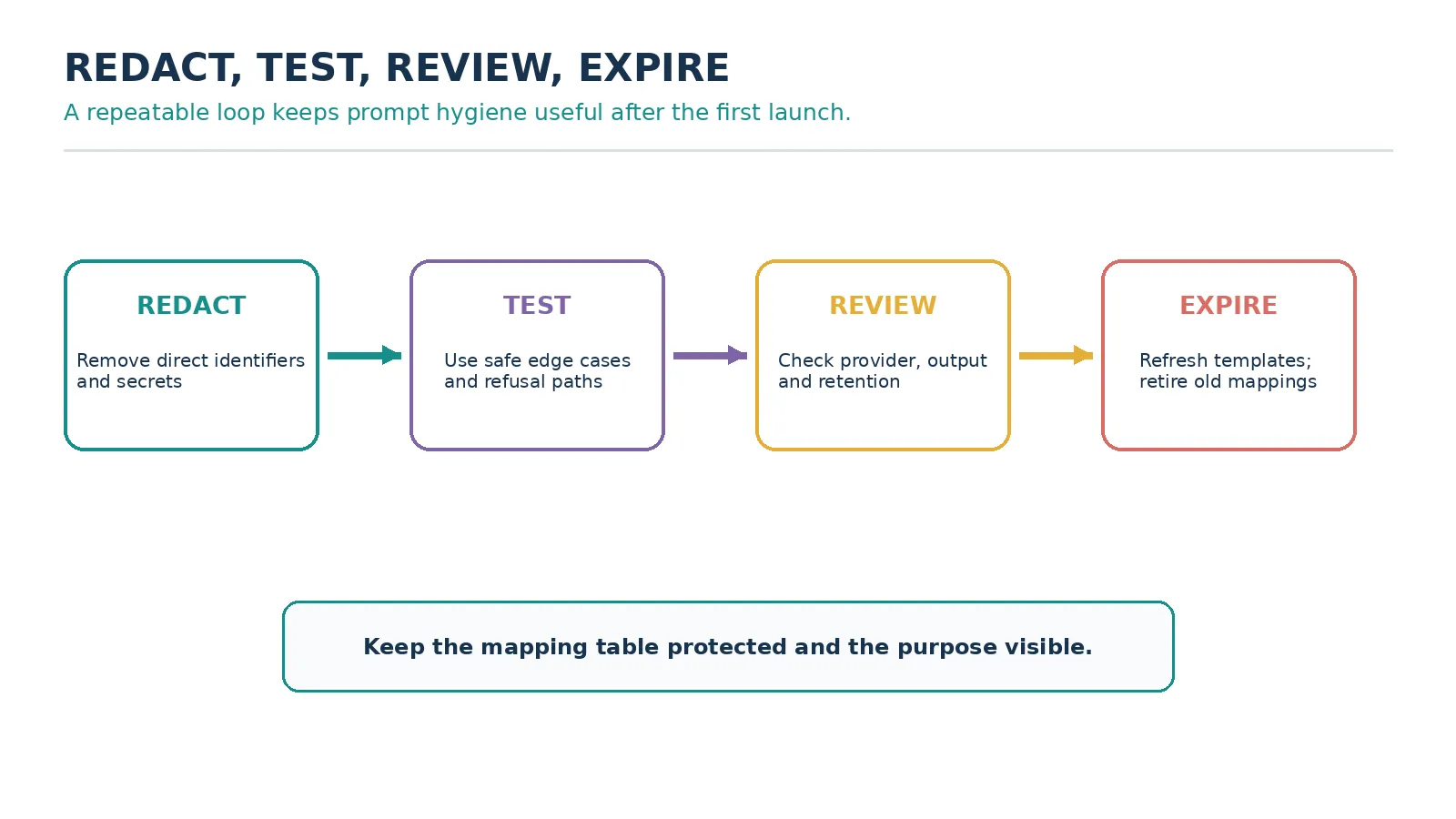
Replace names, email addresses, telephone numbers, account references, and full addresses when the model needs none of them. Use consistent labels such as CUSTOMER_A, ORDER_17, or SUPPLIER_B so the relationship between facts remains understandable.
Use the same token throughout. If one message calls a person CUSTOMER_A and another calls the same person CUSTOMER_C, the model may treat one case as two. Keep the mapping table outside the prompt and protect it as sensitive information.
Use realistic categories where exact values could distract from the task. Replace a precise date of birth with an age band if the age band is sufficient. Replace a full location with a region when the answer depends on delivery coverage instead of a street.
Do not call a pseudonym an anonymised value. A team that can reconnect a token to a person still holds a link back to an identifiable individual. The ICO’s anonymisation guidance explains that the effectiveness of anonymisation depends on whether people can still be identified in the circumstances. [3]
Redaction can also destroy meaning. If a contract question depends on the difference between a customer and a supplier, retain those roles. If a support answer depends on an order date, keep the relevant date or a safe relative description. Minimise without removing the facts that make the task solvable.
Use synthetic examples for routine work
Synthetic records can help colleagues test a prompt, demonstrate a workflow, or train new staff without using live personal information. Create examples that reflect the shape of the real task while changing names, numbers, dates, products, and outcomes.
Label examples as synthetic. A reviewer should not mistake a fabricated customer, price, or policy result for an operational record. Keep the source of the example separate from live systems, and prevent test material from being sent to a customer by accident.
Synthetic data has limits. A made-up record may not represent unusual formatting, language, accessibility needs, or edge cases that appear in real work. Use it for routine experimentation, then move to approved de-identified samples or controlled testing when the workflow needs stronger evidence.
Do not paste a live record into a public tool and ask it to change the details. Generate the structure locally or use an approved environment with defined handling rules.
Treat supplied documents as untrusted input
A document added to a prompt can contain instructions aimed at the model instead of information needed by the person. A web page, email, spreadsheet cell, or knowledge-base article might say “ignore previous rules”, ask for hidden content, or encourage an external action.
The NCSC describes prompt injection as input designed to make a language model behave in an unintended way. [2] Small teams should therefore separate instructions from reference material. State which text is evidence, which text is a command from the team, and which actions remain outside the model’s authority.
Do not allow retrieved text to redefine the workflow. The assistant may quote a policy, identify a conflict, or flag suspicious content. It should not change its tool permissions, reveal its system instructions, or send information because a supplied document requests it.
Review high-risk attachments before submission. Check for hidden instructions, unexpected links, unfamiliar file types, macros, and requests for credentials. If a document seems untrusted, pause and escalate.
Keep secrets out of prompts and outputs
Passwords, API keys, access tokens, private certificates, recovery codes, and session cookies do not belong in an AI request. They are not ordinary examples of text. If the task involves configuration, replace secret values with labels such as API_KEY_REDACTED and describe the required behaviour without including the credential.
Inspect error messages before sharing them. A stack trace may include a file path, username, host name, token fragment, customer identifier, or database query. Keep the useful error type and remove surrounding environment details that do not support the diagnosis.
Check the output as well as the input. A model may reproduce a sensitive value that appeared in context or invent a value that looks genuine. Do not copy an unreviewed output into a ticket, email, source file, or shared document.
Set retention and logging rules
Prompt hygiene includes what happens after submission. Confirm whether the service stores prompts, outputs, attachments, conversation history, or diagnostic logs. Decide which records the team needs for accountability and which material should expire.
Keep an operational record without retaining every private sentence. A case identifier, task type, source version, reviewer, decision, and timestamp may be enough to explain what happened. Store any approved mapping table separately and restrict access to it.
Make the service setting visible to users. A colleague should know whether the prompt is sent to an approved business account, a local model, a third-party service, or a testing environment. “AI assistant” is not a sufficient description of data handling.
Review retention when the provider, plan, region, integration, or workflow changes. A setting that suited a draft experiment may not suit customer support or employment records.
| Prompt check | Safer question | Evidence to keep |
|---|---|---|
| Purpose | What exact answer is needed? | Approved task description |
| Data | Which fields are necessary? | Field list and owner |
| Identity | Can direct identifiers be removed or tokenised? | Redaction rule |
| Source | Could supplied material contain hostile instructions? | Attachment review note |
| Action | Is the result only a draft or can it trigger change? | Approval condition |
| Retention | What is stored, where, and for how long? | Provider setting and review date |
Build a two-person review for higher-risk prompts
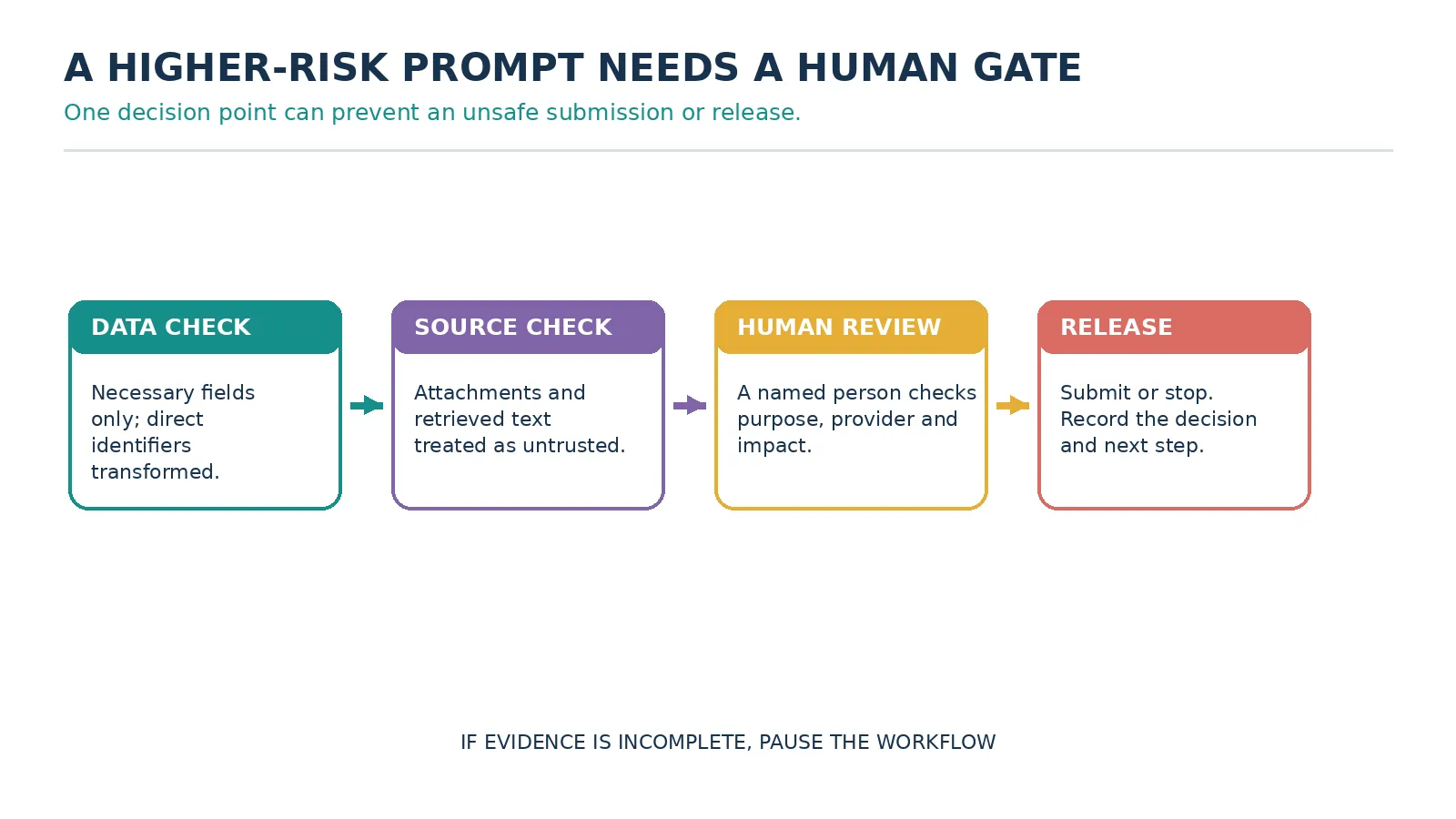
A second person need not inspect every formatting request. Use review when the prompt includes sensitive data, an unusual attachment, a new provider, or an action that could affect a person.
The reviewer should check purpose, fields, transformations, source trust, provider, retention, and intended output. They should be able to reject the prompt without having to justify a preference for convenience.
Record the decision in a short form. Capture what was sent, why it was needed, who approved it, what the model returned, and what action followed. A concise record helps the team investigate a mistake without preserving more personal information than necessary.
Test the routine with difficult cases
A prompt checklist can appear sound until a real document breaks it. Use safe test material to explore missing names, mixed languages, hidden spreadsheet columns, copied signatures, conflicting instructions, sensitive attachments, and outputs that repeat redacted values.
Test whether the workflow removes data before the model call instead of after it. Check whether tokens remain consistent, whether the mapping table is protected, and whether logs contain the original prompt. Test what happens when a colleague skips a field, uploads the wrong file, or submits a request outside the approved purpose.
Include a refusal path. The team should know when to pause, ask for a cleaner source, seek privacy advice, or use a manual process. A system that always produces an answer may reward unsafe inputs.
Review the routine after a provider change, new integration, policy update, incident, or change in the type of information handled. The ICO notes that minimisation techniques can reduce exposure but do not remove every other risk or guarantee that privacy and utility will balance themselves. [1]
Turn prompt hygiene into a small operating habit
Create approved templates for recurring work. Each template should state the purpose, permitted fields, prohibited fields, source boundary, output type, reviewer requirement, retention rule, and escalation route. Keep the wording short enough that colleagues will use it.
Name one owner for each template. The owner reviews whether the prompt still solves the intended problem and removes fields that no longer have a purpose. A security or privacy adviser can support higher-risk changes without becoming the owner of every routine task.
Place a visible pre-send question beside the submission button: “Would this task still work if the unnecessary personal details were removed?” If the answer is yes, remove them. If the answer is no, document why each remaining field is necessary.
Prompt hygiene cannot make every AI use safe. It gives a small team a repeatable way to reduce data exposure, resist hostile instructions, and preserve human judgement. The routine begins before submission and ends after a person checks what the output may do.
| KEY TAKEAWAY: Define the purpose, select only necessary fields, redact direct identifiers, keep secrets out, treat supplied documents as untrusted, control retention, review higher-risk prompts, test refusal paths, and document the owner of every recurring template. |
|---|
| SAFETY CHECK: Never paste passwords, access tokens, private keys, full customer records, or unrelated confidential material into an unapproved AI service. Pause when an attachment contains suspicious instructions, identity cannot be protected, or the requested result could affect a person without appropriate human review. |
|---|