
A small company adopts an AI assistant to help its support team. The trial appears successful. Replies arrive faster, staff report fewer repetitive tasks, and the monthly invoice looks manageable. Three months later, a new colleague asks a basic question: what is this tool allowed to do, how was it tested, and when should someone stop using it?
Nobody has a complete answer. The vendor page explains capabilities. A chat thread contains a few examples. An engineer remembers the original test. The person who approved the trial has moved to another project. The assistant is now part of daily work, but its boundaries exist mainly in memory.
A model card is a structured record that explains an AI model’s purpose, intended use, evaluation, limitations, and important operating conditions. Google DeepMind describes model cards as simple, structured overviews of how an advanced AI model was designed and evaluated. [1] A small team can adapt the idea into an AI system card that covers the model, surrounding prompts, data sources, integrations, people, and decisions.
The record is not a marketing brochure. It is not proof that an AI system is safe in every setting. It is a compact agreement about what the team knows, what it has tested, what remains uncertain, and who owns the next decision. NIST’s AI Risk Management Framework and Generative AI Profile emphasise documentation, evaluation, transparency, and lifecycle attention as part of responsible AI practice. [2] [3]
This guide explains how a small team can create a useful model card without forming a committee or writing a technical report that nobody reads. The examples use a customer-support drafting assistant, but the method also suits sales research, document classification, meeting summaries, coding tools, and internal search.
Begin with the job, not the model name
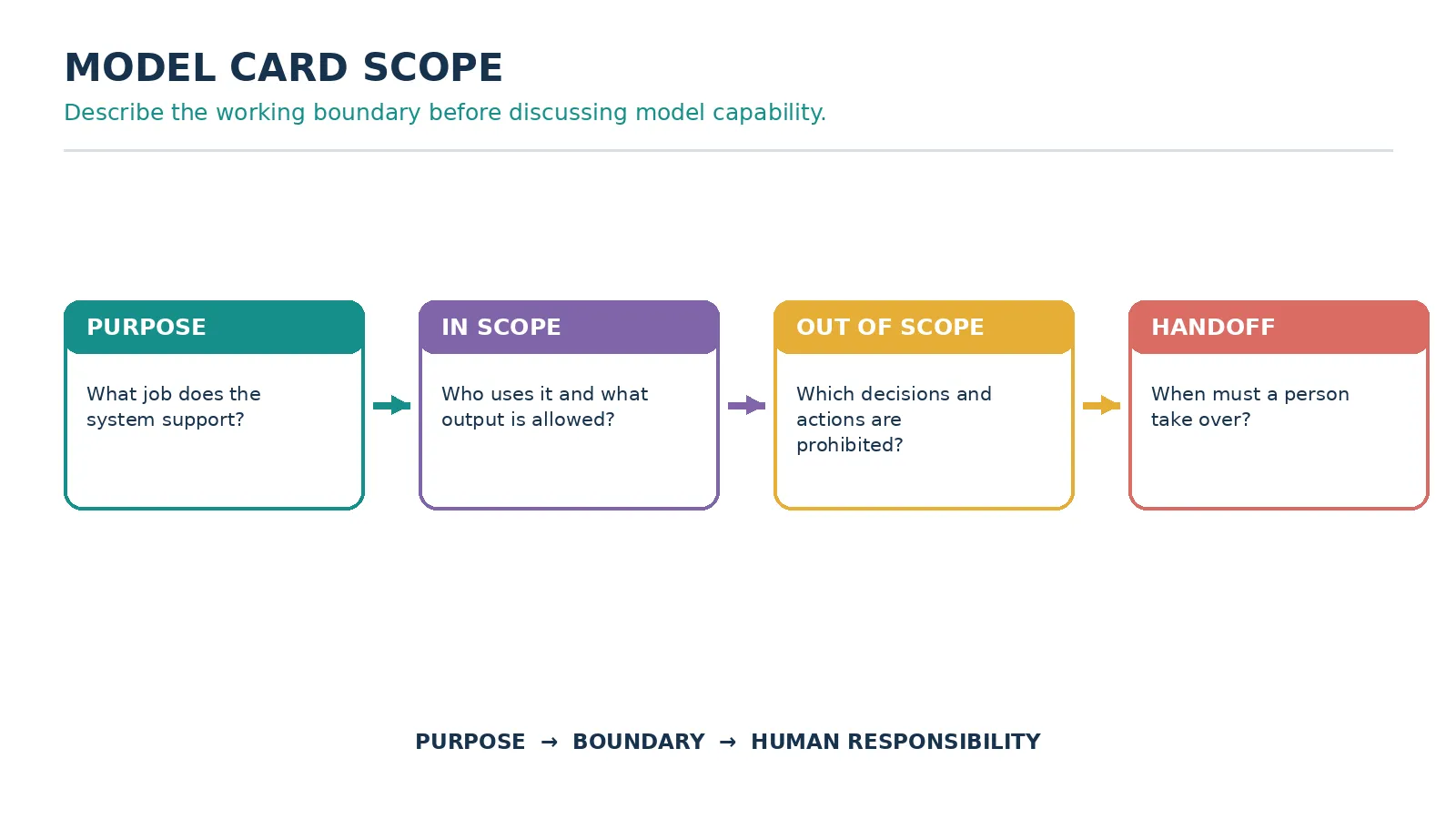
A model card should open with the problem the system is meant to solve. “Uses an advanced language model” says little about the work. “Produces a first draft for delivery-delay replies using approved support guidance” gives the team something that can be tested.
Write the intended outcome in plain language. State who benefits, which workflow is affected, and what the assistant produces. Include the human activity that remains after the model responds. A drafting tool cannot finish the support process because a trained colleague must check and send each message.
Describe the boundary in one paragraph. The assistant may suggest a reply, identify missing information, and point to relevant policy text. It may not approve a refund, change an order, promise a delivery date, or contact a customer without review.
A precise purpose prevents capability lists from becoming the centre of the discussion. The important question is not whether the model can perform an action. It is whether the team has decided that the action belongs in this workflow.
List intended and prohibited uses
Create two short sections: use this system for and do not use this system for. The first section might include summarising approved case notes, proposing a neutral reply, and identifying the policy paragraph that supports a response.
The second section should name realistic misuse. Prohibit decisions about compensation, employment, credit, health, legal status, or account closure unless a separately approved process exists. Prohibit prompts containing passwords, access tokens, unrelated customer records, or confidential information that the task does not need.
Avoid vague wording such as “use responsibly”. A colleague needs a boundary that can guide a decision under pressure. “Do not send a model-generated message directly to a customer” is easier to follow than “human oversight is recommended”.
State what happens when a request falls outside the card. The answer may be to remove sensitive fields, ask an owner, use a manual route, or stop the workflow. A model card becomes useful when it helps somebody decide what not to do.
Describe the complete system around the model
A vendor’s model is only one part of an AI feature. The surrounding system may include an upload form, retrieval index, prompt template, moderation layer, database, tool connection, logging service, reviewer screen, and customer-facing channel.
Name each important component. Record which model version was selected, which provider operates it, where the service is hosted, and which integrations can receive prompts or outputs. If a small team cannot confirm a detail, mark it as unknown instead of filling the gap with a guess.
Explain the route from input to outcome. For the support assistant, a colleague selects a case, the system retrieves approved guidance, the prompt is assembled, the model proposes text, and a person checks the draft before sending it. This sequence is more informative than a sentence saying that the assistant “uses AI to improve support”.
Include the identities involved. Name the business owner, technical owner, reviewer group, provider contact, and person who can disable the feature. One person may hold several roles in a small organisation, provided the record states which responsibility they carry.
Record data and source boundaries
List the information the system can receive. Separate customer messages, order status, product details, policy documents, internal comments, attachments, and technical diagnostics. State which fields are removed, redacted, or transformed before submission.
Describe the approved source collection. A retrieval assistant should not search every connected drive because a relevant sentence might exist somewhere. Identify the collections it may read, the owner of each collection, and the process for removing outdated or unsuitable material.
Record whether the system uses personal data, confidential business information, copyrighted material, or content supplied by third parties. A short description helps a reviewer ask better questions about minimisation, access, retention, and licensing.
Document the source version used for evaluation. A response can appear worse because the policy changed, not because the model changed. Without a source version, the team may blame the wrong component and miss a content-maintenance problem.
Explain how performance was evaluated
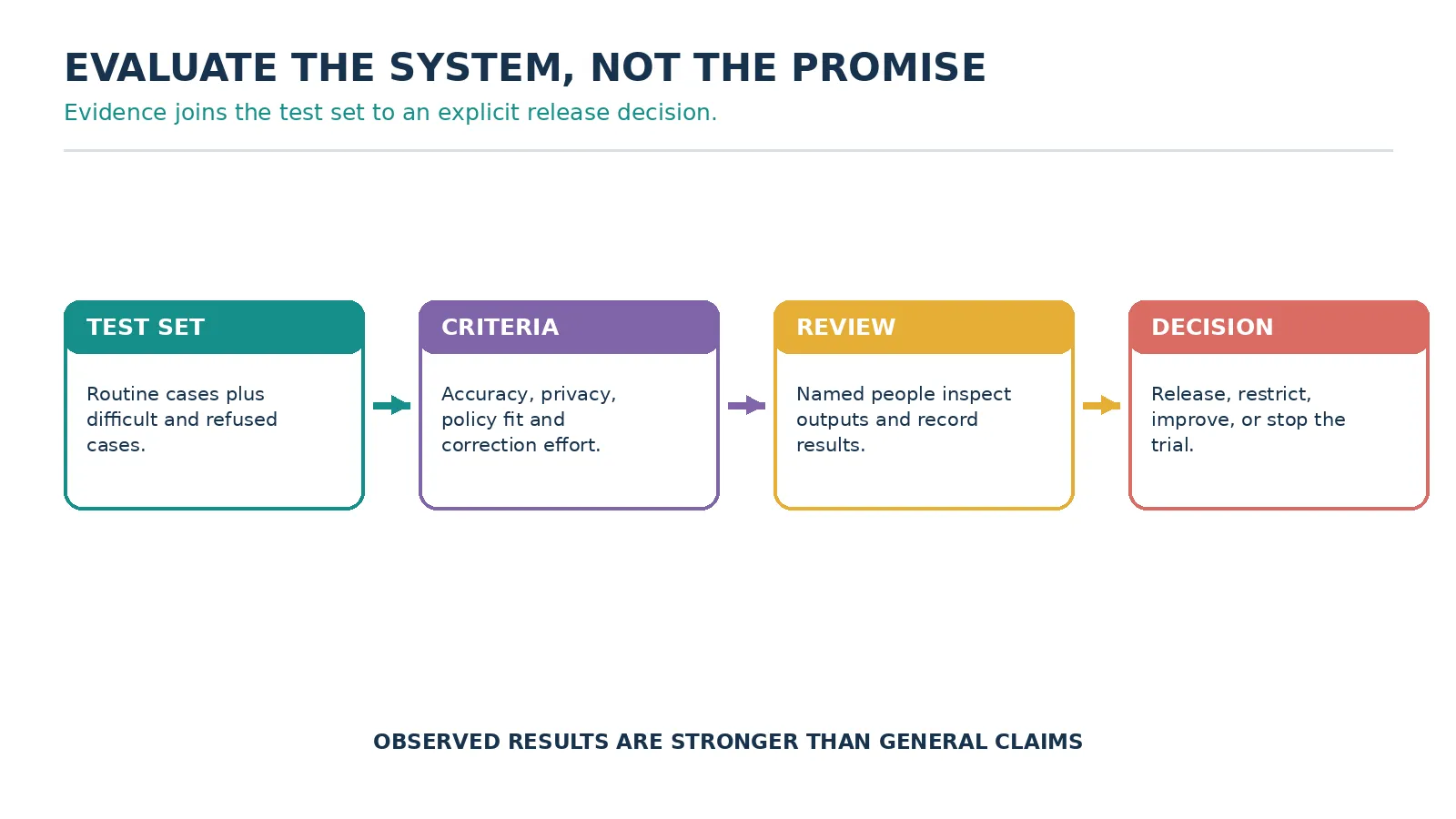
A model card should show how the team decided that the system was useful. Create a small evaluation set that reflects the actual task. Include ordinary cases, missing information, ambiguous requests, contradictory policy text, unusual names, long conversations, and cases that must be refused.
Record the number and type of examples, the date of the test, the model version, the prompt version, and the source version. State who reviewed the outputs and what counted as an acceptable result. A short test can be valuable when its conditions are visible.
Measure more than fluency. Review factual accuracy, policy alignment, omission of required steps, exposure of private information, tone, escalation behaviour, and the time a person needs to correct the draft. If a system writes elegant but unsupported replies, its language quality cannot make it suitable.
Separate observed results from expectations. “The assistant produced acceptable drafts in 42 of 50 test cases reviewed by two support leads” is an observation. “The assistant understands customer problems” is a broad conclusion that needs more definition.
Make limitations specific enough to change behaviour
Every model card needs a limitations section that people will read during ordinary work. Avoid a generic warning that AI can make mistakes. Name the conditions under which mistakes become more likely and describe the response.
The support assistant may confuse two similar product names, rely on an outdated policy paragraph, invent a delivery date, misunderstand a short message, or miss a request for escalation. The card should tell the reviewer to check those points before sending a reply.
Record unsupported languages, file formats, document lengths, and operating contexts. If the evaluation covered written English support messages, do not imply that the result applies to telephone transcripts, handwritten forms, or legal correspondence.
State what the system cannot establish. A confident answer cannot prove that a customer is entitled to compensation. A relevant-looking citation cannot prove that the source was current. A high evaluation score on routine cases cannot establish performance on rare or harmful cases.
Define human oversight as a real task
“Human in the loop” is too vague unless the card explains what the person must do. Identify the reviewer, the point at which review occurs, the evidence they can see, and the action available when the draft is wrong.
For a support assistant, the reviewer checks the customer’s request, source citations, order status, promised remedy, tone, and privacy. They can edit, reject, request more information, or use the manual process. The system should not make the reviewer hunt through several screens to discover what the model saw.
Set a higher review requirement for higher consequences. A routine delivery explanation may need one trained check. A refund recommendation, employment message, or account restriction may need a named specialist or a different process entirely.
Record the approval condition. If a person must confirm every customer-facing message, say so. If the model can publish only after a quality gate passes, document the gate and the person responsible for maintaining it.
Add security and privacy notes
State how prompts, outputs, attachments, and logs are handled. Include provider retention, access controls, deletion, regional processing, and the route for reporting an incident. The detail should be enough for a reviewer to identify a change that might require reassessment.
Mention prompt injection and untrusted sources where retrieval or attachments are involved. A document may contain instructions aimed at the model instead of information needed by the user. The system should treat supplied content as data to inspect, not as authority to change its own rules.
Keep secrets out of the card itself. Store credentials, private tokens, and confidential mapping tables elsewhere. The card should describe the control without reproducing the secret it protects.
Use the record to support a risk conversation instead of to imply that risk has disappeared. NIST’s framework presents AI risk work as a continuing activity involving governance, mapping, measurement, and management. [3]
Track versions and change triggers
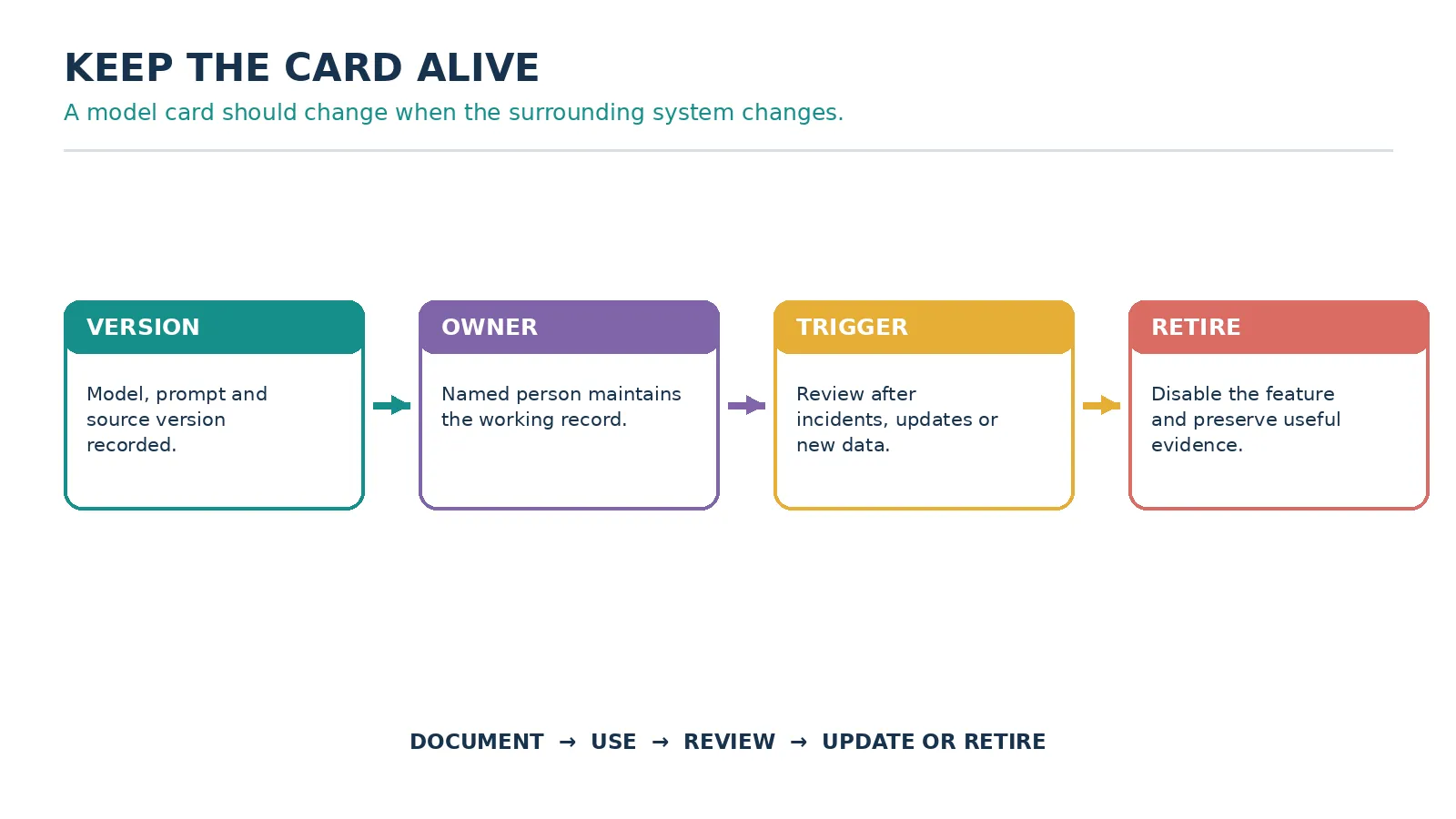
A model card becomes stale when the system changes. Add a version number, owner, approval date, next review date, and change history. Record updates to the model, provider, prompt, retrieval sources, data fields, tools, reviewer process, and user group.
List events that require review. These may include a model replacement, new integration, changed retention setting, source collection expansion, incident, material policy update, or shift from internal drafting to external communication.
Define the release gate. A change should not move into routine use until someone checks the relevant evaluation examples, limitations, permissions, and rollback route. Keep the gate proportionate to the consequence instead of applying a heavy process to every wording change.
Document the shutdown route: disable the feature, revoke credentials, stop scheduled runs, preserve necessary evidence, and tell users what manual process to follow.
| Model-card field | What a small team should record | Why it matters |
|---|---|---|
| Purpose | The job, user, output, and boundary | Prevents capability from becoming permission |
| Data | Inputs, exclusions, sources, and retention | Shows what the system can actually see |
| Evaluation | Test set, criteria, reviewers, and result | Separates evidence from assumption |
| Limitations | Failure conditions and required checks | Changes behaviour before harm occurs |
| Oversight | Reviewer, approval point, rejection route | Makes responsibility operational |
| Change control | Version, owner, triggers, and shutdown route | Keeps the record useful after updates |
Use the card during ordinary work
A model card should sit where decisions occur. Link it from the feature, prompt template, administration page, or internal handbook. Put a short “before you use this” section near the workflow and keep detailed evidence behind it.
Use the card during onboarding. Ask a new colleague to explain the system’s purpose, prohibited uses, limitations, reviewer duty, and escalation route. If they cannot do so from the record, the record is not yet clear enough.
Use it during incident review. Compare the event with the stated boundary, source version, evaluation set, and approval condition. The aim is not to create paperwork after a failure. It is to learn which assumption, control, or ownership decision needs changing.
Review the card at a useful interval. A monthly check may suit a fast-changing assistant, while a stable internal tool may need a quarterly review. The interval should reflect how often the surrounding system changes and how much harm a wrong result could cause.
A practical model card will not predict every failure. It gives a small team a shared account of purpose, evidence, limits, responsibility, and change. That shared account makes an AI feature easier to challenge, improve, pause, or retire.
| KEY TAKEAWAY: Record what the AI system is for, what it must not do, which data and sources it can use, how it was tested, where it fails, who reviews its output, which changes require reassessment, and how the team will disable it. |
|---|
| SAFETY CHECK: Do not treat a model card as proof that an AI tool is safe for every purpose. Keep secrets and unnecessary personal data out of the record and prompts. Require human review before consequential decisions, external communication, or actions that change a person’s rights, money, access, or service. |
|---|