

What does AI agent memory mean?
When people say that an AI assistant “remembers” something, they may be describing several different systems. A chatbot can use messages from an active chat without saving them to a long-term profile. An assistant can also store a preference, retrieve a document from a knowledge base, or keep a record of an action it performed. These forms of memory have different benefits and risks.
A useful answer does not prove that permanent storage is appropriate. An assistant may need a question’s details for a few minutes, not a year. A stored detail can become wrong or dangerous when circumstances change.
NIST’s AI Risk Management Framework recommends regular checks on an AI system. For memory, that means storing only information with a clear purpose and reviewing it as circumstances change.
The four kinds of memory an assistant may use

Manage these four layers separately. Each has its own purpose, lifespan, and risk.
Temporary conversation context
Conversation context is the information an assistant uses while a session is active. It may include the question, earlier messages, attached files, and current instructions. This context prevents unnecessary repetition.
Temporary context is useful for a single task. A person may provide a draft, explain the audience, and ask for revisions. Keeping those details during the session makes the work more efficient. Once the task ends, the material may no longer have a purpose.
Saved preferences
Saved preferences are details that may improve future interactions. Examples include a preferred spelling system, a regular meeting length, a standard report format, or a request to use plain language. These details are usually more useful than personal secrets because they describe how someone wants the assistant to work.
Even a harmless preference needs a correction path. A person may change jobs, audiences, or writing habits. Users should be able to view, edit, or remove the preference from a memory list.
Retrieved knowledge
Some assistants do not store every answer as a personal memory. Instead, they search an approved collection of documents when a new question arrives. This method uses approved documents for current answers and does not save every chat as a profile.
Retrieved knowledge still needs maintenance. A policy document may expire, a product page may change, and two files may disagree. The assistant should identify the source of an important answer and avoid treating an old document as a timeless fact.
Action history
An agent may keep a record of tasks it completed. The record could show that it prepared a customer reply, updated a review sheet, or requested approval for a calendar change. This history helps the team troubleshoot and review what happened.
Action history should not become an unrestricted diary. Keep only the details needed to explain the action, its approver, and its result. Do not copy every message into a permanent log.
What should an AI assistant remember?
A good memory candidate should pass five tests. It should have a clear future use, reliable accuracy, limited sensitivity, a review date, and a correction or deletion path.
A writing assistant may remember your preferred spelling. A scheduling assistant may remember that meetings last thirty minutes. A support agent may remember a customer’s preferred contact channel when the business has a reason to keep it and a way to update it.
The best memories describe stable preferences or repeatable requirements. They should not contain a long story when a short instruction will do. “Use plain language in customer replies” is more useful than storing every previous conversation.
MEMORY PRINCIPLE: A good memory helps with the next task and remains easy to review.
What should an AI assistant forget?
An assistant should not keep information merely because it can. Sensitive identity details, payment information, passwords, private health information, confidential negotiations, and personal messages deserve a strong reason for retention. In many workflows, the safer choice is not to store them at all.
The assistant should also forget information that has expired. A former address, an old job title, a cancelled project, or a temporary delivery instruction can cause harm when it appears in a later answer. A memory that was accurate last year may be misleading today.
Uncertain information belongs in a different category. If the assistant inferred that a customer dislikes a particular product, it should not save that conclusion as a fact. The assistant should ask for confirmation. Until then, keep the observation inside the current task.
Shared workspaces require extra care. A fact that helps one employee may not belong in a memory visible to an entire team. Personal preferences, customer details, and internal comments need clear ownership and access boundaries.
Use a memory admission test
Before saving a new memory, ask five questions.
| Question | Safer decision |
|---|---|
| Will this information improve a future task? | Save it only when the future use is clear. |
| Is the information accurate? | Ask for confirmation when it is an inference. |
| Is it more sensitive than the task requires? | Remove details or avoid saving the item. |
| When should someone review it? | Add an expiry date or review reminder. |
| Can the person correct or delete it? | Provide a visible control and a clear owner. |
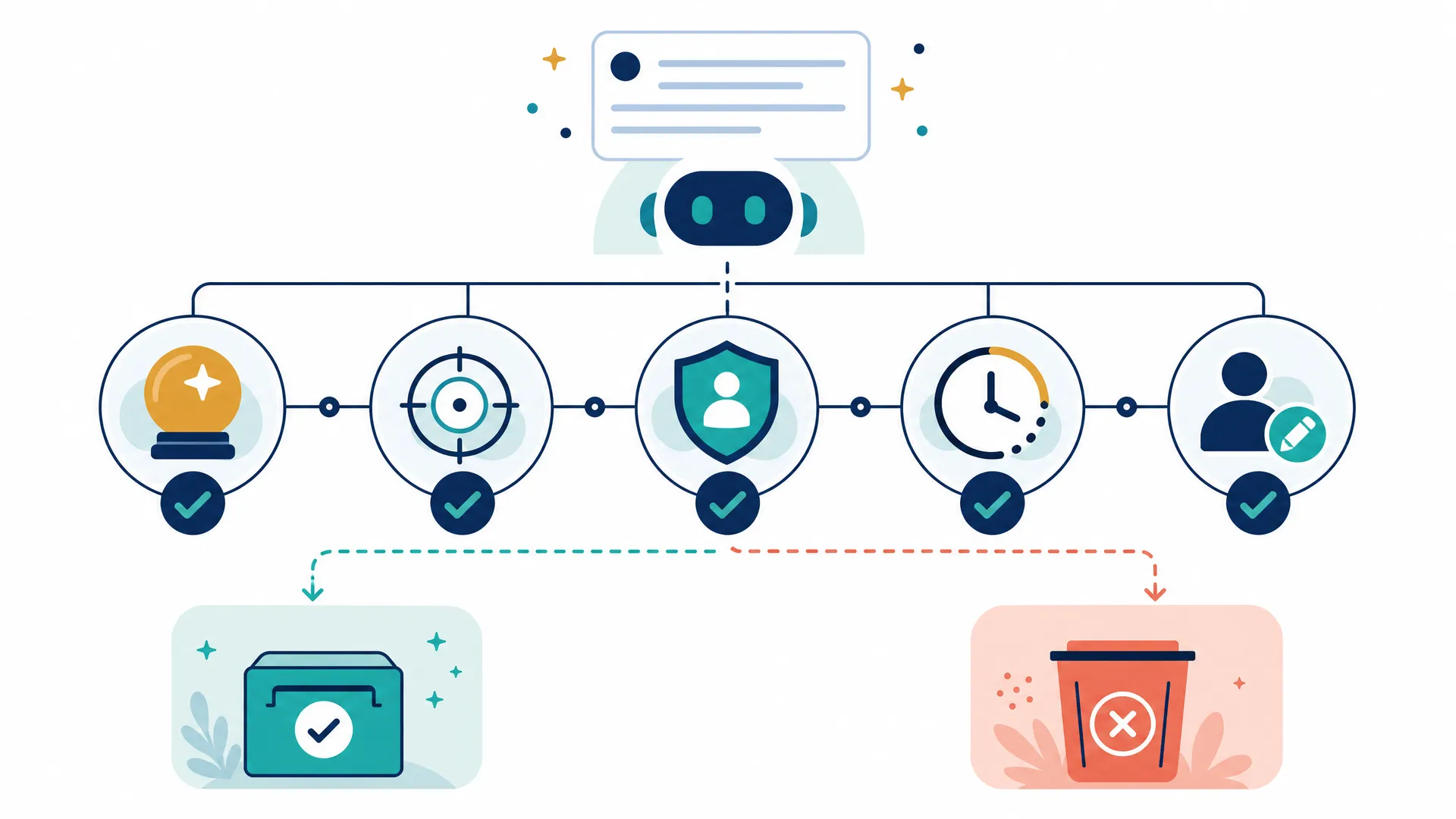
This decision path keeps memory choices tied to usefulness, accuracy, sensitivity, expiry, and user control.
MEMORY RULE: Save a memory only when its future value is clear. If its purpose, accuracy, or owner is uncertain, keep it temporary or delete it.
This test gives a small team a shared way to discuss requests such as “Can the assistant remember this customer’s situation?” The answer should depend on purpose, sensitivity, accuracy, and control rather than convenience alone.
Give users a way to inspect memory
Do not hide lasting memories behind an obscure settings page. Users should see what the system saved, when it saved it, why the item may help, and which future tasks may use it.
A practical memory screen might show each entry with view, edit, pause, and delete controls. It could also show the source and a confidence note when the system inferred the information. A person should not need technical knowledge to correct a wrong preference.
Deletion should be understandable. Removing a memory from a visible list may not remove copies in logs, backups, exports, or connected services. Document what deletion covers and how long other copies remain.
Set retention rules instead of keeping everything
The ICO AI guidance on security and limited data use explains how to protect personal information in AI systems. The ICO storage guidance explains why organisations should delete personal data when its purpose ends.
A small business can apply this idea with a simple schedule: a short review period for temporary notes, a longer period for confirmed preferences, and a separate rule for legally required records. Choose the period deliberately.
Review a memory after a task changes, an employee leaves, a customer requests a correction, or the original purpose ends. Delete old entries instead of allowing them to accumulate.
Watch for false memories and prompt injection
An AI agent can receive misleading instructions inside a document, email, web page, or uploaded file. It may also make an incorrect inference and later repeat that inference as if it were a verified fact. Persistent memory can make either problem last longer.
Do not allow every piece of retrieved text to write directly into lasting memory. Keep observations separate from confirmed facts. Require a review before saving information about a person, a policy, a financial decision, or a sensitive business process.
The agent should identify the source of each saved memory. If an employee asks why it believes a supplier prefers a certain delivery day, the system should point to the approved source or admit that the belief was an unverified inference. Honest uncertainty is safer than a confident but untraceable memory.

This review screen represents a simple rule: useful preferences may remain, while sensitive or outdated information moves toward deletion.
Create a small-business memory policy

The team assigns owners, review dates, and deletion responsibility before enabling shared memory.
A short policy can answer the questions that cause most confusion. Define which assistants may use memory, what types of information they may save, who may review entries, how long each category may remain, and what happens when someone requests a correction or deletion.
For example, a writing assistant may save formatting preferences but not confidential client details. Give a support agent approved product information, but keep payment conversations out of memory. A scheduling assistant may remember working hours without reading private event details.
Assign an owner for each memory system. That person should review access, remove outdated entries, test correction and deletion, and record significant changes. If nobody owns the memory, nobody is responsible for noticing when it becomes inaccurate.
Test memory before trusting it
Use deliberate tests. Tell the assistant a preference, ask it to use it later, correct it, and check whether the correction takes effect. Add an item with an expiry date and confirm that it disappears. Ask the assistant to forget a test entry and check connected logs where appropriate.
Test boundaries too. Place a private detail in one workspace and ask from another whether the assistant can reveal it. Feed it an uncertain statement and see whether it asks for confirmation. Upload a conflicting instruction and verify that the agent does not save it automatically.
Record the results. A memory feature that works during a demonstration may behave differently after a product update, a new connector, or a change in workspace permissions.
Conclusion
Memory can reduce repetition and preserve useful preferences. It can also preserve mistakes, secrets, and outdated assumptions. Good design determines which result the assistant produces.
Let the assistant keep information that has a clear future purpose, low enough sensitivity, reliable accuracy, and a visible review path. Keep temporary context separate from lasting memory. Treat retrieved documents and action logs as different systems. Add expiry, correction, deletion, and access controls before the feature reaches sensitive work.
The smartest assistant is not the one that remembers everything. It is the one that remembers the right things for the right amount of time and lets people remain in control.
References
- The NIST AI Risk Management Framework explains how organisations can consider trustworthiness during the design, development, use, and evaluation of AI systems.
- The NIST Generative AI Profile describes risks and suggested actions for managing generative AI across governance, mapping, measurement, and management.
- The ICO AI security guidance explains how organisations can protect personal information in AI systems.
- The ICO storage guidance explains why organisations should remove personal data after its purpose ends.
- Editorial note: AI products use different names for memory, history, retrieval, and personalisation. Check the current product settings, contracts, and organisational policies before enabling persistent memory for live business information.