
An AI assistant becomes risky when its permissions grow faster than the team’s understanding of what it can do. A helpful tool may begin by searching internal guidance, then gain access to customer records, calendars, payment systems, or production settings. Each new connection can turn a drafting aid into an actor with consequences.
Small teams do not need a large security department to manage this risk. They need a visible permission model. The model should show which identity an assistant uses, which information it may read, which tools it may call, which actions require approval, and how access will be removed.
AI access control is the practice of limiting and supervising an assistant’s ability to view information, call tools, change records, or trigger external actions. Its central idea is least privilege: give a user or process only the access necessary for its assigned work. [1]
Microsoft’s current guidance for AI agents treats identity, authorisation, tool access, lifecycle controls, and auditing as connected security concerns. [2] NIST’s AI Risk Management Framework provides a broader basis for reviewing trustworthiness throughout an AI system’s working life. [3] This article translates those ideas into a practical approach for a small organisation.
The running example is an internal service assistant that searches approved procedures, drafts replies for staff, and opens a help-desk ticket when a person confirms the details. The assistant should not quietly become the person who approves a refund, changes an account, or publishes a policy.
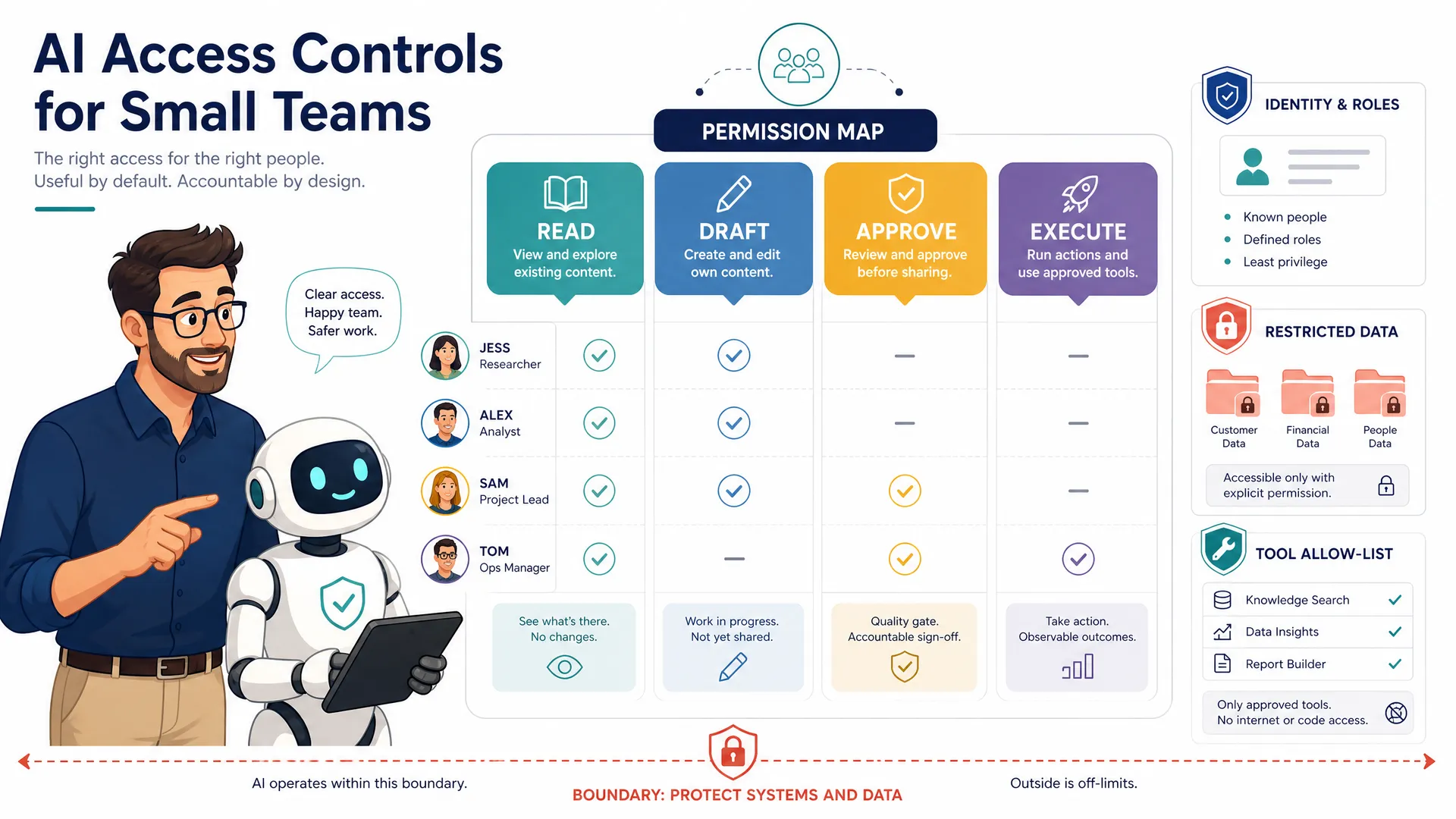
Begin with the job, not the tool
Write down the business task before selecting permissions. “Help the support team” is too broad to guide access. “Find the current refund procedure and prepare a draft for an adviser” gives the team a narrower boundary.
Describe the actor, input, allowed result, and forbidden result. The assistant may receive a question, consult a named collection of articles, and return a draft with source links. It may not decide whether a customer qualifies for compensation or send a message without confirmation.
Give each use case a risk label. Low-risk work may include formatting a public document or classifying an internal request. Medium-risk work may involve confidential records or a recommendation that a colleague must check. High-risk work may affect money, employment, access rights, safety, legal commitments, or personal data.
The label should change the permission design. A low-risk formatter may work with broad document access but no external tools. A support drafter needs restricted source access and no write capability. An agent that can create a ticket needs a controlled action, an audit record, and a human confirmation step.
Give the assistant its own identity
Do not connect an AI service through a colleague’s personal account. A shared human login hides who initiated an action, complicates offboarding, and can leave excessive access behind when the employee changes role.
Create a distinct identity for each meaningful assistant or workflow. The identity does not need a complicated name. It needs an owner, a purpose, an environment, a contact route, and a documented list of permissions.
Separate development, testing, and live use. A test assistant should not hold production credentials merely because those credentials make experimentation easier. Use sample records or a restricted workspace during trials.
Record the relationship between the assistant and the person who starts a request. The assistant’s identity explains which service acted. The user identity explains who asked for the action. Both records matter when a ticket is changed, a message is sent, or a permission is questioned later.
Build a small permission ledger
A permission ledger is a table that turns vague trust into reviewable decisions. Keep one row for each data source, tool, or action. State the reason for access and the condition that ends it.
| Resource or action | Access level | Business reason | Approval | Review trigger |
|---|---|---|---|---|
| Approved help articles | Read | Prepare sourced drafts | Adviser checks reply | Article or policy change |
| Customer ticket text | Read selected fields | Understand the request | Team lead owns use | Data-field change |
| Ticket creation | Create only | Record confirmed follow-up | User confirms details | Workflow release |
| Refund system | No access | Outside the assistant’s role | Not applicable | New use case proposal |
| Outbound email | Draft only | Prepare a response | Human sends it | Template or provider change |
| Production settings | No access | Not needed for support | Not applicable | Any request for expansion |
Keep the ledger close to the code, configuration, or administration page it describes. A document that lives separately from the implementation will drift. When a permission changes, update the ledger in the same review.
Separate reading, drafting, approving, and executing
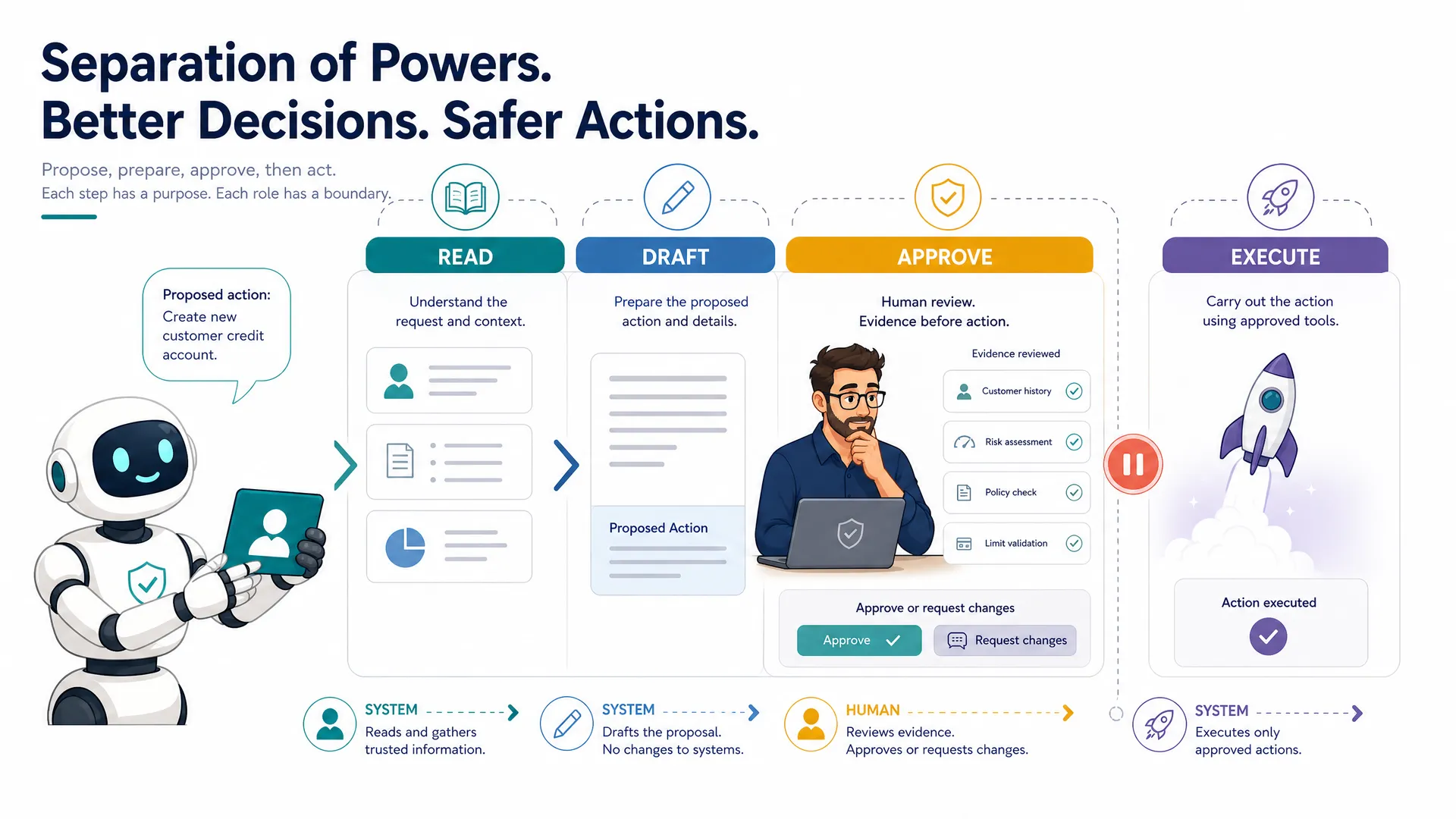
Teams often treat “access” as a single switch. A safer model divides the workflow into four powers. Reading retrieves information, while drafting produces a proposed result. Approval accepts a consequence, and execution changes a system or communicates externally.
An assistant may need the first two powers without receiving the last two. This separation allows automation to save time while keeping responsibility with an authorised person. It also makes a mistake easier to contain because a poor draft has not yet become an irreversible action.
Use different controls for each stage. Source reading should be limited by collection, field, tenant, date, or customer relationship. Drafting should preserve citations and identify missing evidence. Approval should show the proposed action, relevant inputs, and the person responsible. Execution should use a narrow tool with a recorded request identifier.
Do not treat a human button as meaningful approval if it only confirms an action that has already happened. The person should see what will change and have a genuine opportunity to reject it.
Limit tools with an allow-list
An assistant should call named tools for defined purposes. Avoid granting a general-purpose shell, unrestricted browser, broad database account, or open plugin catalogue when the workflow needs one narrow operation.
An allow-list can state that the assistant may search a particular index, create a ticket in one project, or read three fields from a case. It should also define prohibited parameters. For example, a ticket tool may accept a subject and description but reject changes to priority, owner, permissions, or financial status.
Validate inputs at the tool boundary. Do not assume that a prompt instruction will prevent an unsafe value. Check identifiers, record ownership, field length, status transitions, destination addresses, and allowed file types in the service that performs the action.
Return the smallest useful result. If the assistant needs to know whether a ticket exists, do not send the full customer history, internal notes, and contact details. Narrow outputs reduce exposure and make logs easier to review.
Treat tool descriptions as security material. A misleading description can encourage the model to call a powerful function for the wrong reason. Review its name, purpose, required fields, examples, error messages, and failure behaviour.
Apply data boundaries before prompts are built
Permission control begins before text reaches a model. Mark the data that the workflow may use, the data it must exclude, and the data that requires redaction. Personal contact details, payment information, private correspondence, credentials, and health information need deliberate handling.
Use field-level selection where the system supports it. A support drafter might need a product name, order status, and previous approved reply. It may not need a full address, payment token, or unrelated case history.
Set boundaries around retrieval. Limit the assistant to an approved collection instead of allowing a search across every connected drive. Apply the user’s existing access rights where possible, and test whether the assistant can infer or reveal material the user could not normally open.
Decide how prompts, outputs, attachments, and logs are retained. A tool may have different handling rules from the system containing the source data. Keep the retention decision with the use case owner and security reviewer, not hidden inside an installation step.
Add approval gates where harm can occur
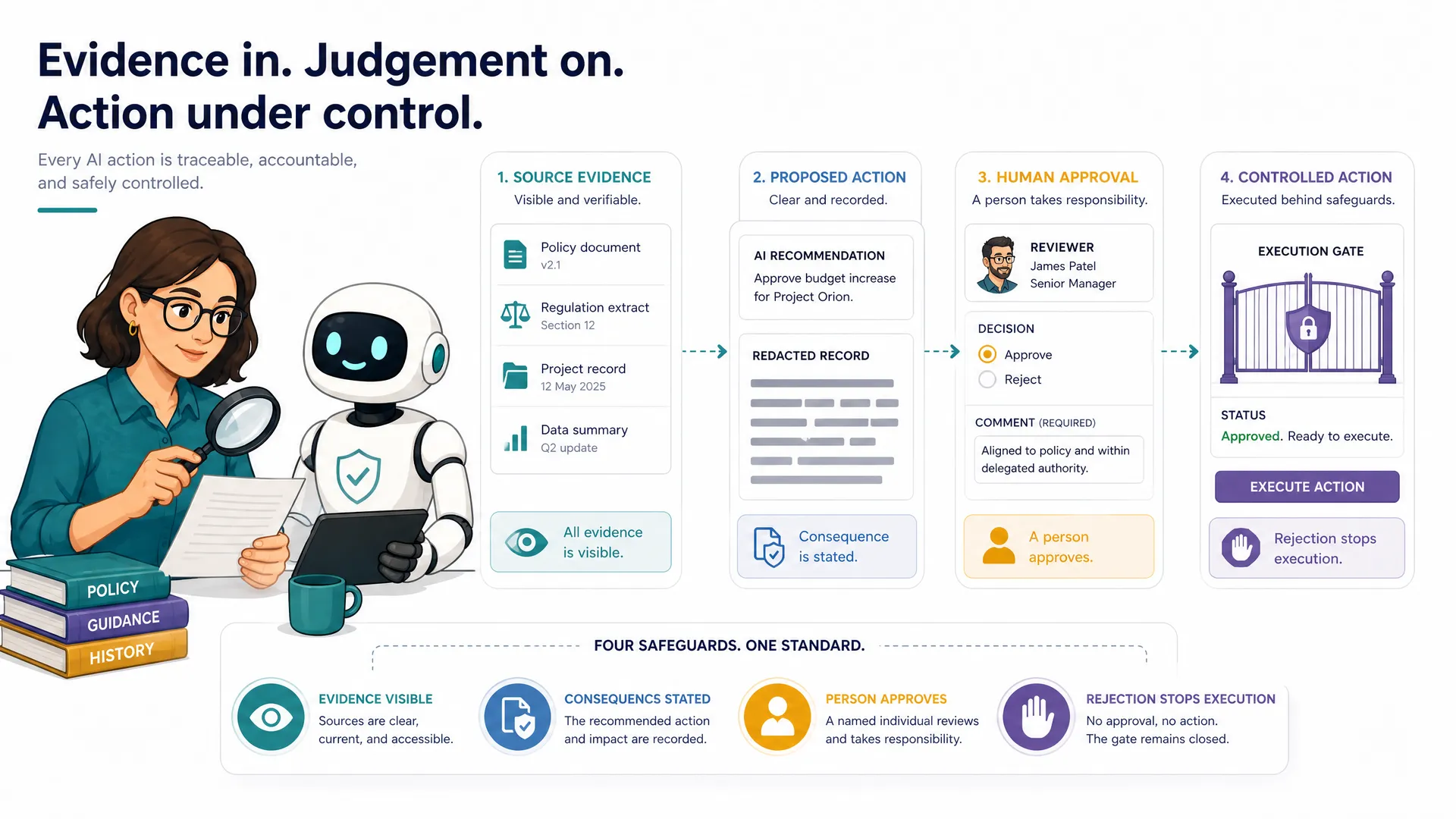
A human review should match the consequence of the action. Reviewing every punctuation change creates noise. Reviewing a proposed bank-detail change, account suspension, legal notice, or safety instruction is proportionate.
Show the reviewer the evidence used to create the proposal. Include source links, record identifiers, uncertainty, affected fields, and any missing information. A reviewer cannot make a sound decision from a polished sentence alone.
Define what happens when the reviewer rejects a proposal. The system should preserve the reason, return the item to a safe queue, and prevent an automatic retry from repeating the same action. A rejection is useful evidence about the boundary, not a nuisance to bypass.
Use a second person for exceptional actions when the consequence warrants it. Small teams can use a rotating approver or named duty manager instead of building a permanent committee.
Make access temporary where possible
Permanent permissions can accumulate. A temporary investigation, launch, migration, or incident response may leave behind a token or role that nobody remembers.
Give elevated access an expiry time. The request should state why the access is needed, who approved it, what systems it covers, and when it will close. A person should have to renew the permission instead of discover it months later.
Use separate credentials for separate environments and services. If one token is exposed, limited scope reduces the affected area. Store secrets in an approved secret manager, restrict who can retrieve them, and prevent them from appearing in prompts, logs, screenshots, or error messages.
Include revocation in the operating procedure. Document the shutdown route: invalidate tokens, remove tool bindings, pause scheduled runs, disable the assistant, and preserve the records needed for investigation.
Log actions that someone can understand
An audit log should answer five questions: who requested the action, which assistant acted, what data it used, which tool it called, and what result followed. Record timestamps, request identifiers, approval details, and failure states where appropriate.
Do not log private content without a reason. A useful record can store a redacted identifier, source version, tool name, decision status, and hash or reference to the relevant artefact. Logging everything may increase exposure while making important events harder to find.
Watch for unusual patterns. A service assistant searching thousands of records, calling a tool outside its normal schedule, repeatedly failing authorisation, or attempting a new destination should trigger investigation. Alerts should route to someone who can pause the workflow.
Review logs after changes and incidents. A permission ledger says what should happen. The log shows what happened. Comparing the two reveals unused access, missing checks, unexpected paths, and gaps in ownership.
Test misuse, not only success
A permission model is incomplete until the team tests what the assistant must refuse. Create safe test records that represent boundary cases. Do not experiment with live customer data or production actions.
Test several boundaries in one controlled exercise. Can the assistant read another team’s documents, reveal hidden fields, use a changed identifier, send to an unapproved address, repeat a successful request, or act after access expires? Include prompt injection in retrieved material and instructions that conflict with the workflow boundary.
Test the approval path. Confirm that a rejected action does not execute, that an expired approval cannot be reused, and that a second attempt receives a fresh review. Test the disable path by revoking a token and checking whether queued work stops safely.
Give each test a result, owner, date, and follow-up. A failed test should block expansion until someone accepts the risk in writing. NIST’s framework supports treating risk management as a continuing activity instead of a one-time launch exercise. [3]
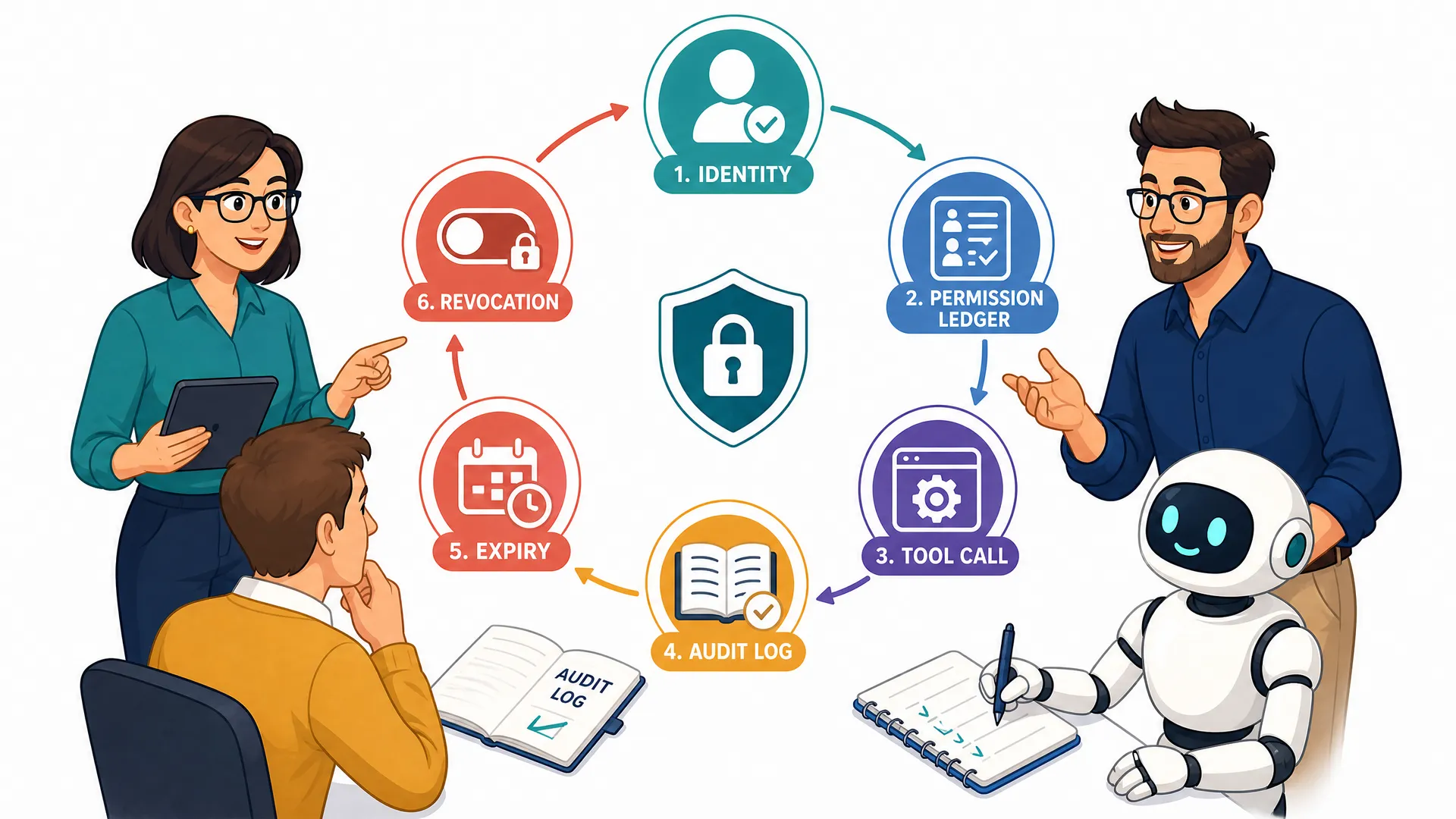
Review permissions when the system changes
Access should be reconsidered when a new data source, tool, model, integration, workflow, user group, or business rule arrives. A harmless-looking change can alter the assistant’s effective authority.
Schedule a short review even when nothing appears to have changed. Remove permissions that the workflow no longer uses. Confirm that owners still exist, source collections remain appropriate, tokens expire, and logs are available.
Ask three practical questions during each review. What can the assistant read now? What can it change now? Which person can stop it now? If the answers are difficult to demonstrate, the permission model needs better evidence.
A small team can begin with one assistant, one permission ledger, one allow-list, and one approval route. The objective is not to make automation powerless. It is to make every useful capability explainable, bounded, reversible, and owned by a person who can act when the boundary fails.
| KEY TAKEAWAY: Give an AI assistant its own identity, define the job narrowly, separate reading from execution, restrict data and tools, require proportionate approval, expire elevated access, log meaningful actions, test refusal paths, and review permissions whenever the workflow changes. |
|---|
| SAFETY CHECK: Never give an AI assistant a colleague’s login, unrestricted production access, a general-purpose shell, or permission to perform a consequential action without an appropriate human decision. Keep secrets and unnecessary personal data out of prompts, tools, logs, and test records. |
|---|