
Introduction
AI agents can do more than answer questions. They can read incoming information, sort it, prepare drafts, update internal records, and move work between connected applications. This combination can help a small business save time without hiring another full-time employee.
Here, delegation means giving an AI agent a limited part of a process. It does not mean allowing the system to act without supervision. In many cases, the better arrangement is to let the agent prepare the next step while a person checks the result. The appropriate level of independence depends on the data involved, the cost of a mistake, and how easily the business can reverse an action.
The NIST AI Risk Management Framework recommends managing AI risks across design, development, use, and evaluation. That principle is useful for everyday work: choose a narrow purpose, understand the information involved, test the result, and improve the setup when real evidence reveals a weakness.
What makes a task safe to delegate?
A suitable first task has a clear starting point and a visible result. It follows a process the team already understands. Someone should be able to review the result quickly, and the action should be easy to reverse.
A task becomes less suitable when it involves private records, financial commitments, legal judgments, medical advice, employment decisions, or an external message that could damage trust. Those activities may still benefit from AI assistance, but they need tighter permissions and a human approval step.
15 practical tasks for an AI agent
1. Sort incoming enquiries
An agent can read messages from a website form or shared inbox and place them into broad categories such as sales, support, billing, or general information. The resulting queue helps the team see which items need attention first. Keep the categories simple at the beginning. A small set of reliable labels is more useful than a complicated system that produces confusing results.
2. Prepare customer reply drafts
The agent can read a customer question, locate the relevant policy, and draft a reply for an employee to review. Use a current policy source. The draft should explain its recommendation. Do not allow the system to send the message automatically until the team has tested accuracy, tone, and escalation behaviour.
3. Summarise support conversations
Long support threads often contain a problem, previous attempts, missing information, and a requested outcome. An AI agent can turn that history into an internal brief. Ask it to separate confirmed facts from assumptions and identify the next unanswered question. This gives the support representative useful context without requiring a complete reread.
4. Turn forms into internal tasks
When someone submits a form, the agent can extract the main details and prepare a task for the appropriate employee. A service request might become a review item, while a partnership enquiry might go to a sales queue. Keep the agent’s role limited to creating or suggesting the task until the team trusts the field mapping.
5. Draft meeting notes
An agent can organise a transcript or rough notes into decisions, open questions, and proposed follow-ups. The meeting owner should check names, dates, and commitments before sharing the result. The tool should not invent a decision simply because several people discussed a topic. A useful summary shows uncertainty instead of hiding it.
6. Find calendar options
An agent can compare the availability of approved calendars and suggest meeting times. It should not move an existing appointment or invite an external person without confirmation. A safer setup prepares two or three options and leaves the final choice with an employee.
7. Create first-draft internal documents
Teams often need briefs, checklists, project outlines, and handover notes. An agent can create a first draft from approved material, giving a colleague something concrete to improve. A reviewer must confirm the accuracy of any document that could influence a customer, supplier, or executive decision.
8. Extract fields from invoices or receipts
A system can read an invoice and identify the supplier, date, amount, reference number and possible expense category. This saves the team from copying those details by hand. Because financial records matter, the agent should place fields it cannot verify in a review queue instead of guessing. It should never approve payment solely because a number looks plausible.
9. Check for missing information
Before a team processes a request, an agent can compare the submission with a known list of required fields. It might notice a missing phone number, project code, delivery address, or attachment. The agent can prepare a polite follow-up draft. A person should handle unusual cases and decide how to treat sensitive information.
10. Compare a document with a checklist
An agent can compare a draft proposal, onboarding file, or safety document with a checklist and identify omissions. This is a quality aid, not a final certification. Ask the system to show the exact section that caused each warning. Showing the relevant section lets a reviewer verify each warning and improve the checklist over time.

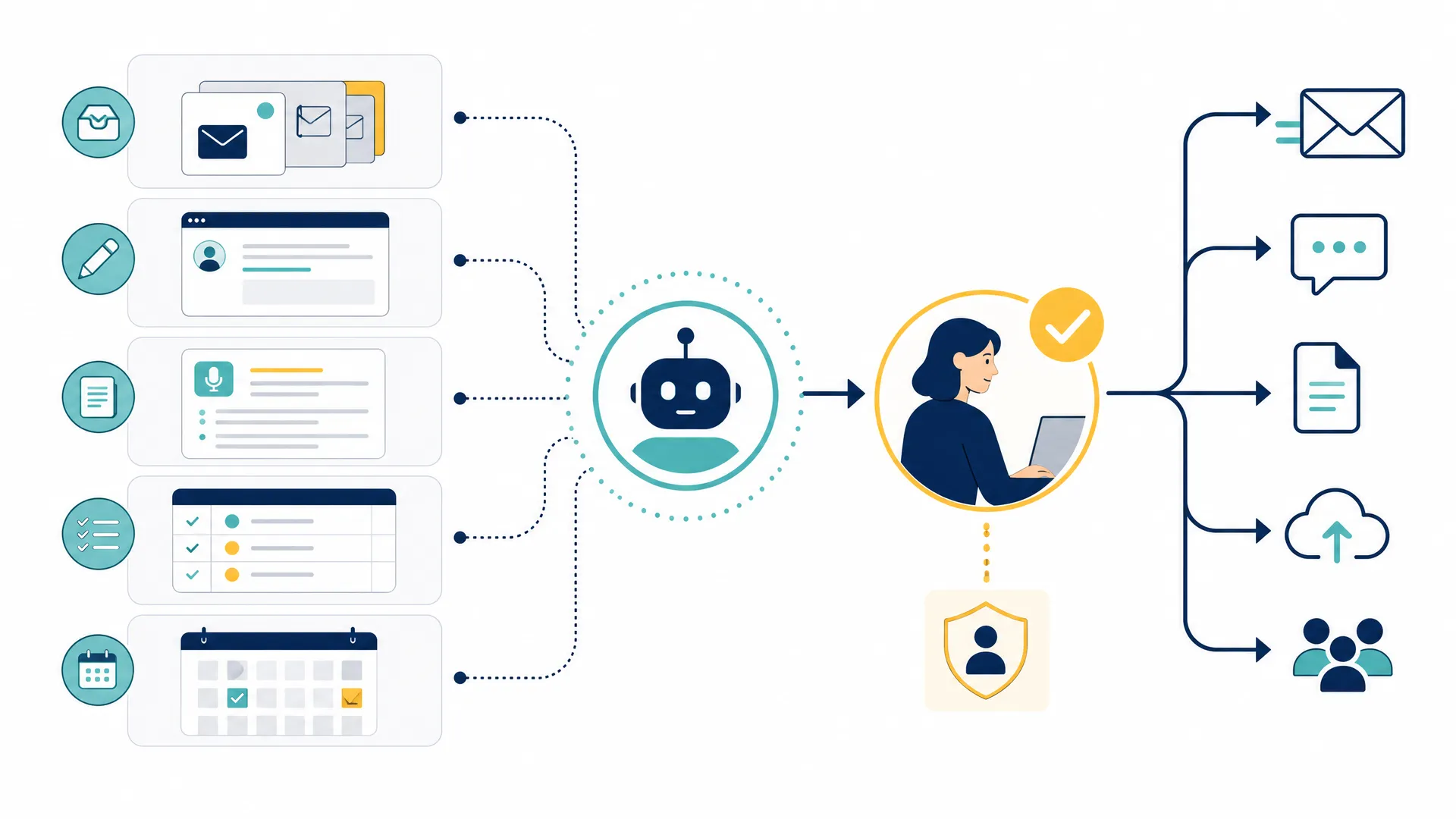
The employee makes the final decision while the agent handles preparation and sorting.
11. Prepare follow-up reminders
An agent can look for agreed next steps in internal notes and prepare reminder tasks. It can suggest that a colleague follow up with a prospect, request a missing file, or revisit an unresolved support case. Keep the reminders inside the team’s task system until someone confirms that the dates and owners are correct.
12. Draft product or service summaries
Given approved source material, an agent can create a concise summary for an internal catalogue, sales sheet, or support page. It should identify the source used and avoid adding benefits that the source does not support. A reviewer must check pricing, availability, technical limits, and any promise made to customers.
13. Monitor simple status changes
An agent can monitor an internal board for routine changes, such as a task entering review or a request awaiting information. It can prepare a notification for the responsible employee. Do not connect it to sensitive alerts until the team has tested how it handles duplicate events, missing data and unusual status changes.
14. Organise research notes
An agent can group notes by topic, remove obvious duplicates, and create a list of questions for further research. This is especially useful after a customer interview or internal workshop. Keep the original notes available. The organised version helps people find information, but it does not replace the original notes.
15. Prepare a daily operations brief
At the end of a workday, an agent can collect selected internal updates and prepare a brief showing completed work, pending items, blocked tasks and questions that need attention. Limit the sources to information the intended reader is allowed to see. The brief should exclude private details the reader does not need and identify information that has not been confirmed.
Tasks that need stronger controls
The fifteen examples above are safer starting points because they focus on preparation, organisation and internal assistance. They become riskier when the agent can send messages, change customer records, approve payments, delete files, make legal or medical recommendations, or decide which person receives an opportunity.
For these cases, create a clear approval gate. The agent can prepare the action and show its supporting information, but a person must confirm the final decision. Article 14 of the EU AI Act describes human oversight as the ability to understand system limits, interpret outputs, override results, and stop the system when necessary. Even when the law does not directly apply to a small internal experiment, this principle remains useful.
MIT Sloan’s explanation of agentic AI notes that agents can use tools and complete multi-step work. For that reason, data quality, security, governance, and oversight deserve attention before deployment. More connected tools create more possible failure points, so begin with the smallest permission set that can complete the chosen task.
How to test a delegated task
Start with examples whose correct answers are known. Test an ordinary request, an incomplete request, an unusual request, and a request outside the agent’s role. Confirm that the system asks for missing information instead of inventing it, recognises uncertainty, and sends the work to a person when the request crosses its boundary.
Keep a record of the test results. Note the task, the information provided, the output, the reviewer’s decision, and any later change. Microsoft’s current Copilot Studio guidance follows a similar pattern of adding knowledge, testing changes, and improving the agent before publication. Products use different interfaces, but the same testing discipline applies to all of them.
A practical starting plan
Choose one task from this list and define its boundaries in one paragraph. State what starts the task, which sources it may read, what it may prepare, and what requires approval. Give the agent only the access it needs. Use test data first. Keep the initial output inside the company. Review a sample of results each day during the first week.
If the agent makes a mistake, ask what failed. Was the source outdated? Was the instruction unclear? Did the system lack a required field? Did it have more access than necessary? Fix the cause before adding another task. A narrow system that behaves predictably is more useful than a broad system the team cannot explain.
Review the initial results carefully
During the pilot, compare a sample of prepared results with decisions made by experienced employees. Look for patterns rather than isolated mistakes. You may find that the agent handles routine requests well but struggles with names, exceptions, incomplete forms or recently changed information. Keep a change log and record the reason for each adjustment. This record helps the team distinguish a temporary error from a design weakness. It also gives new reviewers a clear explanation of what the agent may do and when they must step in. After the results become reliable, add permissions one at a time and review each change.
BOTTOM LINE: Delegate the repetitive preparation first. Keep decisions, sensitive communication, and irreversible changes with a person until the evidence supports a wider role.
Conclusion
AI agents can help small businesses with everyday work without taking over important decisions. Sorting messages, preparing drafts, summarising information, checking forms, organising notes and creating internal reminders are practical places to begin. Each task should have a clear purpose, limited access, a visible output and an easy way for a person to correct the result.
An agent does not need a large assignment to be useful. Start with one responsibility and keep the team informed and in control.
References
- NIST AI Risk Management Framework explains how organisations can manage risks across the AI lifecycle.
- Article 14 of the EU AI Act describes human oversight for applicable high-risk AI systems.
- MIT Sloan’s guide to agentic AI discusses tools, multi-step workflows, security, and oversight.
- Microsoft Learn’s Copilot Studio guide explains how to add knowledge, test an agent, and publish it.
- Editorial note: This article is original explanatory content. Product features, laws, and platform documentation can change, so readers should verify current details in the linked sources before making operational decisions.